
VPN
L2TP
L2TP Client
L2TP Client configures and manages L2TP tunnel connections, supporting add, enable, disable, delete and viewing of entries such as server, username, password, IP address and status, with search for quick lookup, to establish or maintain VPN tunnels.
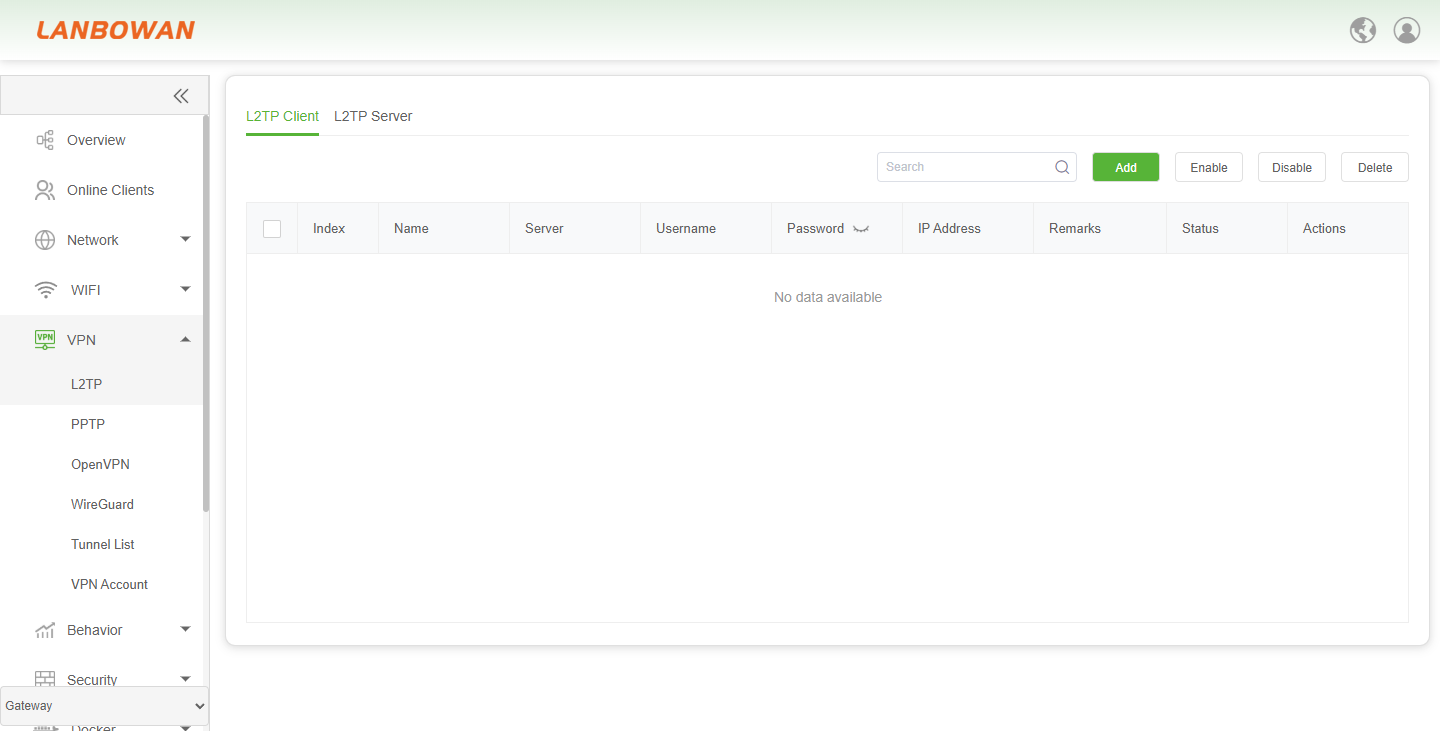
Add L2TP Client
Add L2TP Client is used to create a new L2TP client tunnel configuration by entering name, server address, username, password, MTU/MRU, interval and remarks, then save to establish the VPN dial-up connection.
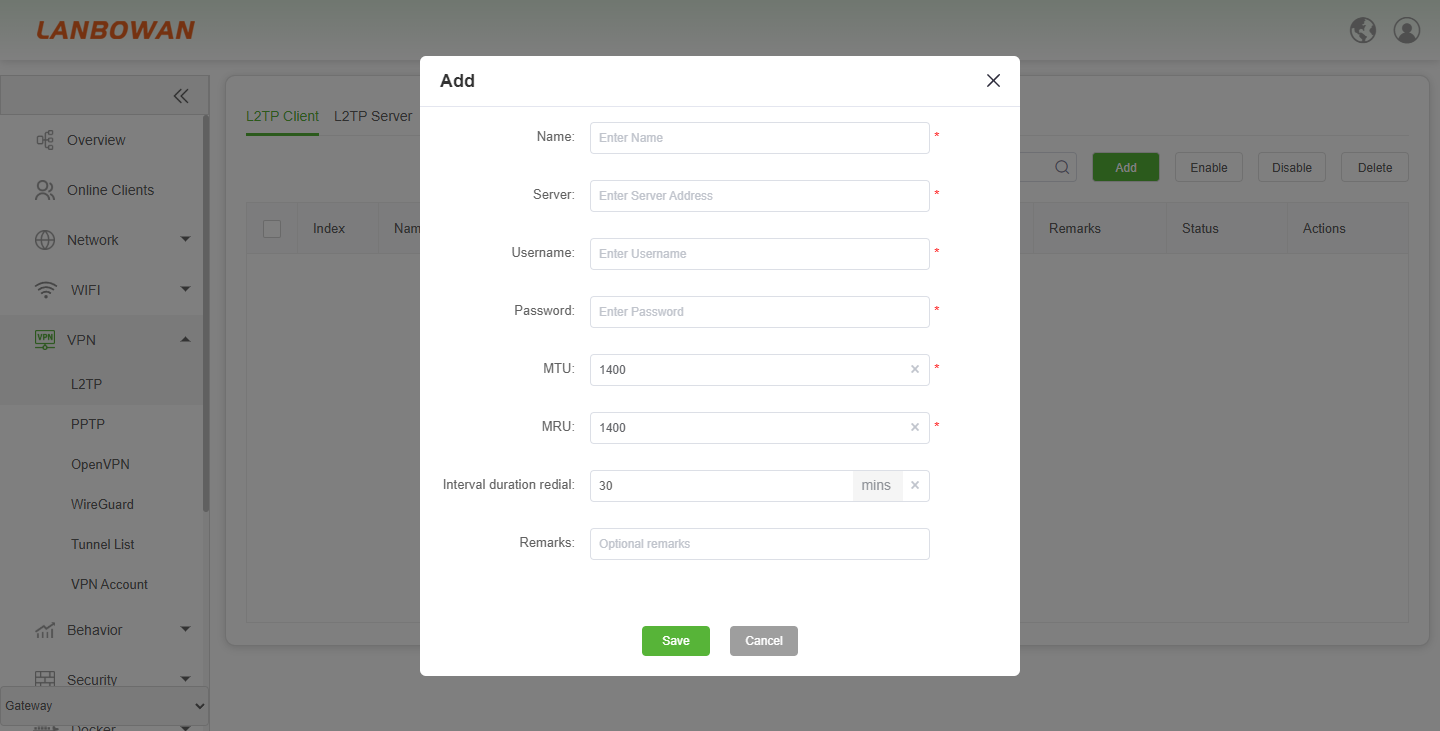
Parameter Description:
| Parameter | Description |
|---|---|
| Name | Identifier/name for the L2TP client tunnel entry. |
| Server | Remote L2TP server address used for VPN dial-up. |
| Username | Account username for L2TP authentication. |
| Password | Password for L2TP authentication; may be shown/hidden via the eye icon. |
| MTU | Maximum Transmission Unit size for the tunnel interface. |
| MRU | Maximum Receive Unit size for the tunnel interface. |
| Interval duration radial | Interval timer in minutes for connection/redial or keepalive detection. |
| Remarks | Optional description/note for this entry. |
| Save | Save the configured L2TP client entry. |
| Cancel | Close the dialog without saving changes. |
L2TP Server
L2TP Server Basic Settings enable the L2TP server and configure service port, client address pool, server address, DNS, MTU/MRU and related parameters to assign addresses to dial-in clients and establish VPN tunnel connections.
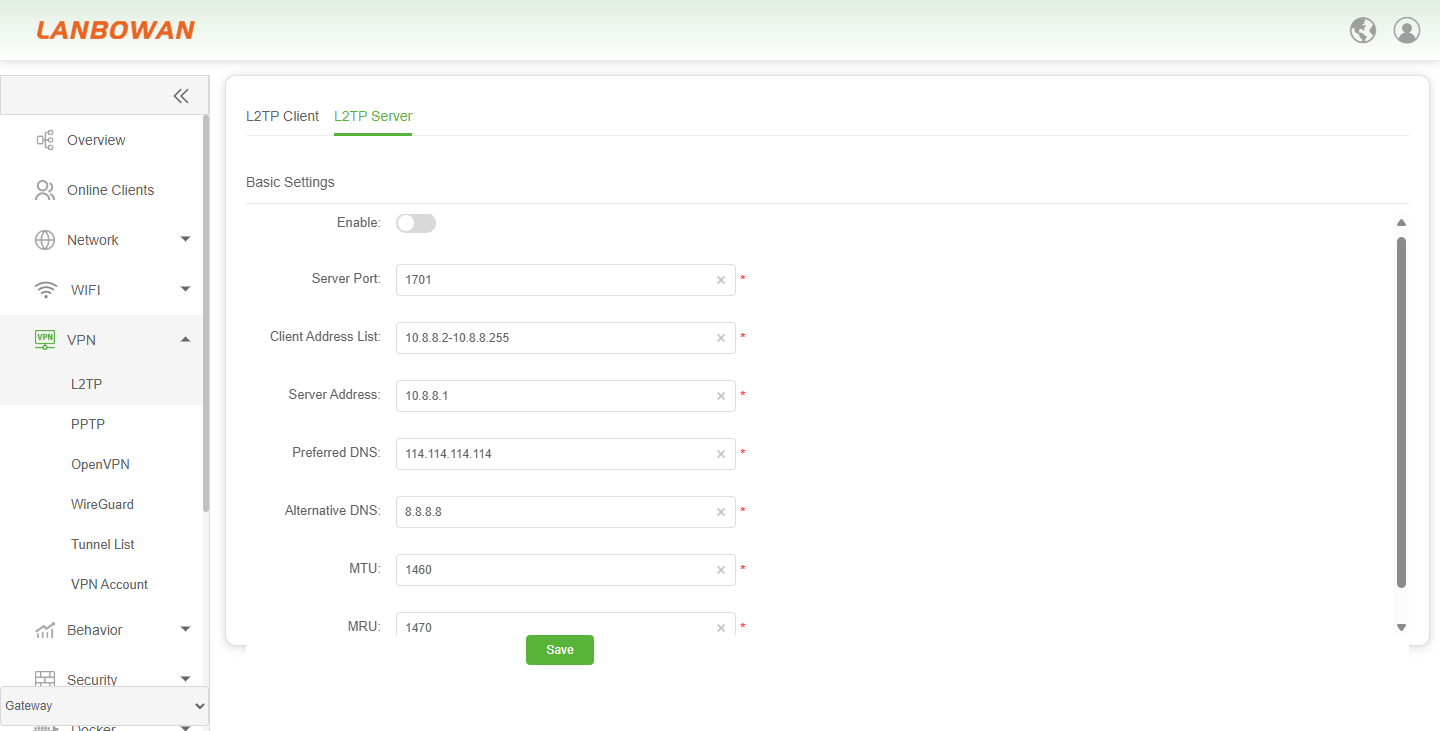
Parameter Description:
| Parameter | Description |
|---|---|
| Enable | Toggle to enable or disable the L2TP server function. |
| Server Port | Listening port number for L2TP server connections. |
| Client Address List | IP address pool/range assigned to connected L2TP clients. |
| Server Address | Virtual/gateway IP address of the L2TP server side. |
| Preferred DNS | Primary DNS server address pushed to or used by clients. |
| Alternative DNS | Secondary/backup DNS server address. |
| MTU | Maximum Transmission Unit size for the L2TP tunnel/server interface. |
| MRU | Maximum Receive Unit size for the L2TP tunnel/server interface. |
PPTP
PPTP Client
PPTP Client/Server configures and manages PPTP tunnel connections, supports switching between client and server modes, provides search, add, enable, disable, delete and per-entry actions, and displays/manages name, server address, username, password, assigned IP, remarks and connection status to establish or maintain VPN tunnels.
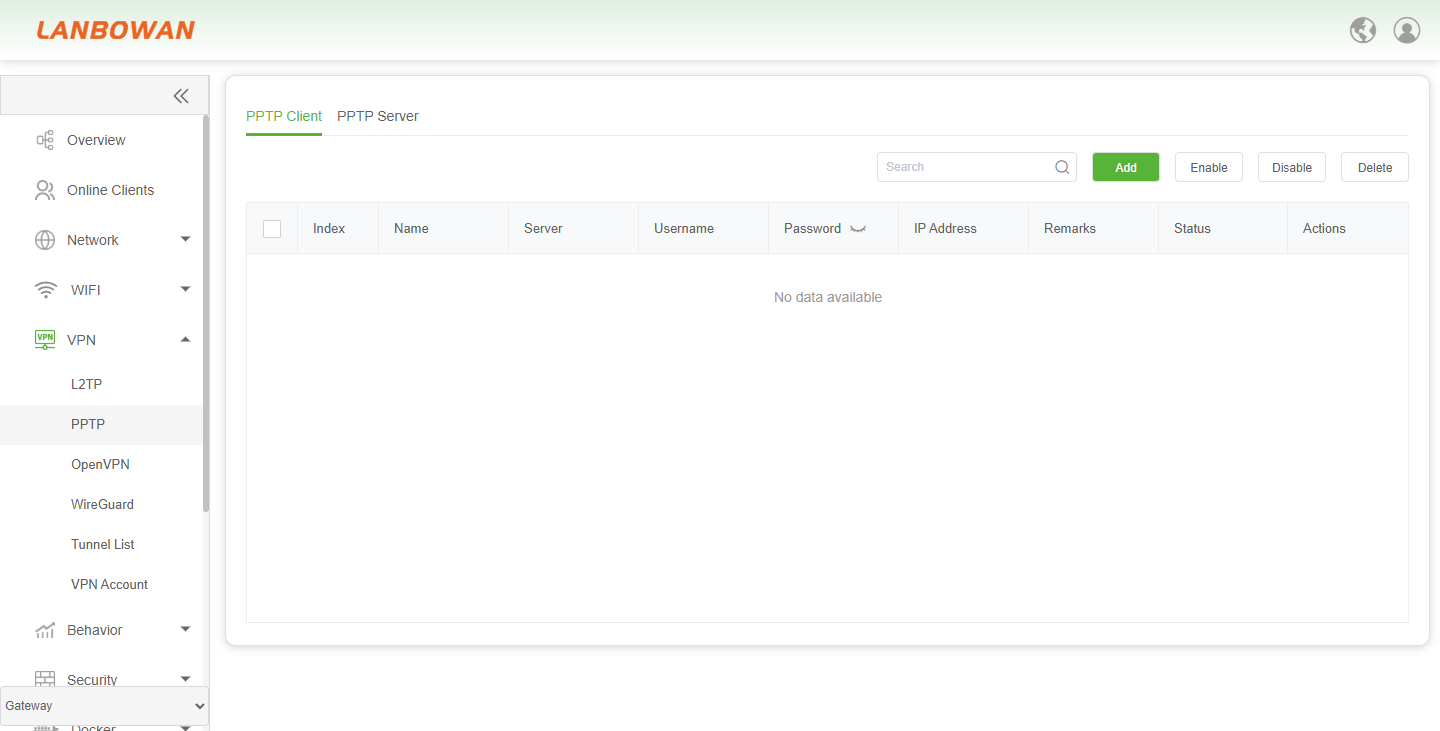
Add PPTP Client
Add PPTP Client is used to create a new PPTP client tunnel configuration by entering name, server address, username, password, MTU/MRU, interval and remarks, then save to establish the VPN dial-up connection.
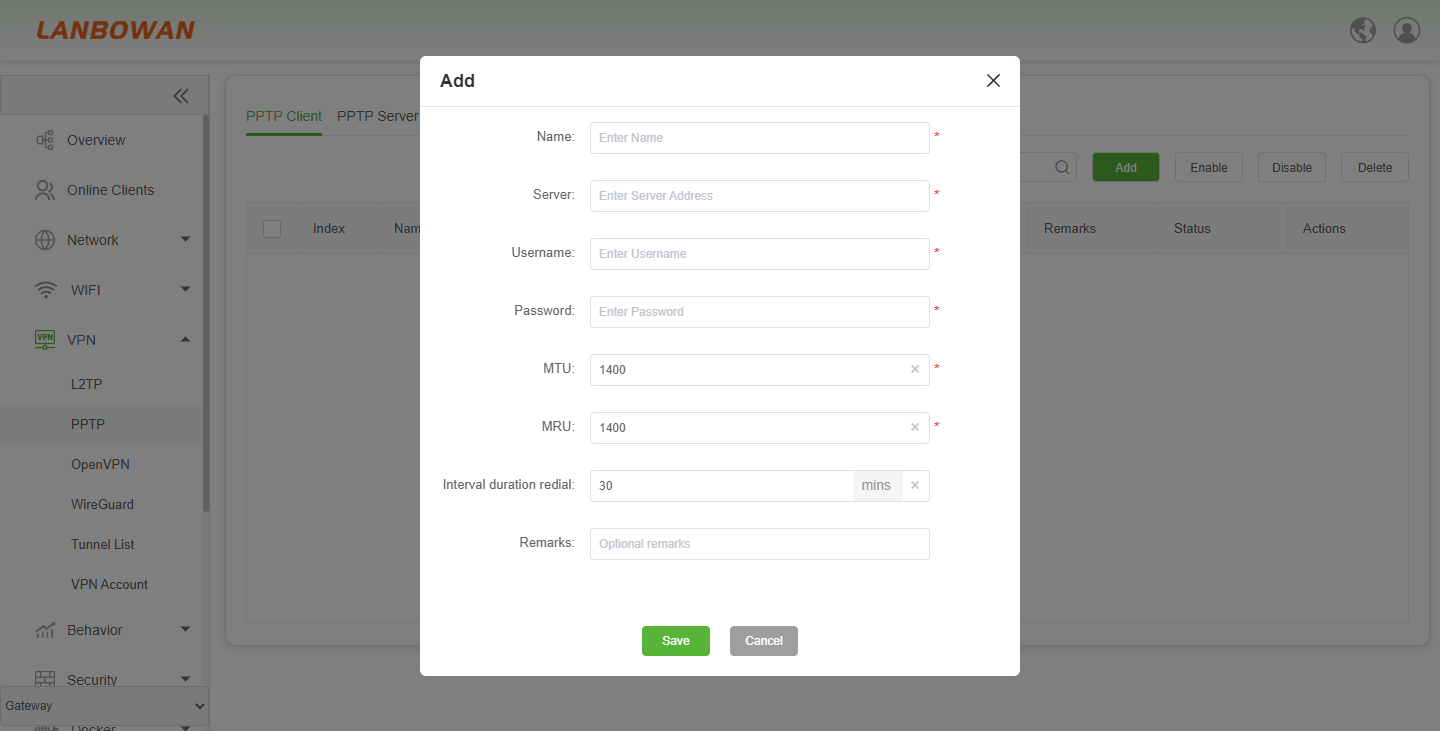
Parameter Description:
| Parameter | Description |
|---|---|
| Name | Identifier/name for the PPTP client tunnel entry. |
| Server | Remote PPTP server address used for VPN dial-up. |
| Username | Account username for PPTP authentication. |
| Password | Password for PPTP authentication; can be shown/hidden via the eye icon. |
| MTU | Maximum Transmission Unit size for the PPTP tunnel interface. |
| MRU | Maximum Receive Unit size for the PPTP tunnel interface. |
| Interval duration redial | Interval timer in minutes for redial/keepalive or connection check. |
| Remarks | Optional description/note for this entry. |
| Save | Optional description/note for this entry. |
| Cancel | Close the dialog without saving changes. |
PPTP Server
PPTP Server enables and configures the PPTP server, setting preferred/alternative DNS, client address pool, server address and advanced MTU/MRU parameters to assign addresses to dial-in clients and establish VPN tunnel connections.
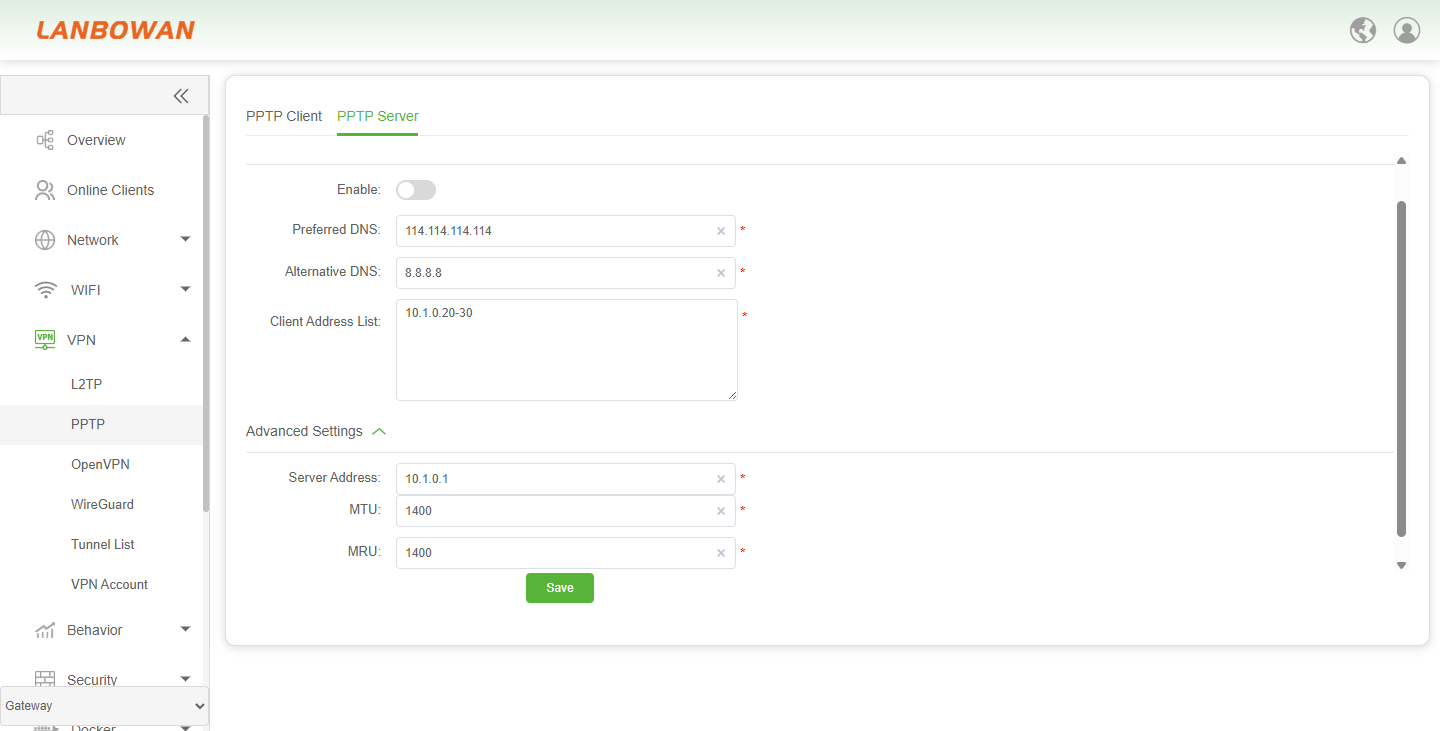
Parameter Description:
| Parameter | Description |
|---|---|
| Enable | Toggle to enable or disable the PPTP server function. |
| Preferred DNS | Primary DNS server address assigned/pushed to PPTP clients. |
| Alternative DNS | Secondary/backup DNS server address for PPTP clients. |
| Client Address List | IP address pool/range assigned to connected PPTP clients. |
| Advanced Settings | Expand/collapse advanced PPTP server parameters. |
| Server Address | Virtual/gateway IP address of the PPTP server side. |
| MTU | Maximum Transmission Unit size for the PPTP tunnel/server interface. |
| MRU | Maximum Receive Unit size for the PPTP tunnel/server interface. |
OpenVPN
OpenVPN Client
OpenVPN Client is used to configure and connect to a remote OpenVPN server, establishing an encrypted tunnel for secure remote access and traffic forwarding; OpenVPN Server is used to deploy a local VPN service, allowing remote clients to securely access internal network resources.
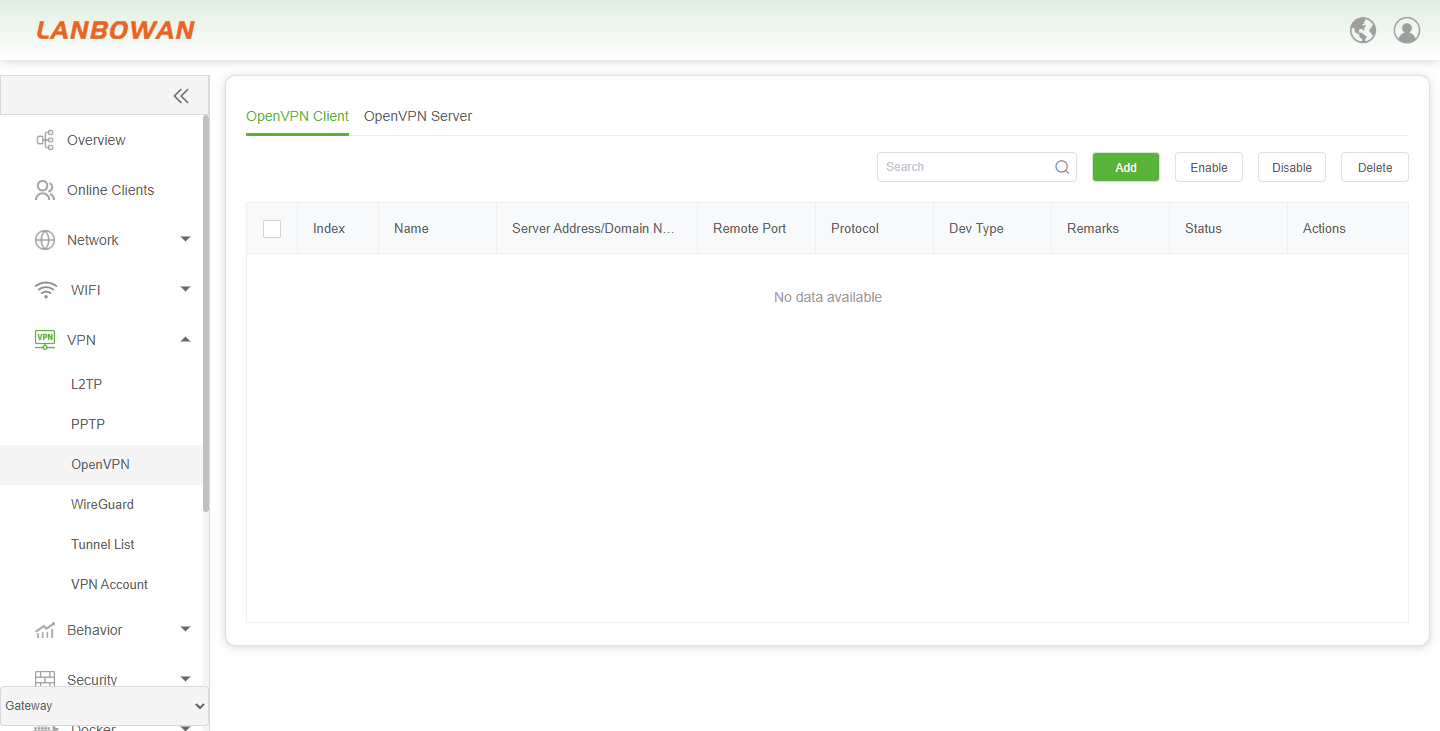
Add OpenVPN Client
The OpenVPN Client add/edit page is used to configure the connection name, server address and port, username/password, protocol (UDP/TCP), device type (tun/tap), MTU, and CA certificate to create or update an encrypted client tunnel to a remote OpenVPN server.
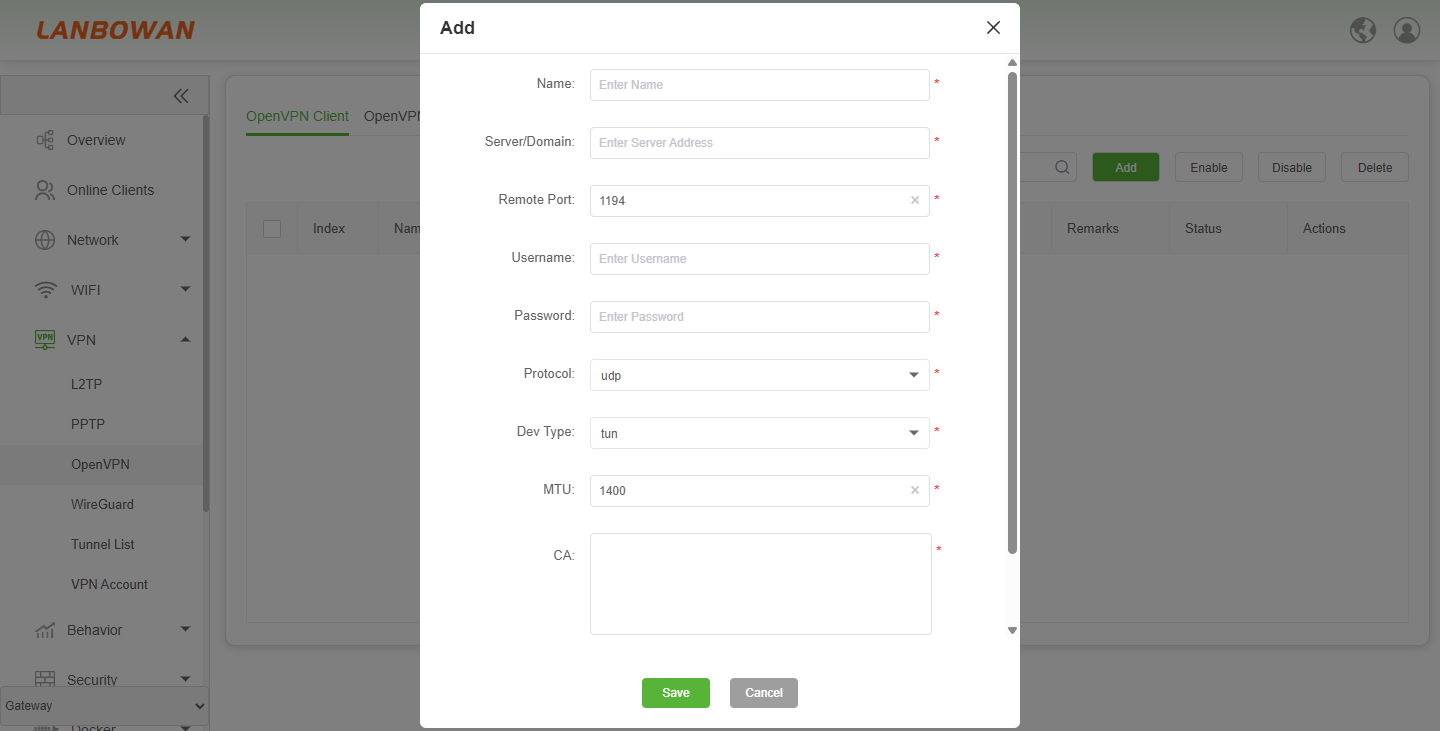
Parameter Description:
| Parameter | Description |
|---|---|
| Name | Identifier for the OpenVPN client profile. |
| Server/Domain | Remote OpenVPN server address or domain name to connect to. |
| Remote Port | TCP/UDP port of the remote OpenVPN server (default shown: 1194). |
| Username | Account username for VPN authentication. |
| Password | Account password for VPN authentication. |
| Protocol | Transport protocol used by the tunnel, e.g., UDP or TCP. |
| Dev Type | Virtual network device type, such as tun (layer 3) or tap (layer 2). |
| MTU | Maximum Transmission Unit size for the tunnel interface (example: 1400). |
| CA | Certificate Authority certificate text used to verify the server identity. |
| Save | Apply and save the current configuration. |
OpenVPN Server
OpenVPN Server is used to enable and configure the local OpenVPN service, setting the listening port, VPN subnet and netmask, tunnel protocol/type, MTU, and CA/server certificate with private key, to provide remote clients with encrypted access and internal network connectivity.
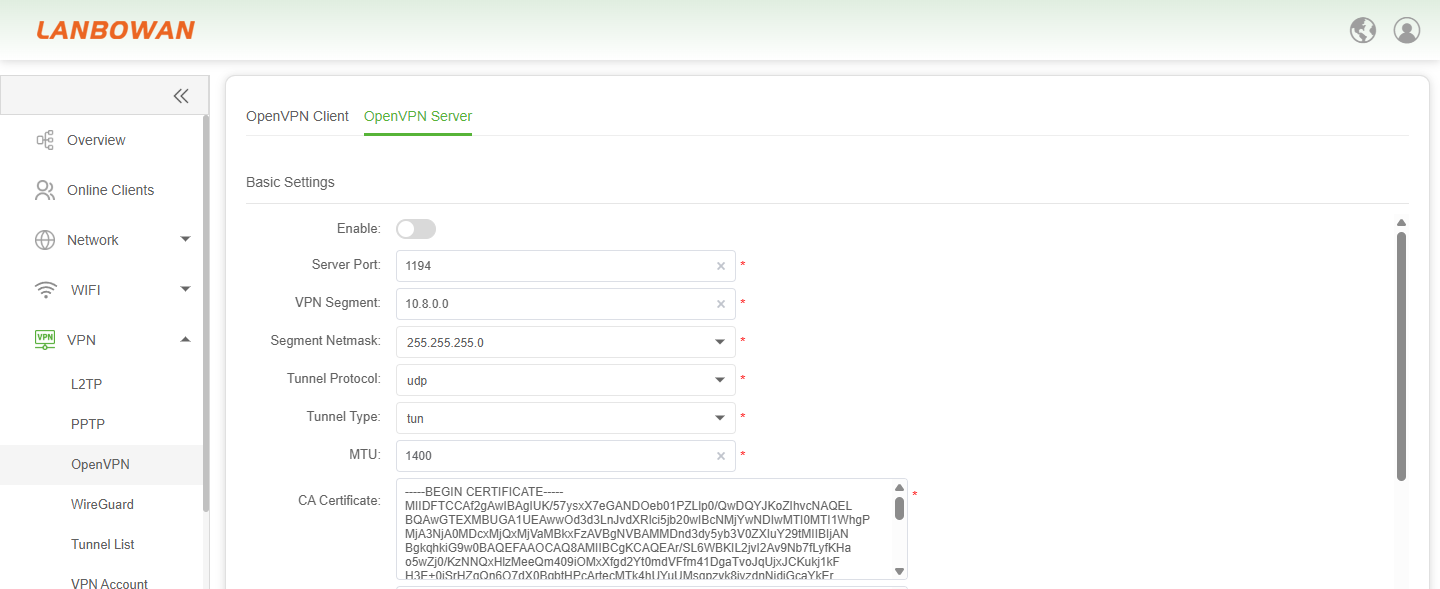
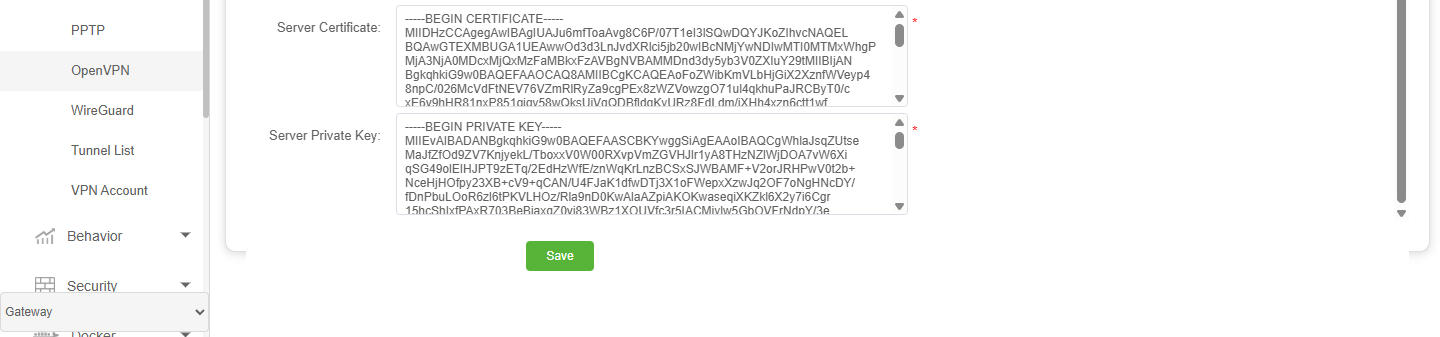
Parameter Description:
| Parameter | Description |
|---|---|
| Enable | Toggle to enable or disable the OpenVPN server function. |
| Server Port | Listening port for OpenVPN server connections (e.g., 1194). |
| VPN Segment | irtual IP subnet allocated to VPN clients (e.g., 10.8.0.0). |
| Segment Netmask | Subnet mask for the VPN virtual network (e.g., 255.255.255.0). |
| Tunnel Protocol | Transport protocol for the VPN tunnel, such as UDP or TCP. |
| Tunnel Type | unnel device mode, such as tun (Layer 3 routed) or tap (Layer 2 bridged). |
| MTU | Maximum transmission unit size for the tunnel interface (e.g., 1400). |
| CA Certificate | Certificate Authority certificate used to verify client/server trust. |
| Server Certificate | Local server certificate presented to connecting clients. |
| Server Private Key | Private key matching the server certificate for TLS/SSL authentication. |
| Save | Apply and save the current OpenVPN server settings. |
WireGuard
Interface List
Interface List List is used to view and manage VPN tunnel interfaces and established tunnels, supporting add, enable, disable, delete and search operations for centralized monitoring of local addresses, listening ports and connection status.
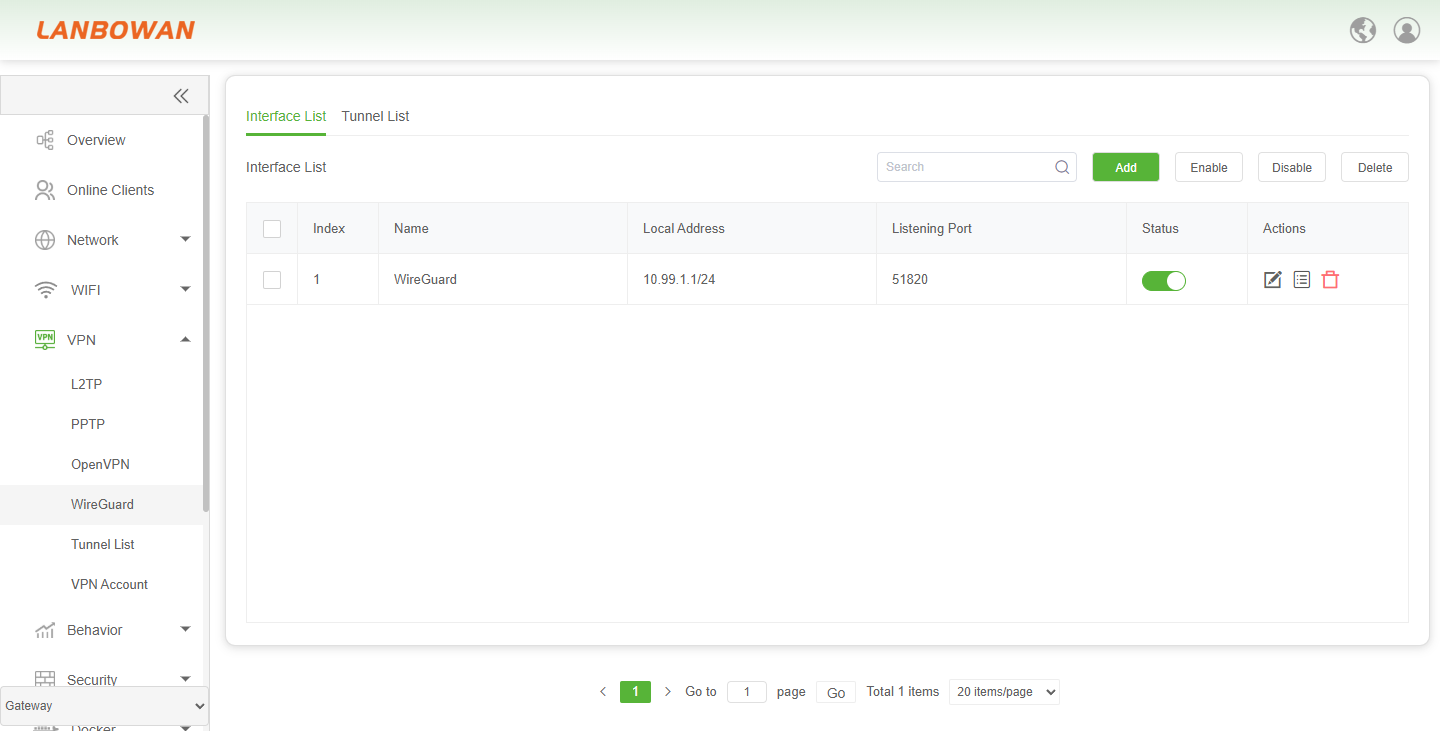
Parameter Description:
| Parameter | Description |
|---|---|
| Index | Sequential number identifying the entry in the list. |
| Name | Name or identifier of the interface/tunnel entry. |
| Local Address | Local IP address bound to the interface or tunnel. |
| Listening Port | Port on which the service or tunnel listens for connections. |
| Status | Current operational state of the interface or tunnel, such as active/inactive. |
| Actions | Available operations for the selected entry, such as edit or remove. |
| Search | Filter the list by keywords or field values. |
| Add | Create a new interface or tunnel entry. |
| Enable | Activate the selected interface or tunnel entry. |
| Disable | Deactivate the selected interface or tunnel entry. |
| Delete | Remove the selected interface or tunnel entry. |
| No data available | Indicates that no entries exist in the current list. |
Add Wireguard
Add interface is used to create a WireGuard/encrypted tunnel interface by configuring the interface name, local address, private/public key pair, listening port, and MTU, with options to generate new keys and save the configuration.
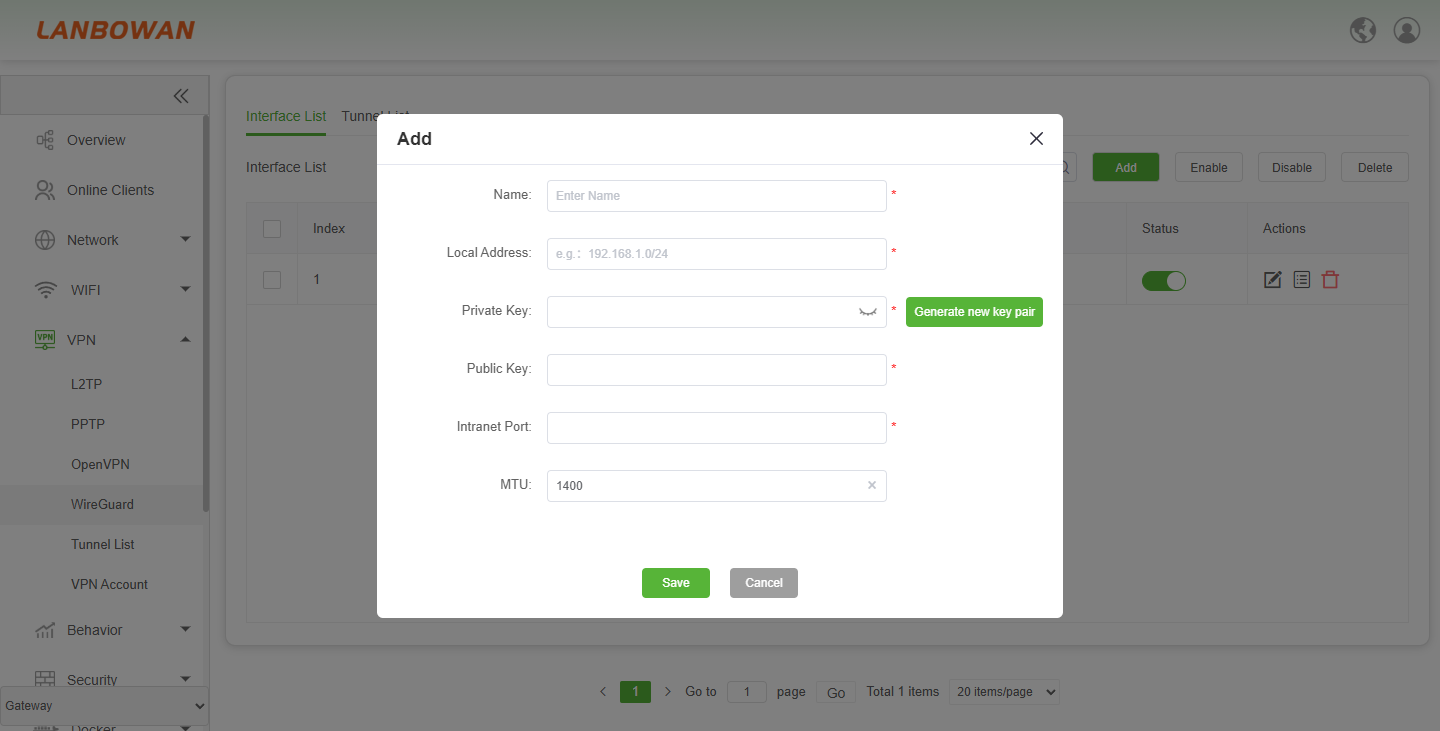
Add Peer Configuration
Click the next icon under Actions to navigate to the list page,then client “Add” and add the remote-end configuration.
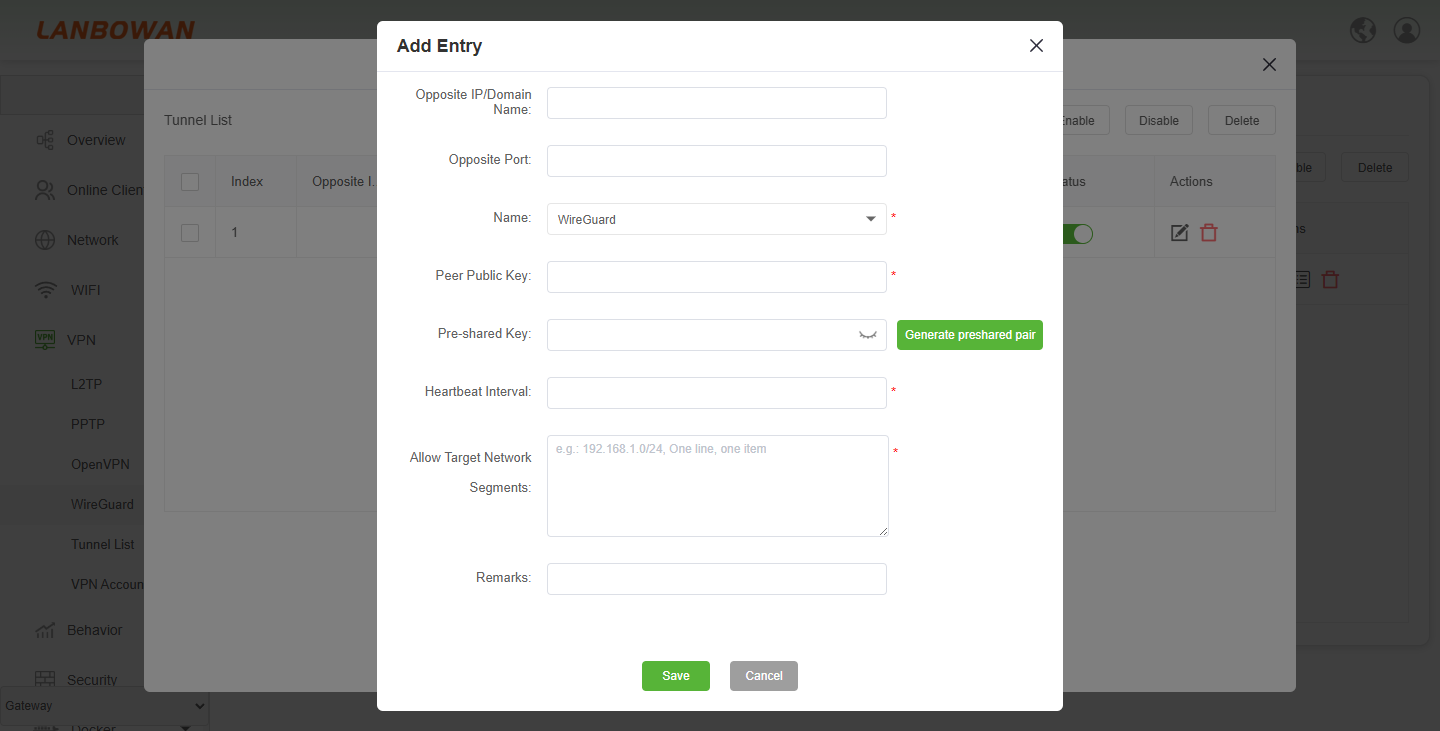
Parameter Description:
| Parameter | Description |
|---|---|
| Opposite IP/Domain Name | Remote peer endpoint address or domain name for the tunnel connection. |
| Opposite Port | Remote peer listening port for the tunnel connection. |
| Name | Interface or profile name associated with this peer entry. |
| Peer Public Key | Public key of the remote peer used for authentication/encryption. |
| Pre-shared Key | Optional symmetric key for additional encryption between peers. |
| Generate preshared pair | Generate/set a pre-shared key for the peer session. |
| Heartbeat Interval | Interval for keepalive/heartbeat packets to maintain the tunnel. |
| Allow Target Network Segments | Allowed remote network segments/routes for traffic through this peer, one per line. |
| Remarks | Optional description or comment for this entry. |
| Save | Apply and save the current entry configuration. |
| Cancel | Close the dialog without saving changes. |
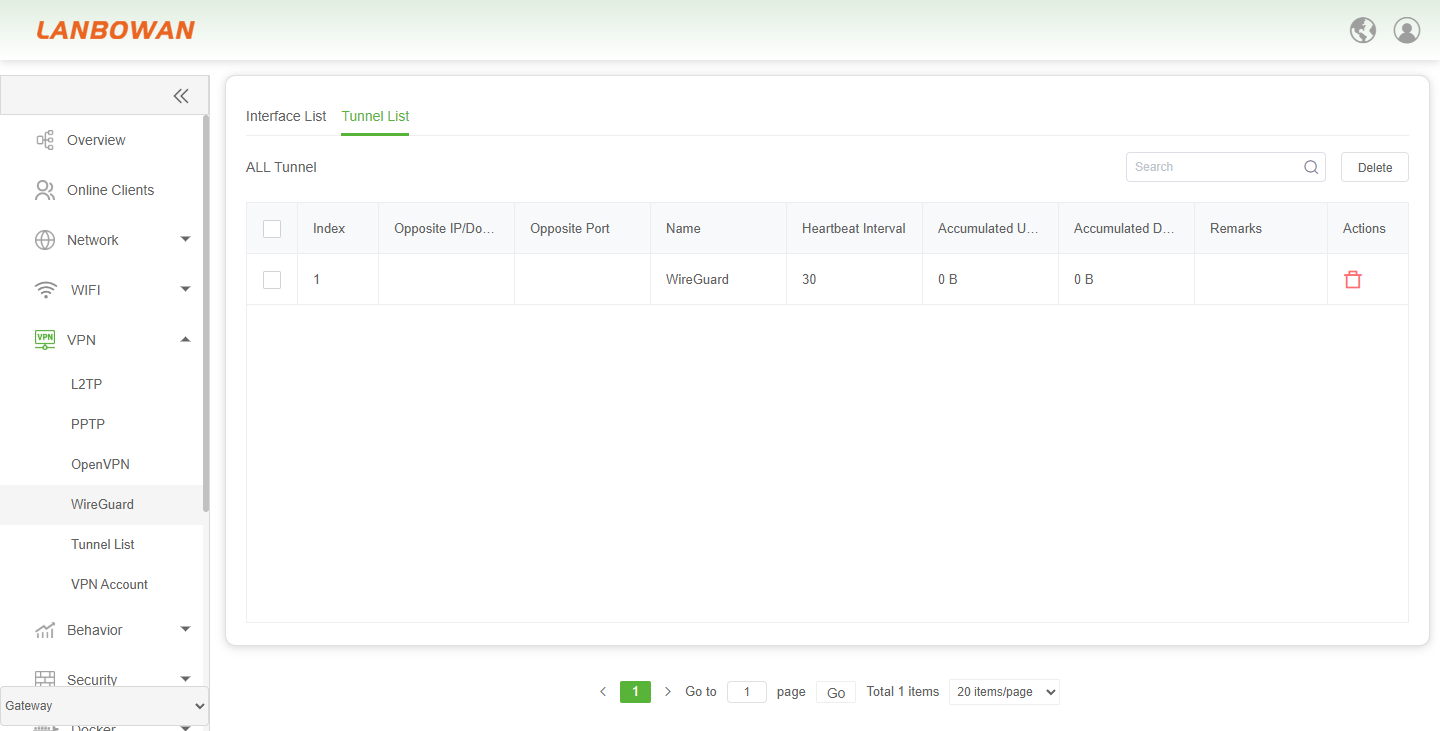
Tunnel List
Tunnel List is used to view configured peer tunnel connection information and status, including peer address, port, heartbeat interval, accumulated traffic, and remarks, with search and delete actions for centralized VPN tunnel monitoring and maintenance.
Tunnel List
Tunnel List is used to view client session information for VPN clients connected to the local VPN server, including index, authentication type, IP address, MAC/IP, and uptime, with search and refresh actions for monitoring and maintaining VPN client connections.
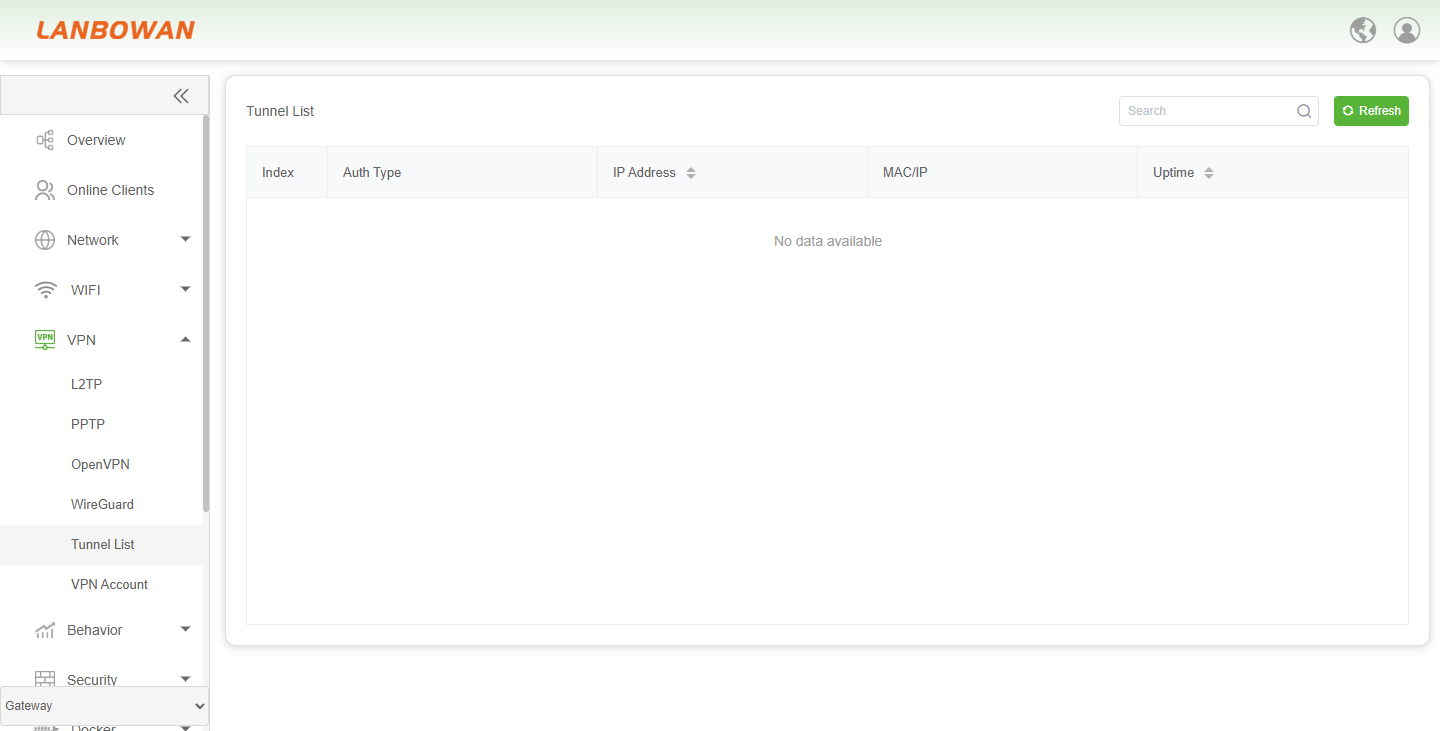
Parameter Description:
| Parameter | Description |
|---|---|
| Index | Sequential identifier for the VPN client/tunnel session entry. |
| Auth Type | Authentication method or type used by the connected VPN client. |
| IP Address | Assigned or reported IP address of the VPN client session, sortable. |
| MAC/IP | MAC or IP-related identifier associated with the client/tunnel entry. |
| Uptime | Duration since the VPN client/tunnel connection was established, sortable. |
| Search | Filter displayed entries by keyword. |
| Refresh | Filter displayed entries by keyword. |
| No data available | Indicates no VPN client/tunnel session records exist or match the current view. |
VPN Account
VPN Account is used to manage VPN service accounts, supporting add, search, enable, disable, delete, and edit operations, with configurable service type, username, and password, and allowing account status and paginated list viewing for centralized VPN access user permission maintenance.
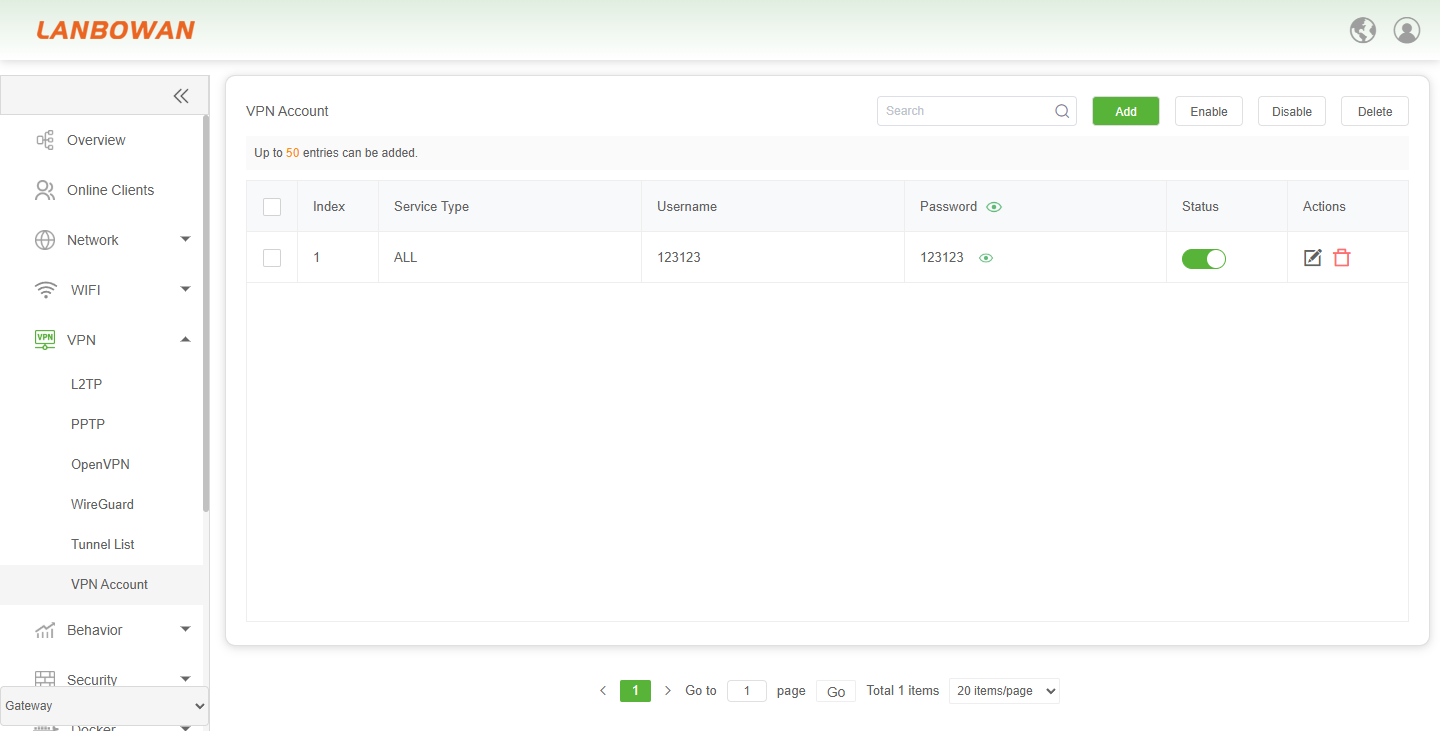
Parameter Description:
| Parameter | Description |
|---|---|
| Search | Filter VPN account entries by keyword. |
| Add | Create a new VPN account entry. |
| Enable | Enable selected VPN account(s). |
| Disable | Disable selected VPN account(s). |
| Checkbox | Select one or multiple account entries for batch actions. |
| Index | Sequential number identifying the account entry. |
| Service Type | VPN service type or scope assigned to the account (e.g., ALL). |
| Username | Login username for VPN client authentication. |
| Password | Login password for the VPN account; may be shown/hidden via toggle. |
| Status | Current enabled/disabled state of the VPN account. |
| Actions – Edit | Modify the selected VPN account settings. |
| Actions – Delete | Remove the specific VPN account entry. |