Network
WAN/LAN
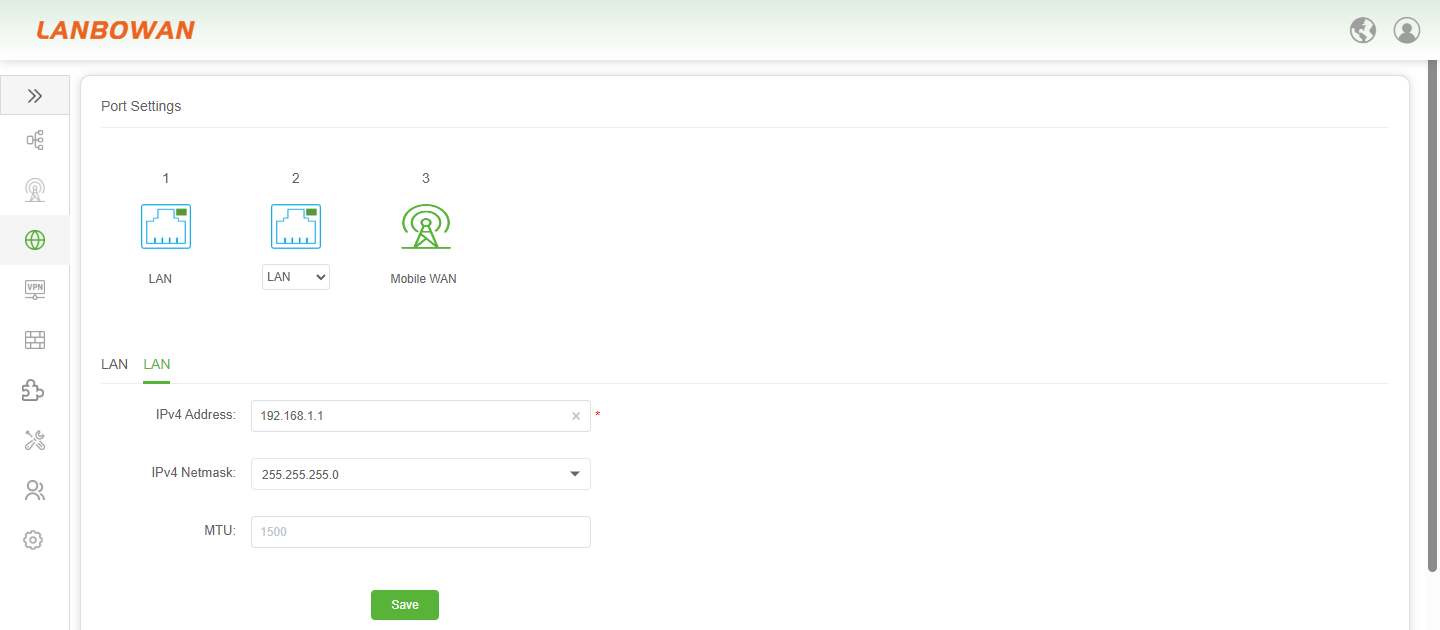
Port Settings
The LAN Interface Configuration feature allows administrators to flexibly switch the role of physical ports (such as LAN, LAN1, WAN) on the T830's top visual area. In the form below, key network parameters such as the IPv4 address, IPv4 Netmask, and MTU can be precisely set for the currently selected LAN interface. The configuration takes effect after clicking "save", meeting diverse internal network planning and business interconnection/integration requirements.
Port Information
The Port Status Overview feature presents the core network information and operational status of each physical and cellular port of the T830 in a clear tabular format. It covers key indicators such as Port Type, IP Address, Gateway, DNS, real-time connection Speed, and MAC Address. This helps administrators quickly grasp the status of the network links and interface configurations, facilitating daily inspections and troubleshooting.

Parameter Description:
| Parameter | Description |
|---|---|
| Port ID | Unique identifier for the physical or logical port on the T830 device. |
| Port Type | Classification of the port's function, such as LAN (Local Area Network) or Mobile WAN (Cellular Wide Area Network). |
| IP Address | The specific Internet Protocol address assigned to the port for network communication and data routing. |
| Gateway | The IP address of the next-hop router or default gateway used to forward data packets to external networks. |
| DNS | Domain Name System server addresses that translate human-readable domain names into machine-readable IP addresses. |
| Speed | The current negotiated transmission rate or connection status of the port (e.g., No Link, 2.5 G, 5 G). |
| MAC Address | The unique Media Access Control address assigned to the network interface for communication on the local network segment. |
VLAN
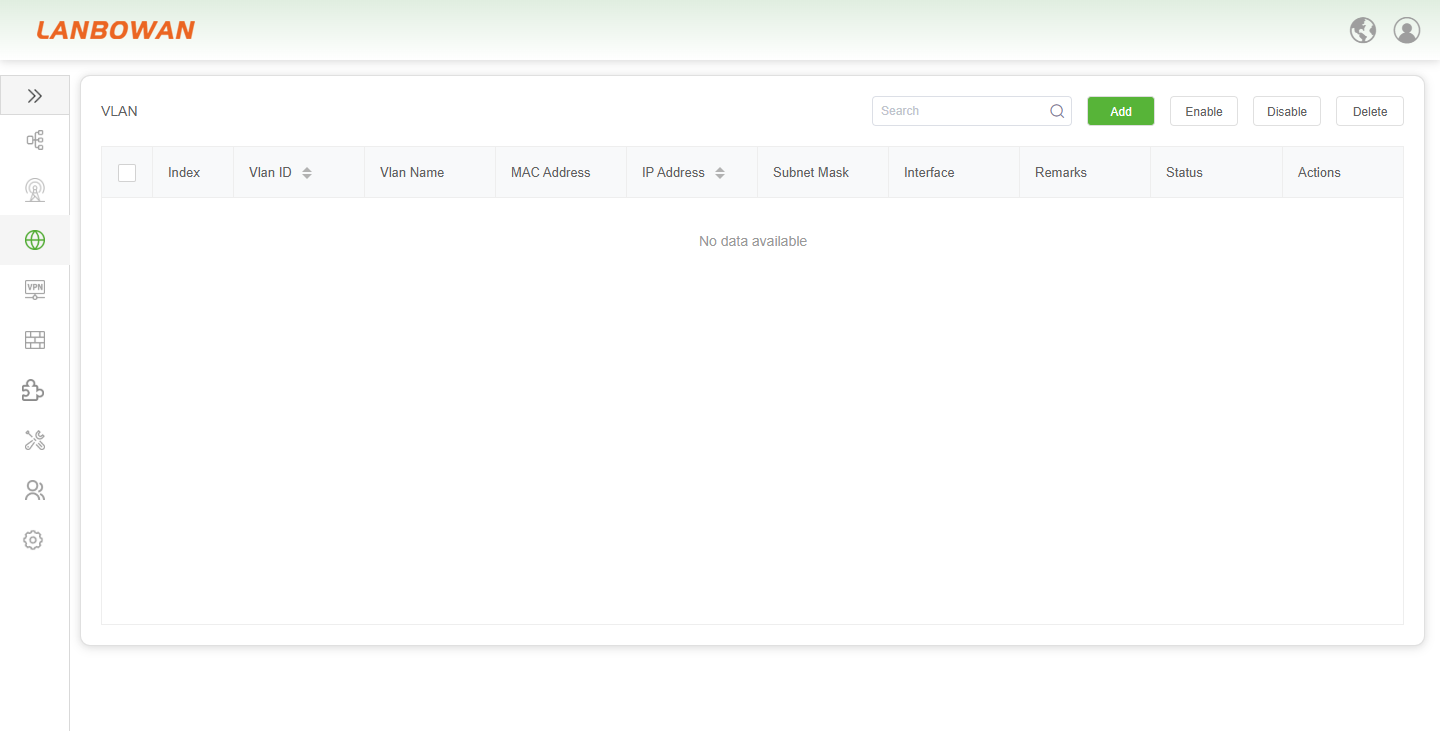
The VLAN Configuration Management feature provides an intuitive list view and a quick-action area, allowing administrators to quickly search, add, enable, disable, or delete Virtual Local Area Networks on the T830. It also supports viewing and editing details such as VLAN ID, Name, MAC Address, IP Address, Subnet Mask, bound Interface, and Remarks, thereby achieving efficient network broadcast domain isolation and refined IP subnet planning.
Add VLAN
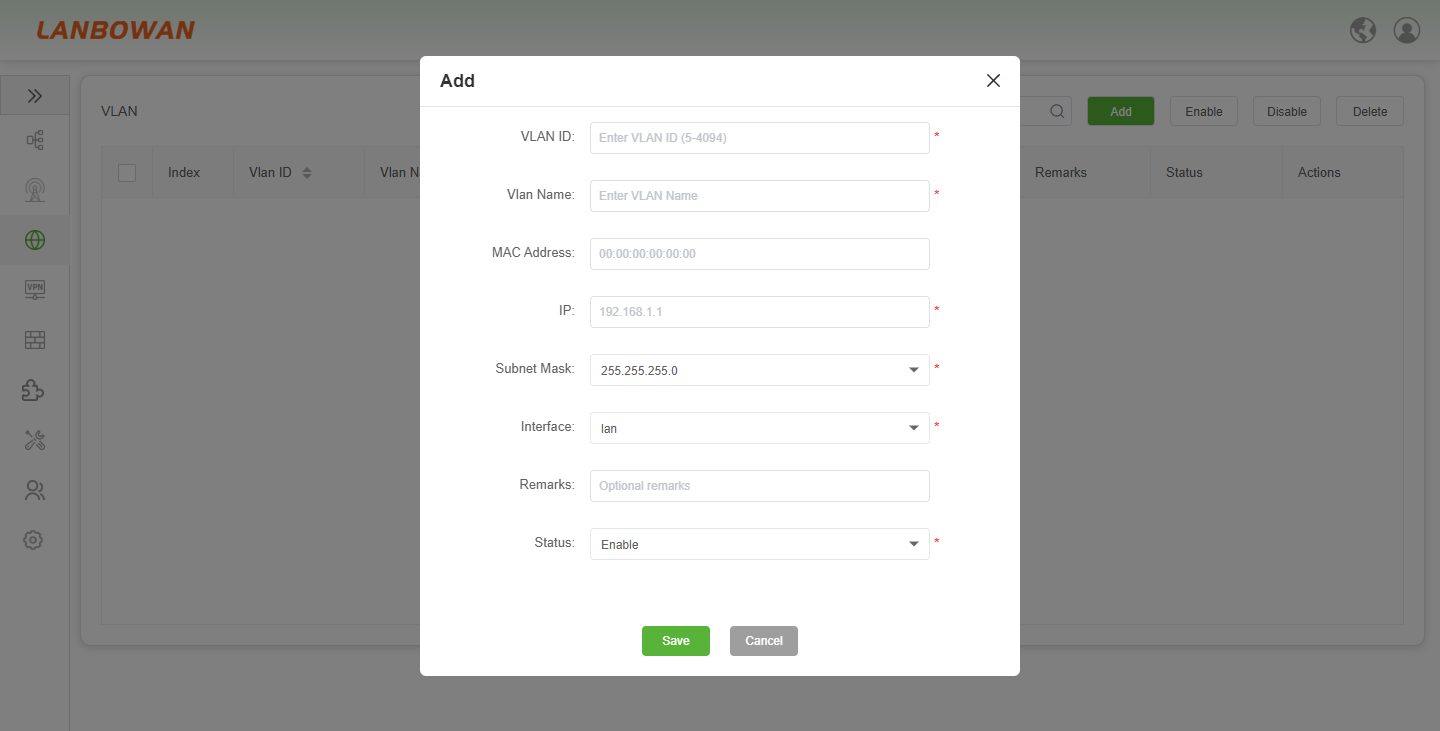
The VLAN Creation Wizard feature provides an intuitive pop-up configuration interface for the T830, guiding administrators to sequentially set the VLAN ID (range 5-4094), custom VLAN Name, MAC Address, IP Address, Subnet Mask, bound physical Interface (e.g., lan), optional Remarks, and initial Status (Enable or Disable). Clicking "save" quickly completes the deployment of a new Virtual Local Area Network and broadcast domain segmentation.
Parameter Description:
| Parameter | Description |
|---|---|
| VLAN ID | The unique numeric identifier for the Virtual Local Area Network, typically ranging from 5 to 4094. |
| VLAN Name | A custom descriptive name assigned to the VLAN for easier identification and management. |
| MAC Address | The Media Access Control address associated with the VLAN interface, which can be manually set or left to the system default (e.g., 00:00:00:00:00:00). |
| IP | The IPv4 address assigned to the VLAN interface, serving as the default gateway for devices within that subnet. |
| Subnet Mask | The mask used to define the network portion of the IP address, determining the range of available host addresses within the VLAN. |
| Interface | The physical or logical port (e.g., lan) on the T830 that the VLAN is bound to for traffic transmission. |
| Remarks | Optional textual notes or descriptions added by the administrator for documentation and reference purposes. |
| Status | The operational state of the VLAN, where "Enable" activates the VLAN for network traffic and "Disable" deactivates it. |
DHCP
DHCP Server
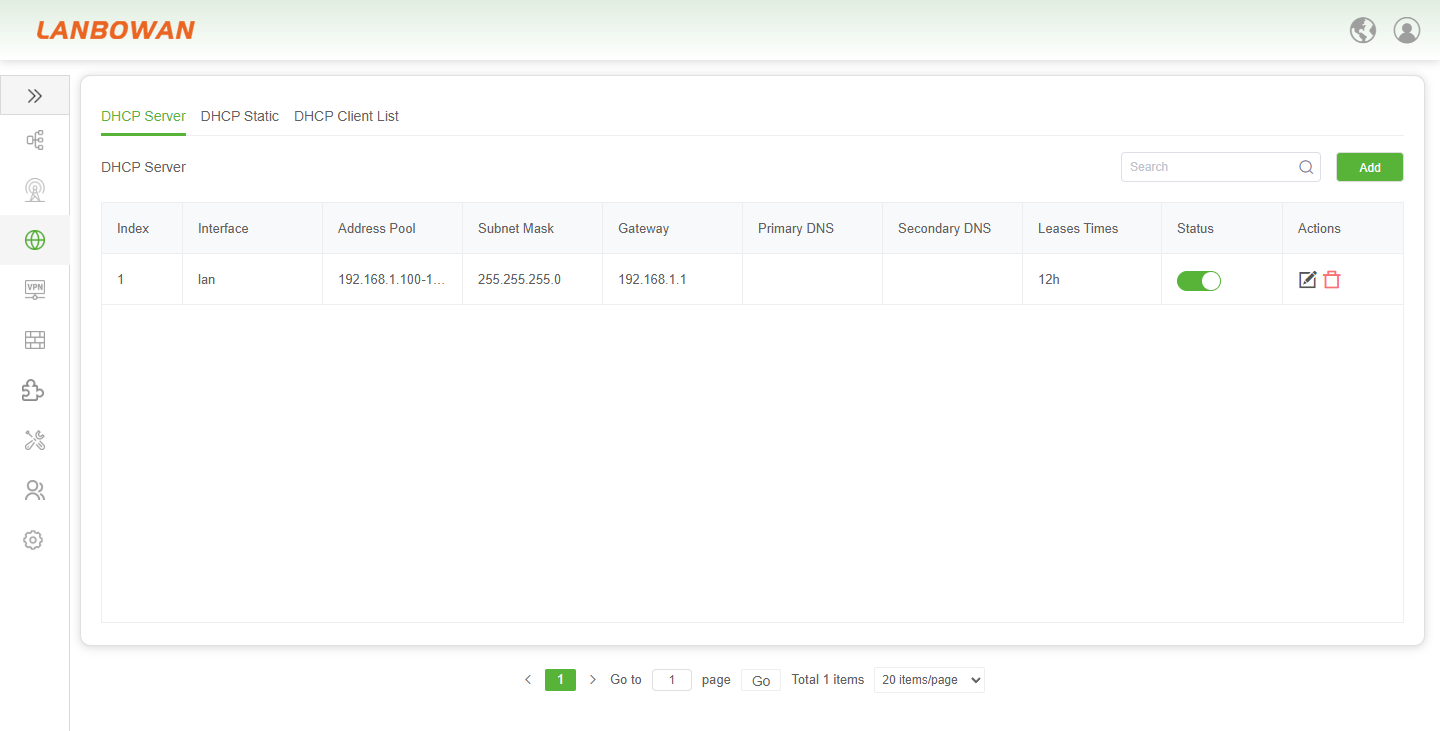
The DHCP Server Management feature provides a centralized control panel for Dynamic Host Configuration Protocol services on the T830. It allows administrators to view the DHCP operational status of each interface through an intuitive list, and quickly add or modify core network parameters such as the Address Pool, Subnet Mask, Gateway, and DNS. Additionally, it supports flexible setting of Leases Times and Status (Enable/Disable), thereby achieving automated, refined management and efficient distribution of IP addresses for clients within the local area network.
Add DHCP Server
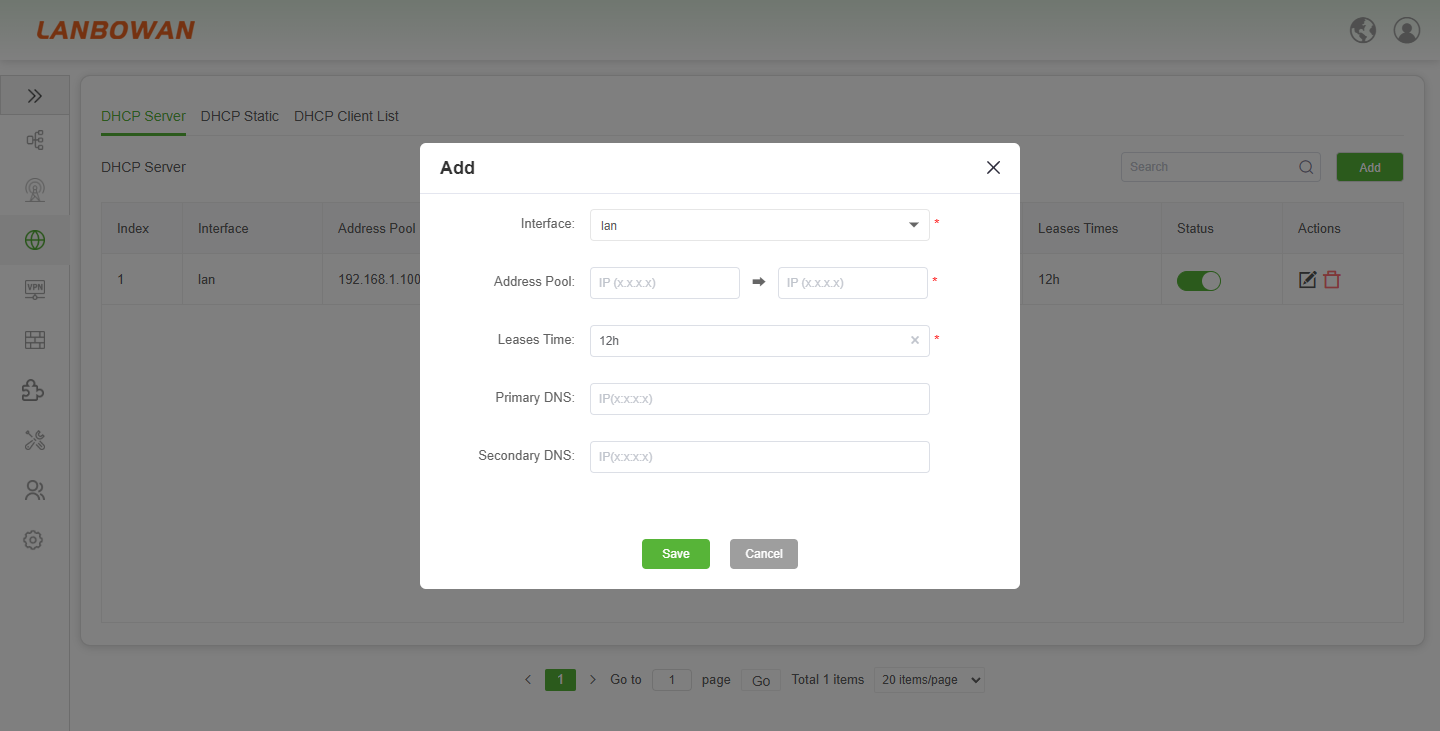
The DHCP Server Addition Wizard feature provides a concise and intuitive pop-up configuration interface for the T830. It allows administrators to quickly select the physical or logical interface (e.g., lan) bound to the service, accurately define the start and end range of the dynamic IP Address Pool, customize the Leases Time (e.g., 12h), and optionally enter Primary and Secondary DNS server addresses. Clicking "Save" efficiently completes the deployment of DHCP services within a specific network segment and issues automated IP allocation policies.
Parameter Description:
| Parameter | Description |
|---|---|
| Interface | The specific physical or logical port (e.g., lan) on the T830 to which the DHCP server instance is bound to provide address allocation services. |
| Address Pool | The definable range of IP addresses (start IP to end IP) available for dynamic lease and assignment to client devices within the network segment. |
| Leases Time | The duration for which a client is permitted to use an assigned IP address, typically configured in minutes (m) or hours (h), such as 12h. |
| Primary DNS | The preferred Domain Name System server IP address distributed to clients, used to resolve domain names into IP addresses for network access. |
| Secondary DNS | An optional backup DNS server IP address distributed to clients, ensuring continued normal domain name resolution if the primary DNS fails. |
DHCP Static
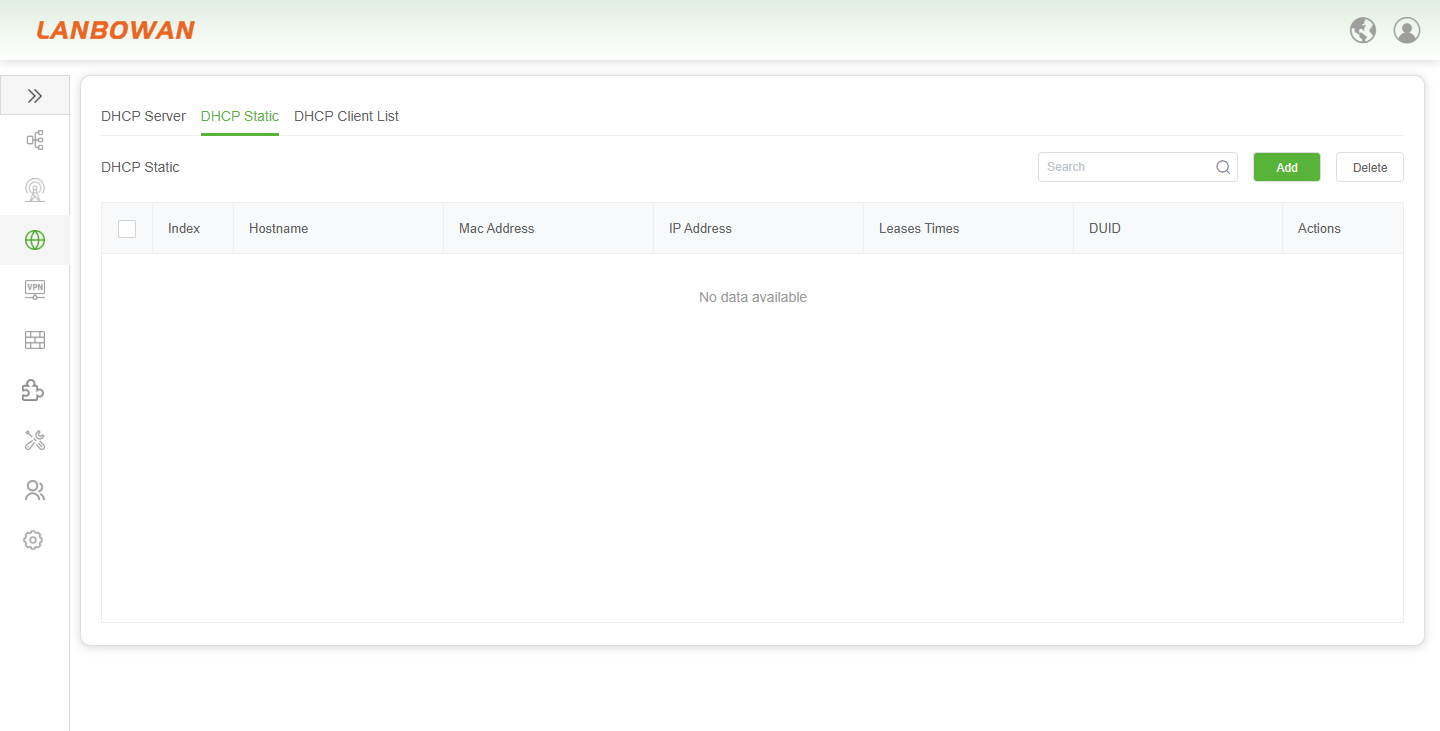
The DHCP Static Binding Management feature provides a dedicated IP allocation control panel based on MAC Addresses or DUIDs for the T830. It allows administrators to intuitively view the hostname, fixed IP address, leases times, and unique identifiers of bound devices through a list, and perform add, delete, or modify actions at any time. This ensures that critical devices (such as servers, printers, or surveillance terminals) always obtain a stable and immutable IP address within the network environment, achieving efficient network identity recognition and access control.
Parameter Description:
| Parameter | Description |
|---|---|
| Index | The sequential numerical identifier for each static DHCP binding entry, used for listing and referencing specific configuration items. |
| Hostname | The custom device name or alias assigned to the client, making it easier for administrators to identify specific machines on the network. |
| Mac Address | The unique physical Media Access Control address of the client device, used to ensure that a specific device always receives the same reserved IP address. |
| IP Address | The fixed IPv4 address statically bound to the client's MAC Address or DUID, providing a permanent network identity for the device. |
| Leases Times | The duration for which the statically assigned IP address is allocated to the client, defining the validity period of the lease. |
| DUID | The DHCPv6 Unique Identifier assigned to the client, used in IPv6 networks to uniquely identify the device for static IP allocation. |
| Actions | Operational buttons allowing administrators to edit or delete specific static binding entries as needed. |
DHCP Client List
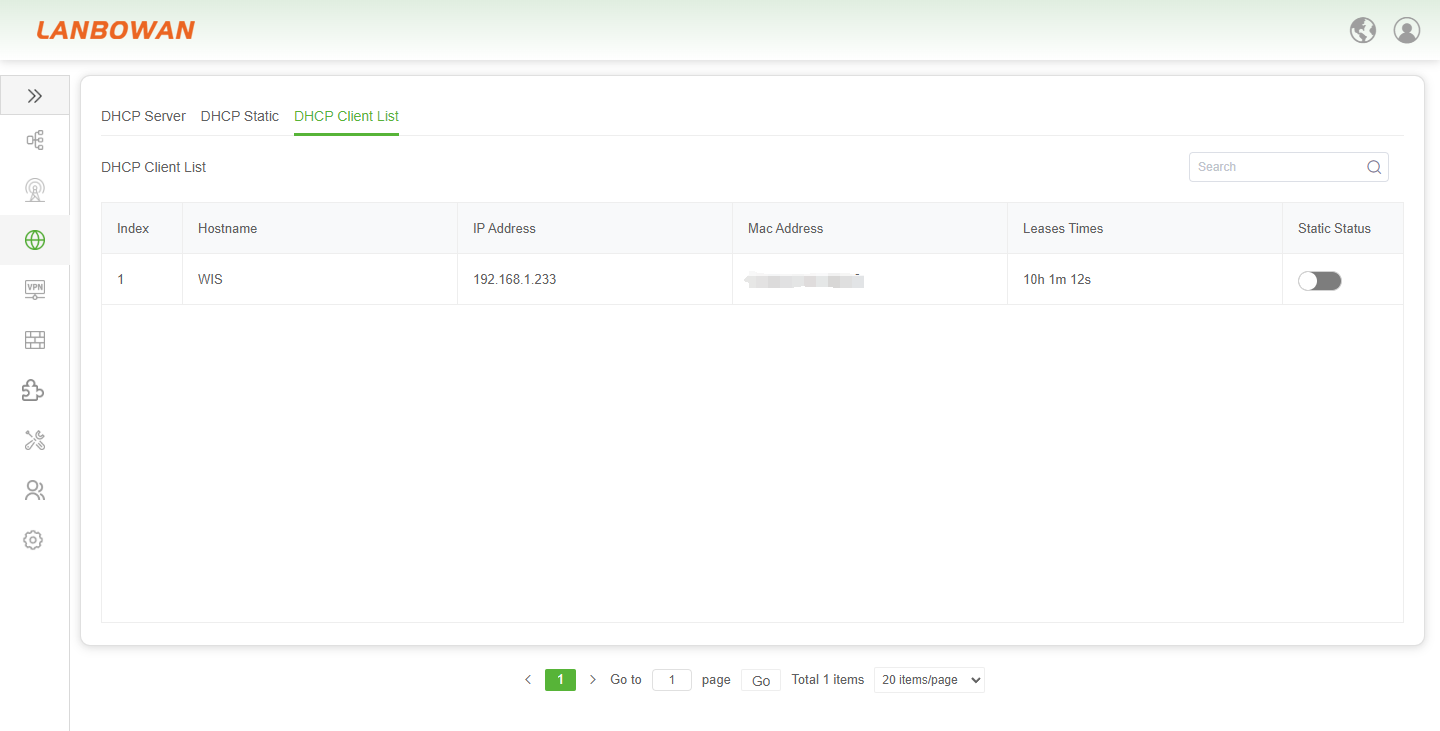
The DHCP Client List feature provides a real time local area network host monitoring view for the T830. It allows administrators to centrally view detailed information of all online clients currently obtaining IP addresses via the DHCP service, including hostname, assigned IP address, MAC Address, remaining lease time, and static binding status toggle. Additionally, search and pagination functions enable efficient management and tracking of network device connections.
TR069
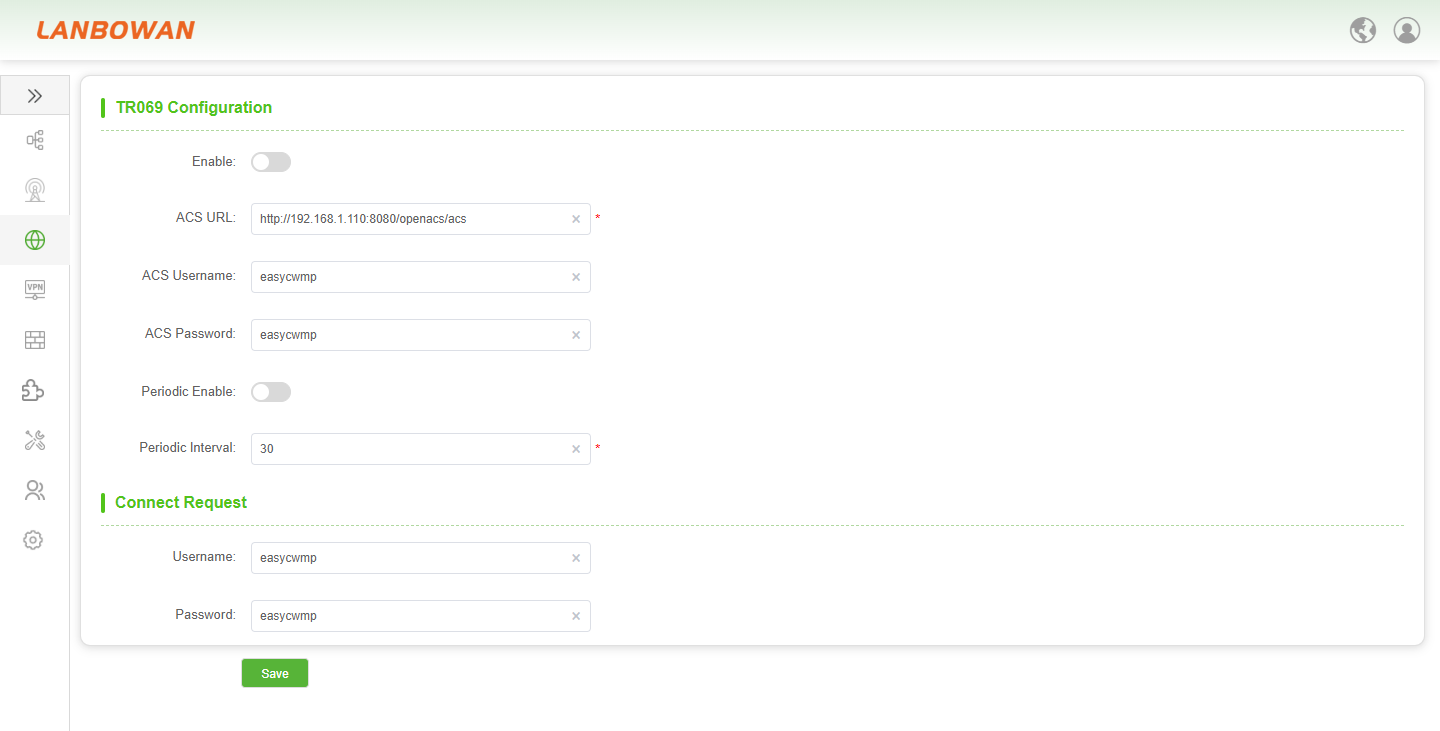
The TR069 Remote Management Configuration feature provides an automated operations and maintenance channel based on the CWMP protocol for the T830. It allows administrators to enable the service with one click and accurately fill in the ACS (Auto-Configuration Server) URL, authentication username, and password. It supports flexible setting of periodic notification intervals to actively maintain management connections, and configuring Connect Request authentication information to allow the server to actively initiate remote provisioning or diagnostics. This achieves zero-touch deployment and efficient full lifecycle centralized control of batch devices.
Static Routes
Routing Tables
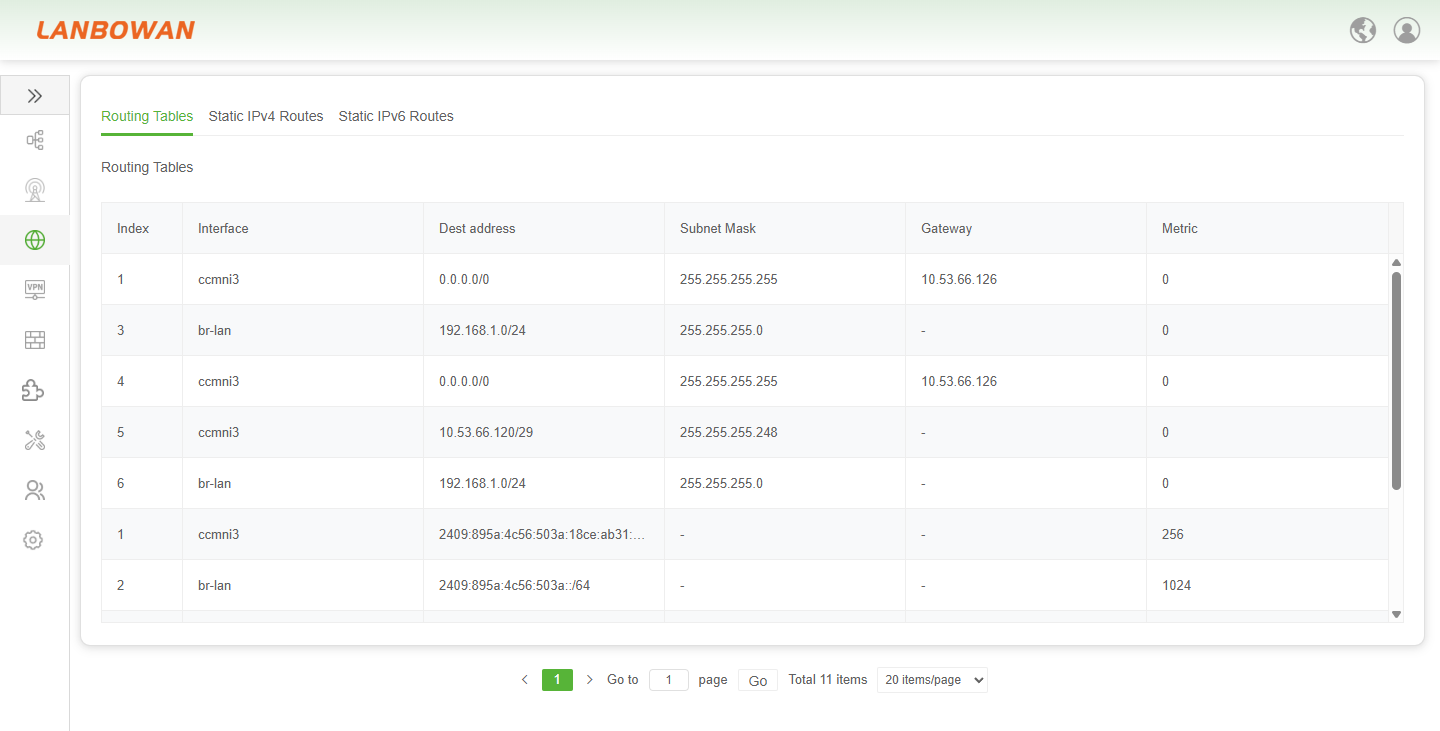
The Routing Tables feature provides a core network path forwarding query and management panel for the T830. It allows administrators to intuitively view the current kernel routing entries of the device, including system-generated directly connected network segments (e.g., br-lan) and static or default routes pointing to specific interfaces (e.g., ccmni2). It details key parameters such as destination address, subnet mask, next-hop gateway, and route metric, thereby assisting operations personnel in monitoring data flow in real-time, troubleshooting network connectivity issues, and optimizing traffic forwarding strategies.
Parameter Description:
| Parameter | Description |
|---|---|
| Index | The sequence number or unique identifier of the routing entry, used for referencing and managing specific routes in the routing table. |
| Interface | The destination IP address or network segment that the routing rule targets, defining where the data packet is intended to go. |
| Subnet Mask | The mask used to determine the network portion of the destination address, defining the scope and range of the target network. |
| Gateway | The IP address of the next-hop router or gateway to which packets are forwarded to reach the destination network. |
| Metric | The priority or cost value of the route; lower values indicate higher priority and are preferred when multiple paths to the same destination exist. |
Static IPv4 Routes
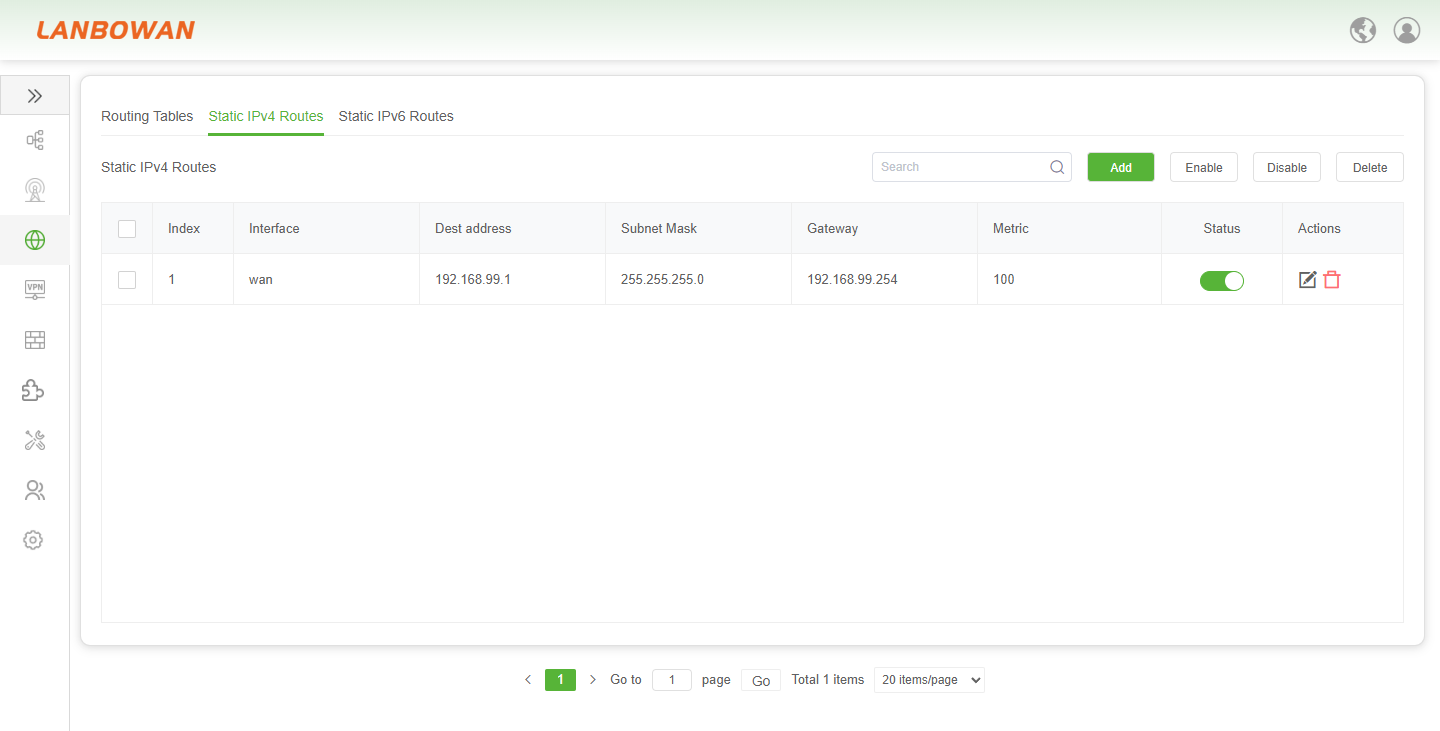
The Static IPv4 Routes feature provides flexible manual path planning and traffic control capabilities for the T830. It allows administrators to manually add, enable, disable, or delete specific routing rules. By accurately configuring key parameters such as destination address, subnet mask, outgoing interface, next-hop gateway, and route metric, it achieves cross-subnet communication within the LAN, multi-exit policy routing, and directional forwarding of specific service traffic. This meets the refined operation and maintenance requirements in complex network environments.
Parameter Description:
| Parameter | Description |
|---|---|
| Index | The unique sequence number or identifier for the static route entry, used for ordering and managing specific routes in the list. |
| Interface | The local network interface (e.g., WAN, LAN) through which traffic for the destination network is forwarded. |
| Dest address | The destination IP address or specific network segment that the static route targets. |
| Subnet Mask | The mask used to define the network portion and scope of the destination IP address. |
| Gateway | The IP address of the next-hop router or gateway to which packets are forwarded to reach the destination. |
| Metric | The priority or cost value of the route; lower values indicate higher priority when multiple paths to the same destination exist. |
| Status | The current operational state of the static route (e.g., Enabled or Disabled), indicating whether the rule is active. |
| Actions | Operational buttons allowing administrators to modify (Edit) or remove (Delete) the specific route entry. |
Static IPv6 Routes
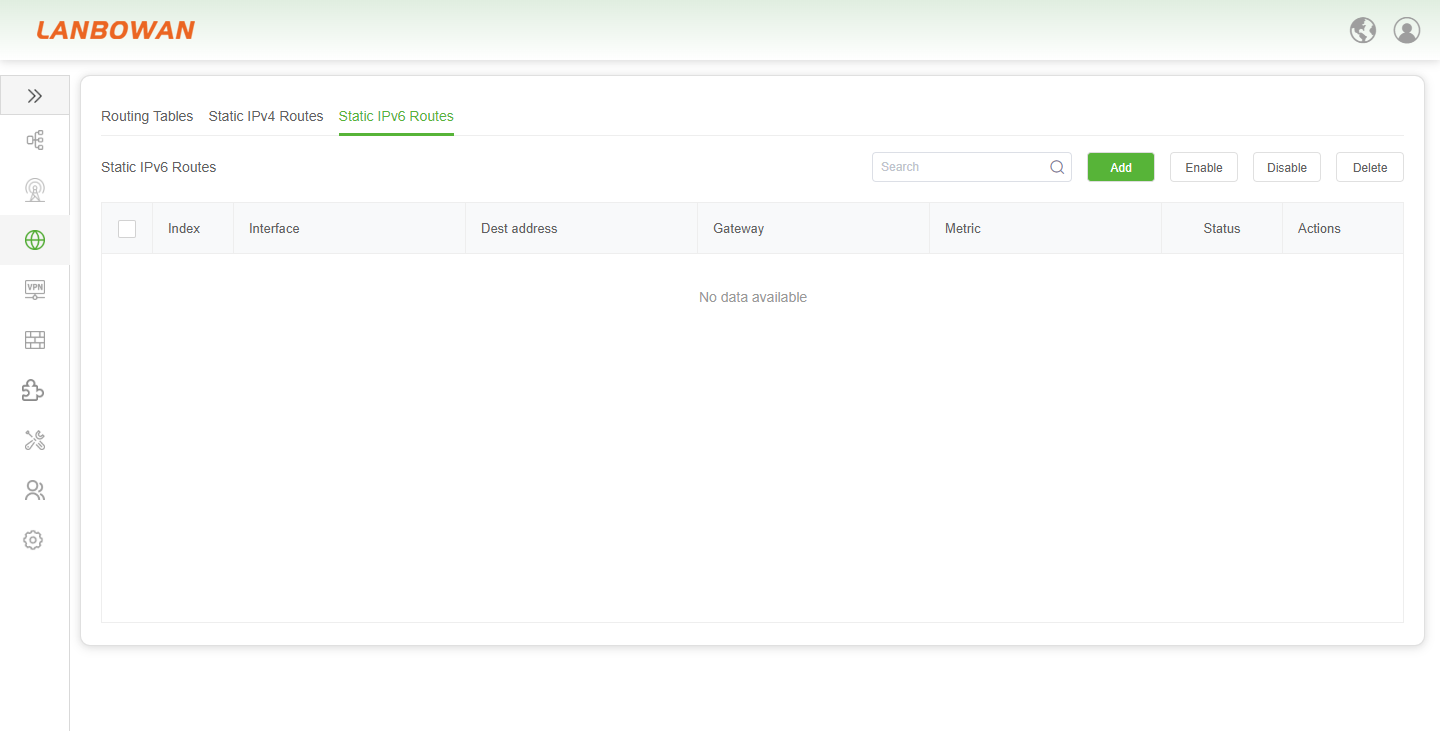
The Static IPv6 Routes feature provides the T830 with precise traffic control and path planning capabilities for the next-generation Internet protocol. It allows administrators to manually add, enable, disable, or delete specific IPv6 routing rules. By flexibly configuring key parameters such as destination address, outgoing interface, next-hop gateway, and route metric, it achieves cross-subnet communication, multi-exit policy routing, and directional forwarding of specific service traffic in IPv6 network environments. This meets the refined operation and maintenance requirements in complex IPv6 network architectures.
Load Balancing
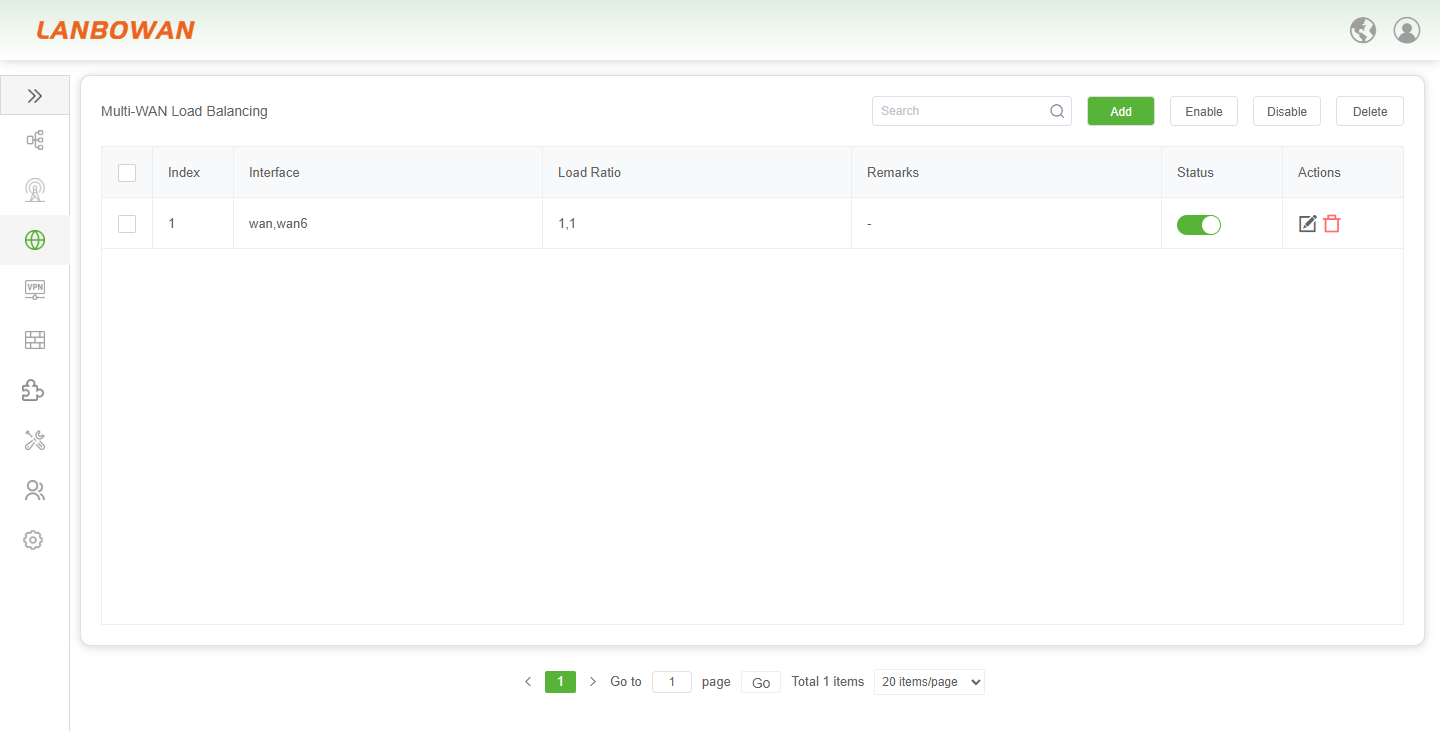
The Multi-WAN Load Balancing feature provides the T830 with efficient bandwidth aggregation and redundant backup capabilities. It allows administrators to logically bind multiple WAN interfaces (e.g., wan and wan6) and intelligently distribute outbound traffic by customizing load ratios (e.g., 1:1). Together with operations such as adding, enabling, disabling, or deleting rules, it maximizes network bandwidth utilization, enables automatic failover in case of link failures, and ensures stable access in high-concurrency scenarios.
Add Load Balancing
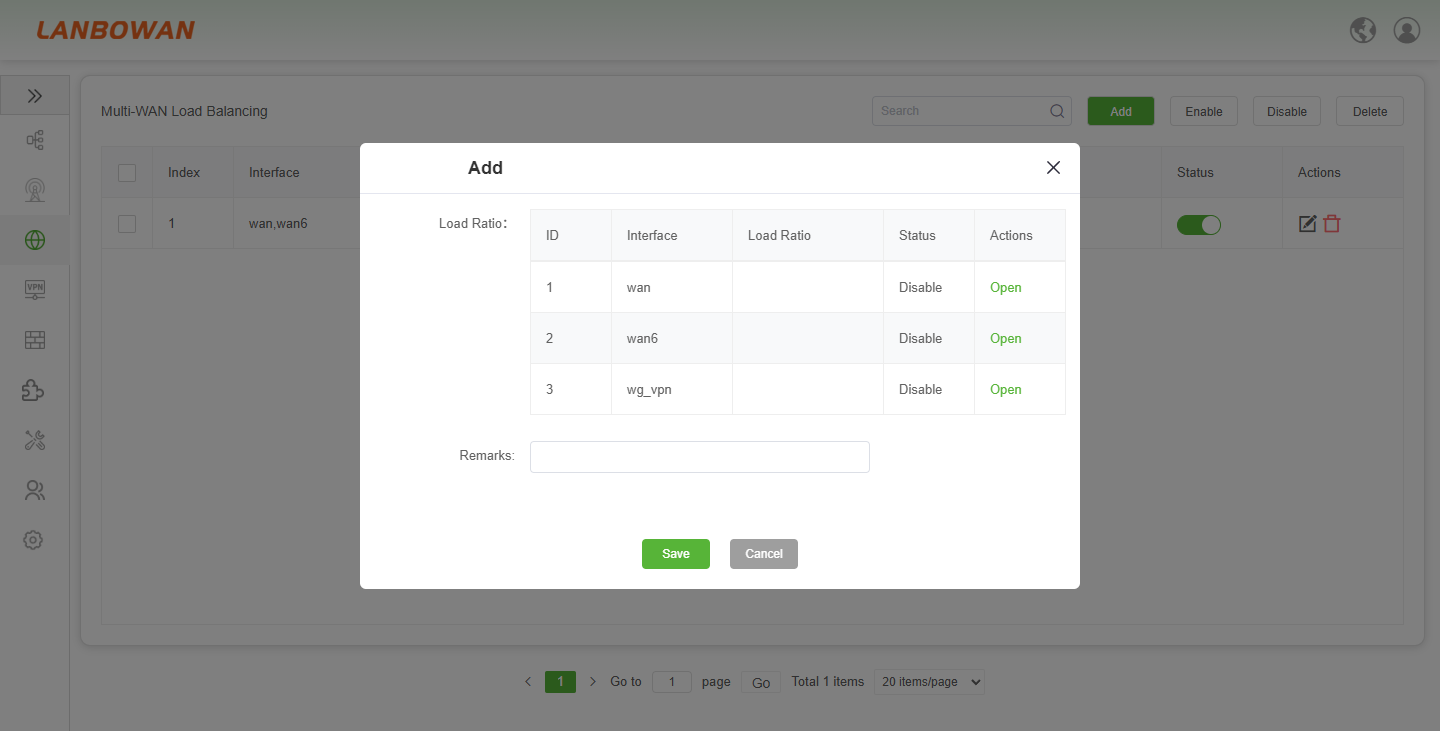
The Add Multi-WAN Load Balancing pop-up window provides an intuitive policy configuration interface for the T830. It allows administrators to view available physical or virtual interfaces (such as wan, wan6, and wg_vpn) within the pop-up, flexibly enable target interfaces and customize their load weight ratios by clicking "Open", and fill in remarks for subsequent operation and maintenance. The configuration is applied to the system's load balancing rules upon saving, thereby achieving refined scheduling of multi-link traffic and bandwidth optimization.
Port Routing
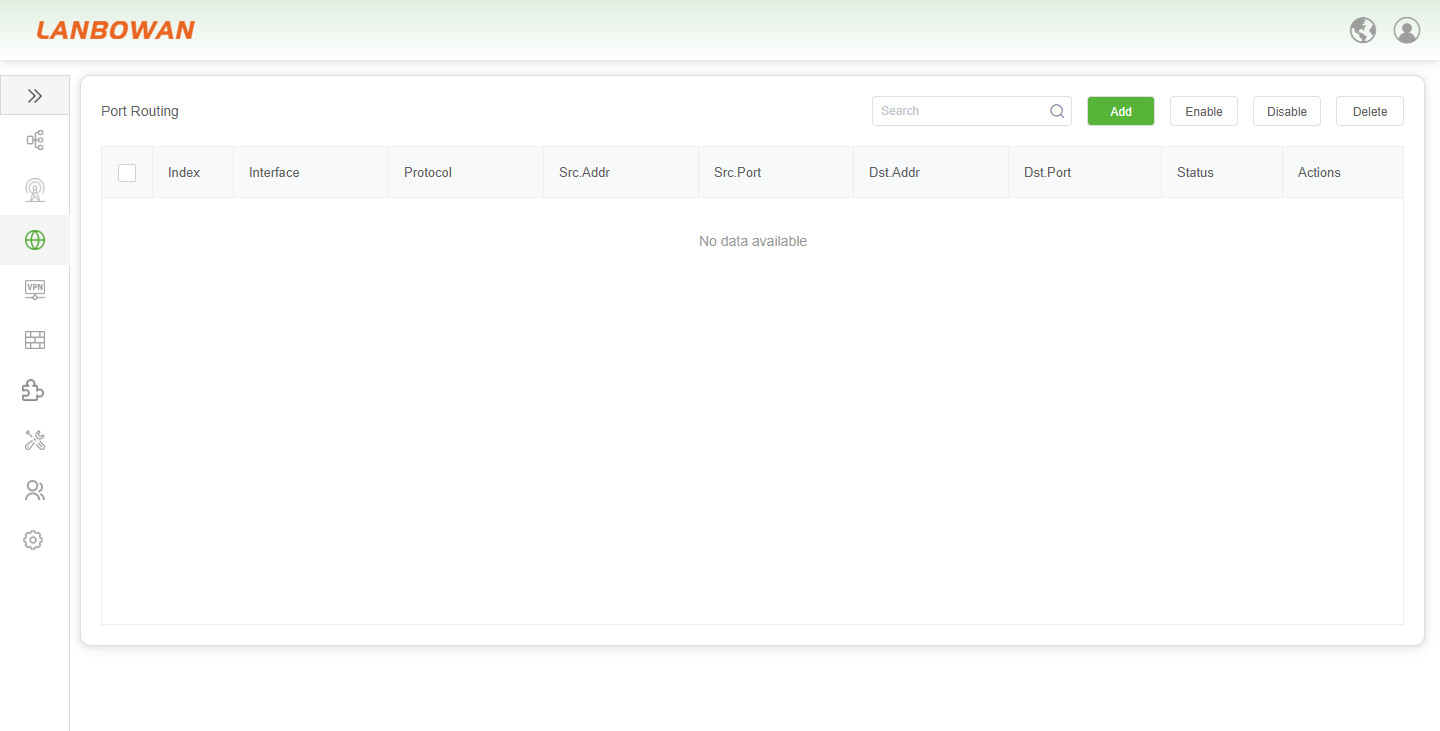
The Port Routing feature provides the T830 with advanced policy routing capabilities based on protocol and port levels. It allows administrators to direct specific service traffic to designated WAN interfaces based on fine-grained conditions such as source/destination IP addresses, source/destination ports, and communication protocols. Through operations such as adding, enabling, disabling, or deleting rules, it achieves intelligent path selection, bandwidth guarantee for critical applications, and access strategy optimization in multi-line network environments.
Add Port Routing
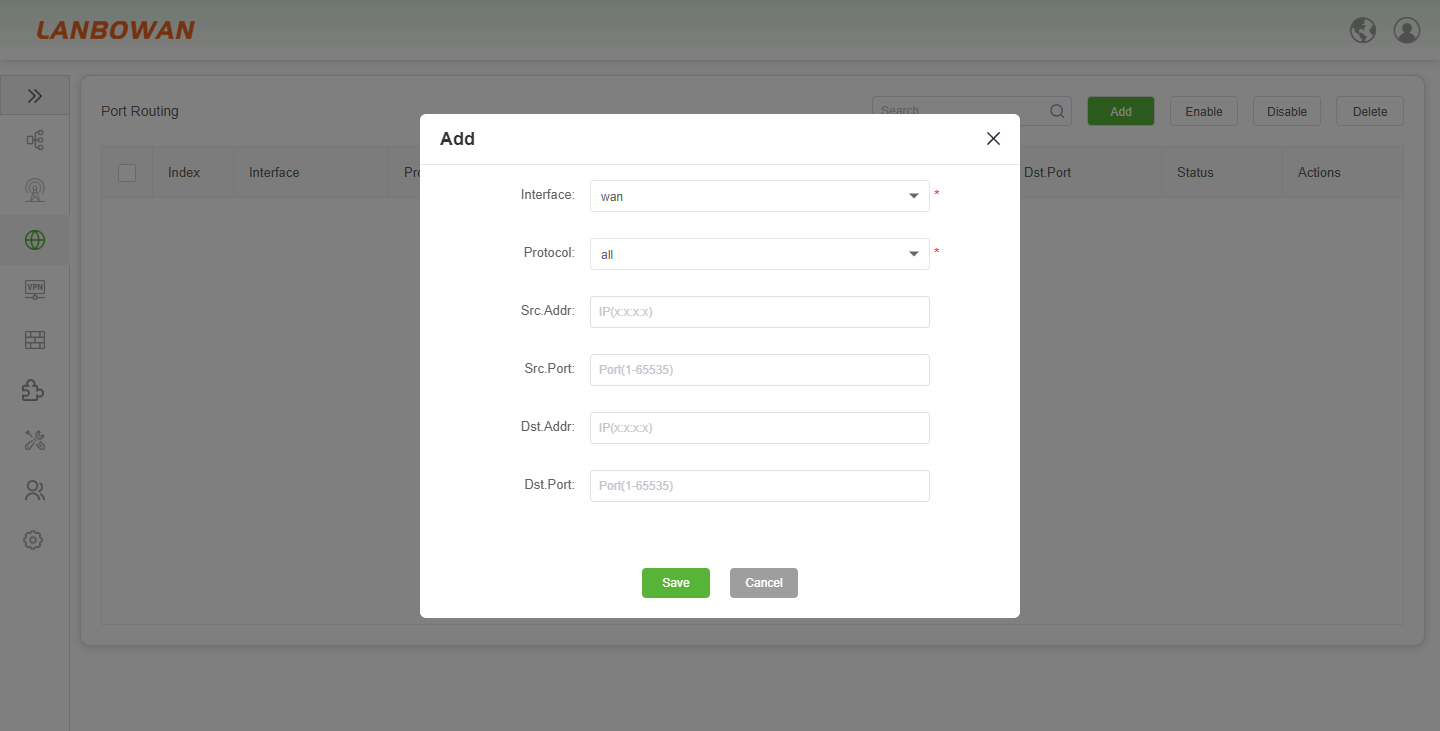
The Add Port Routing pop-up window provides a refined policy routing configuration interface for the T830. It allows administrators to customize the outgoing interface (e.g., wan) and communication protocol, and accurately fill in key matching conditions such as source/destination IP addresses and source/destination port numbers. This enables the creation of highly customized traffic splitting rules, ensuring that specific service data is precisely forwarded to the designated link according to preset policies, ultimately achieving intelligent scheduling of network traffic and efficient utilization of multi-line bandwidth.
Parameter Description:
| Parameter | Description |
|---|---|
| Index | The unique sequence number or identifier for the static route entry, used for ordering and managing specific routes in the list. |
| Interface | The local network interface (e.g., WAN, LAN) through which traffic for the destination network is forwarded. |
| Dest address | The destination IP address or specific network segment that the static route targets. |
| Subnet Mask | The mask used to define the network portion and scope of the destination IP address. |
| Gateway | The IP address of the next-hop router or gateway to which packets are forwarded to reach the destination. |
| Metric | The priority or cost value of the route; lower values indicate higher priority when multiple paths to the same destination exist. |
| Status | The current operational state of the static route (e.g., Enabled or Disabled), indicating whether the rule is active. |
| Actions | Operational buttons allowing administrators to modify (Edit) or remove (Delete) the specific route entry. |
Port Forwarding
Port Forwarding
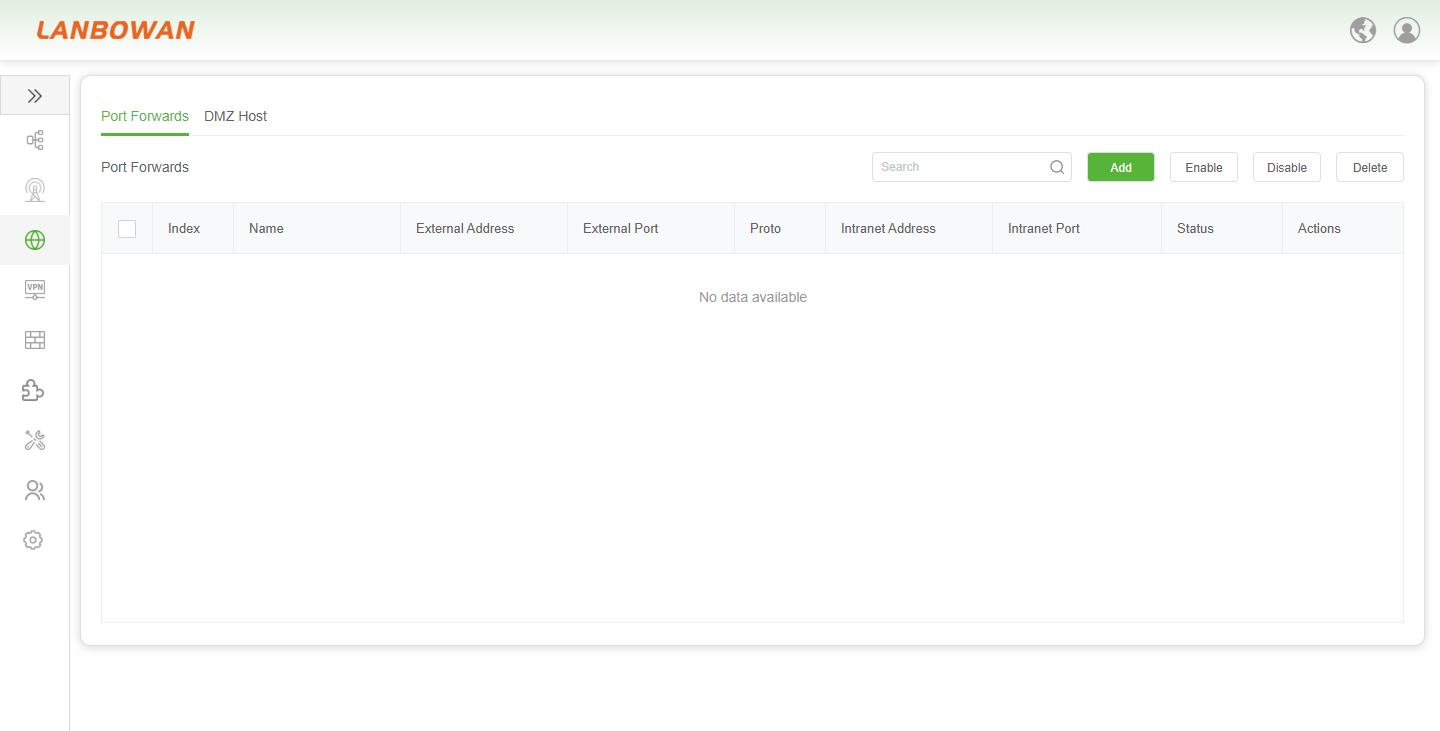
The Port Forwarding feature provides the T830 with secure external mapping capabilities for internal services. It allows administrators to accurately forward specific IP address and port requests from the external network to the corresponding host and service port in the intranet according to the specified protocol. Through operations such as adding, enabling, disabling, or deleting rules, it conveniently enables public network access to intranet applications like remote monitoring and private servers, as well as NAT policy management.
Add Port Forwards
The Port Forwards feature provides the T830 with DNAT-based inbound access mapping capabilities. It allows administrators to precisely combine protocol, external port, internal IP, and internal port to forward specific requests received on the public interface to a designated host in the LAN, with optional source IP restrictions and rule enable/disable control, thereby achieving secure exposure of intranet services and refined perimeter access management.
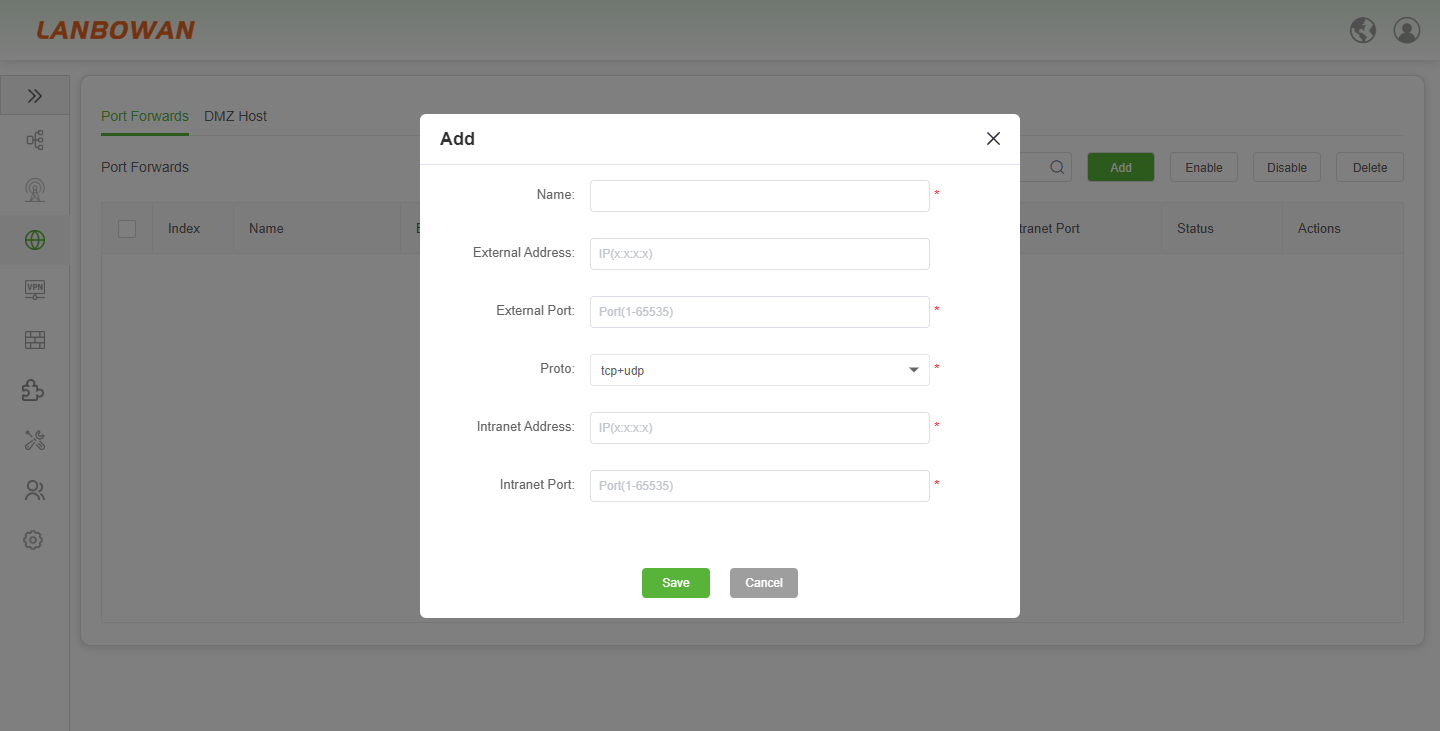
Parameter Description:
| Parameter | Description |
|---|---|
| Name | A custom label for the port forwarding rule, used to identify the specific service or application mapping for easy management and subsequent maintenance. |
| External Address | The public IP address on the T830's WAN interface that listens for incoming external connection requests; leaving it blank typically defaults to all available public IPs. |
| External Port | The specific port number (1-65535) on the external interface that triggers the forwarding rule when accessed by external users. |
| Proto | The transport layer protocol to be matched for the traffic, with options such as TCP, UDP, or tcp+udp to ensure accurate routing to the intranet service. |
| Intranet Address | The destination IP address of the internal host (e.g., a local server or PC) within the LAN that will receive the forwarded traffic. |
| Intranet Port | The specific service port (1-65535) on the internal host that listens for and processes the forwarded connection request. |
DMZ Host
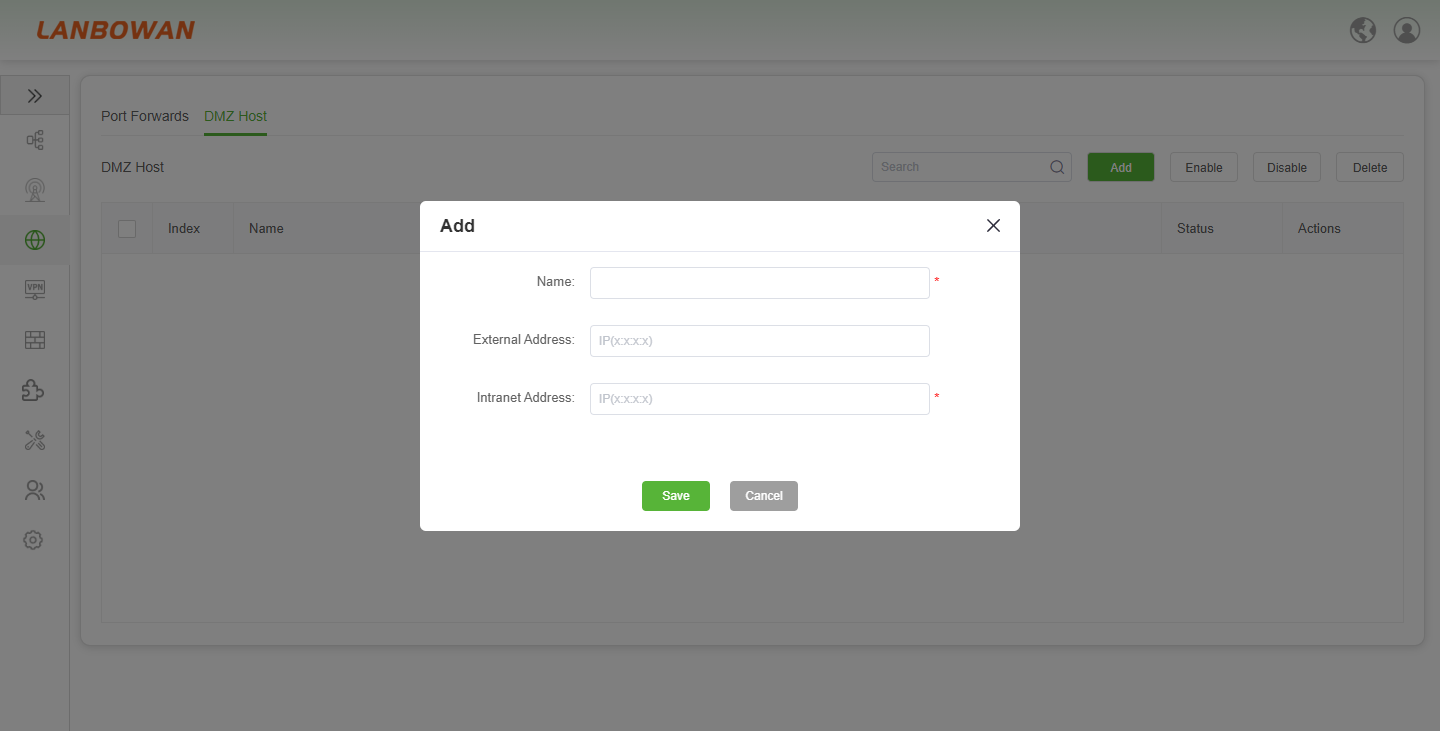
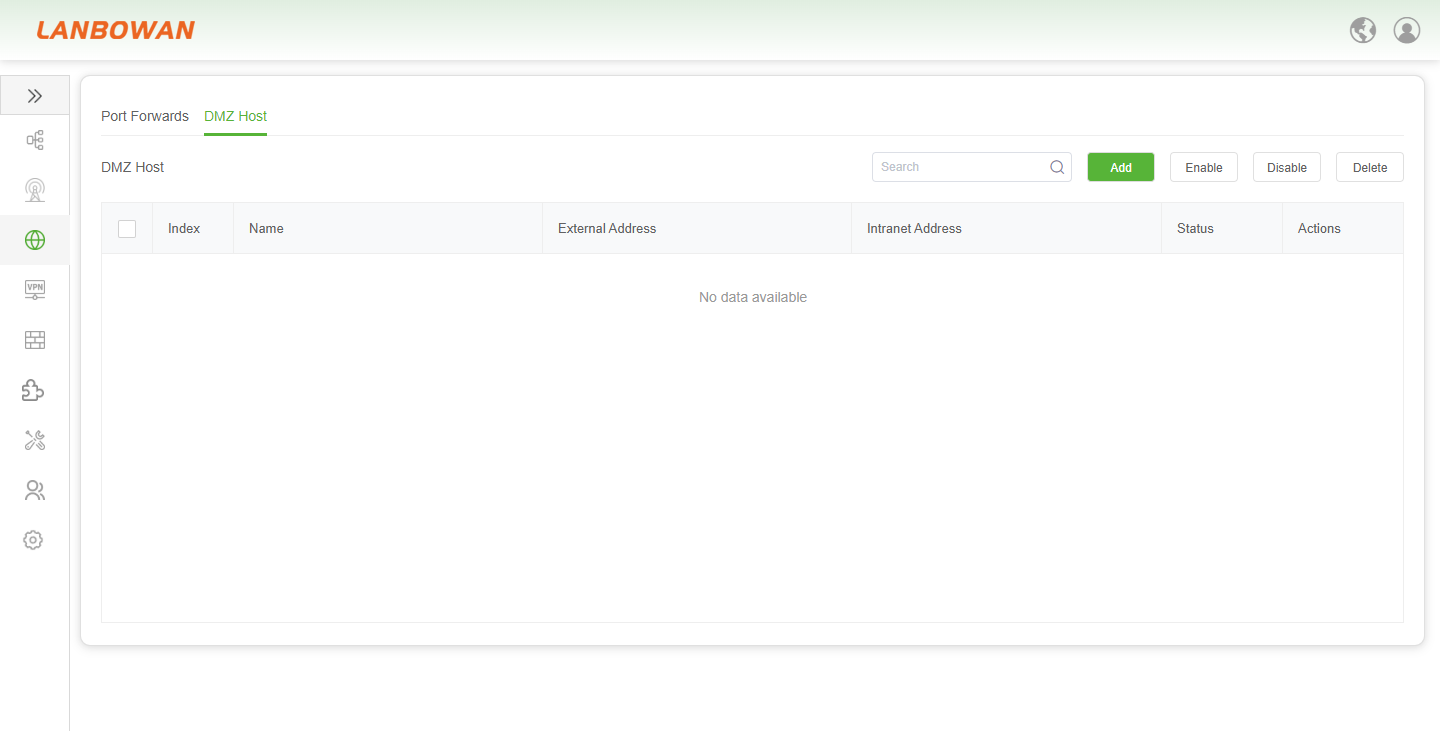
The DMZ Host (Demilitarized Zone) feature provides the T830 with a mechanism to fully expose specific intranet devices to the public network. It allows administrators to direct inbound traffic that does not match any port forwarding rules to a designated intranet host IP. This is suitable for scenarios requiring all ports to be open, such as gaming consoles or servers, and enables flexible perimeter access control and security management through adding, enabling, disabling, or deleting rules.
Add DMZ Host
The "Add DMZ Host" pop-up window for the T830 provides network administrators with a convenient interface for configuring DMZ rules. It supports custom rule names and precise input of the external listening address and the corresponding intranet host IP. This enables the quick setup of a specified intranet device as a DMZ host, facilitating the unified forwarding and management of all inbound traffic from the public network that does not match existing port forwarding rules.