Status
Status
1.Controller
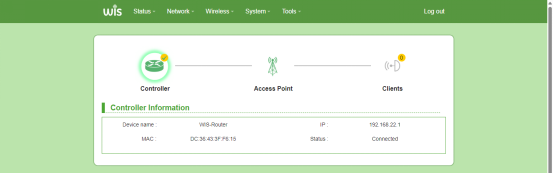
View information of the upstream device directly connected to the bridge, e.g., Device Name, MAC, IP, Status.
2.Clients
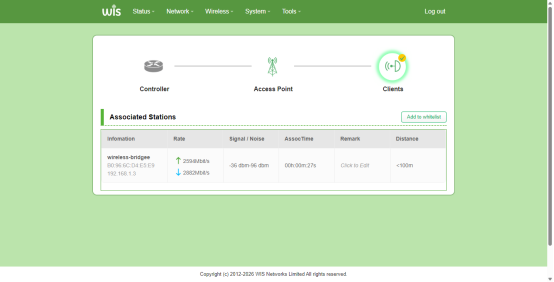
Record information of clients connected to the current bridge. Support adding remarks to clients and whitelisting operations.
Parameter Description:
| Parameter | Description |
|---|---|
| Information | Basic client information, including SSID name, wireless MAC and IP address. |
| Rate | The theoretical data rate achievable by the wireless device per second in wireless communication. |
| Signal/Noise | Client connection signal strength and noise. |
| Assoc Time | The duration for which the client is connected to the AP. |
| Remark | Manually add remarks for the current client. |
| Distance | The distance between the client and the Access Point (AP).This function supports 5G devices only; 6G devices are not supported. |
| Add to whitelist | Manually add the client to the whitelist. |
3.Access Point
On the Access Point page, you can view basic information, wireless configurations and Ethernet ports of this bridge.
System
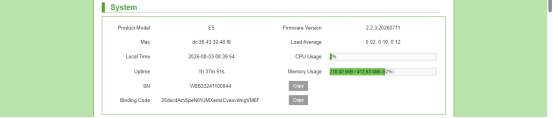
You can view basic information of the bridge, including uptime, average load, SN and BindCode.
Parameter Description:
| Parameter | Description |
|---|---|
| Product Model | The identifier number used to identify the product. |
| Fimware Version | Version number of the embedded software inside the device, which indicates the update and iteration status of the firmware. |
| MAC | Physical layer address for identifying network devices, also known as physical address or hardware address. |
| Load Average | Used to measure the overall system load. It reflects the level of resource competition over a period of time, especially the busy status of core resources such as CPU, memory and I/O. |
| Local Time | Local time of the device. Default: UTC. (Time zone can be modified under System > System Properties.) |
| CPU Usage | An indicator measuring how busy the central processing unit (CPU) is when processing tasks over a period of time. |
| Uptime | The continuous normal running time of the device since startup, used to evaluate system stability, reliability or task duration. |
| Memory Usage | The amount of memory resources occupied by the system during operation. |
| SN | Serial Number. A unique identifier for each product, which can be used to query production batch, production date, warranty status and other information. (Used as serial number identifier for cloud management.) |
| BindCode | Binding code for cloud management. |
| Copy | Click the button to copy content. |
Wireless
Detailed wireless configuration information can be viewed, including wireless mode, SSID, wireless encryption mode, channel, bandwidth, wireless transmit power, country code, etc.
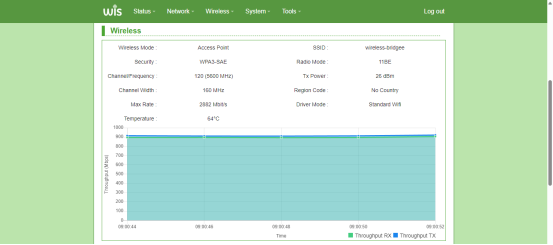
Parameter Description:
| Parameter | Description |
|---|---|
| Wireless Mode | Wireless operation mode. Options: Access Point (AP), Client. |
| SSID | Name of the Wi-Fi network, a unique identifier for a wireless local area network. |
| Security | Wireless encryption mode. Supported options: WPA3-SAE, WPA2-PSK/WPA3-SAE, WPA2-PSK, WPA2 with Radius. |
| Radio Mode | Radio operating mode of the wireless device complying with IEEE 802.11 standards. |
| Channel/Frequency | A channel is a path for signal transmission, the medium for delivering information during communication.Frequency refers to the number of periodic signal oscillations or variations per unit time, measured in Hertz (Hz). |
| Tx Power | Transmission power used by the wireless device to send radio signals. Unit: dBm (decibel-milliwatt). |
| Channel Width | Spectrum bandwidth occupied by Wi-Fi wireless signals. Supported values: 20MHz, 40MHz, 80MHz, 160MHz, 320MHz. |
| Region Code | Regulatory region code. Select a region code compliant with local laws and regulations. Available wireless frequency bands vary across countries or regions, including restrictions on frequency bands, Tx Power, channels and technical specifications. |
| Max Rate | Theoretical maximum data transmission rate of the device under specific conditions. Unit: Mbps. |
| Driver Mode | Wi-Fi operating mode. Selectable on the Wireless page: Standard Wi-Fi or WIS TDMA. |
| Temperature | Chip operating temperature of the Wi-Fi radio. |
Network
You can view the status of the bridge's RJ45 and SFP+ network interfaces, including Internet, SFP+, MAC, IP Address, Gateway, DNS, Link Rate, Max Link, QoS, Bridge STP and Internet Status.
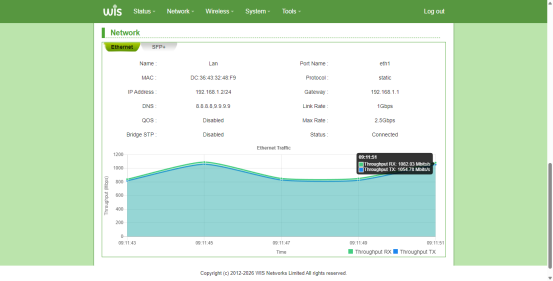
Parameter Description:
| Parameter | Description |
|---|---|
| Name | Physical interface of the device used to connect devices within the local area network. It generally serves as the LAN interface, distinguished from the WAN external network interface. |
| Port Name | Designated physical interface of the device. |
| MAC | Physical layer address used to identify network devices, also known as physical address or hardware address. |
| Protocol | Protocol of the Ethernet interface. Supported modes: Static address, DHCP client, DHCPv6 client. |
| IP Address | IP address and subnet mask of the current network interface. |
| Gateway | Gateway address of the device. |
| DNS | DNS server resolves domain names into corresponding IP addresses, allowing users to access websites or network services via domain names. |
| Link Rate | Actual data transmission rate of the Ethernet port on the network. Unit: Mbps. |
| Max Rate | Theoretical maximum data transmission rate of the device under specific conditions. Unit: Mbps. |
| QoS | Enable/disable status of the QoS function. |
| Bridge STP | Enable/disable status of the Spanning Tree function. STP resolves loops caused by interconnected bridges. It blocks redundant links to build a loop-free tree topology, while keeping backup links for fast failover if the primary link fails. |
| Status | Connection status of the ETH1 physical interface. |
| Ethernet Traffic | Displays real-time download and upload traffic of the ETH1 physical interface. |
Routing
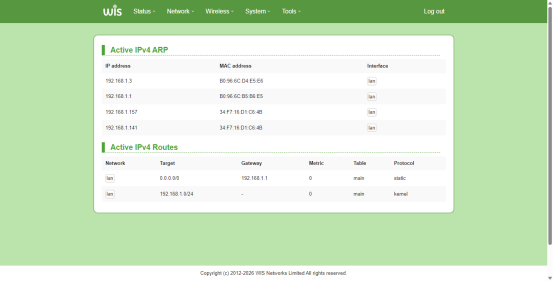
Displays IP addresses and MAC addresses of LAN-connected devices and IPv4 routing forwarding links.
ARP: Protocol for mapping IP addresses to physical MAC addresses in IPv4 networks.
Active IPv4 Routes: Routing describes forwarding IP packets from source to destination host. Active routes are valid entries guiding packet forwarding. Entries reside in the device routing table (this page) and are maintained by routers and bridges.