
SNMP
SNMP (Simple Network Management Protocol) allows network administrators to remotely monitor and manage this device (such as wireless bridges) through the network. After activation, management software such as MIB Browser, Librenms, can query device status (interface traffic, CPU, Memory, etc.) and modify some configurations under authorization.
WIS Bridge support SNMP V2c and SNMP v3, and support LibreNMS platform management.
SNMP Parameters
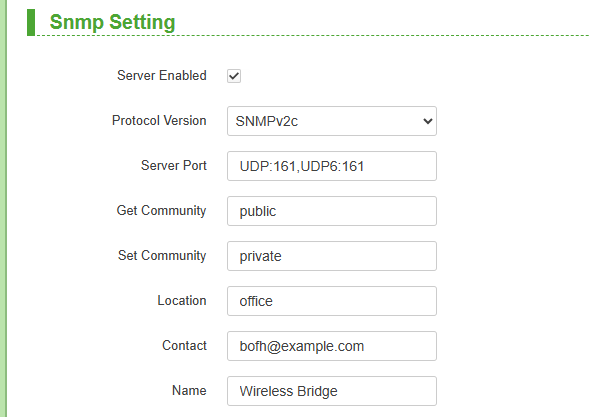
SNMP v2c
| Parameters | Description |
|---|---|
| Server Enabled | Enables or disables the SNMP agent service on the device. |
| Protocol Version | Support SNMP V2c and SNMP v3 |
| Server Port | Defines the UDP ports on which the SNMP agent listens. UDP:161 for IPv4, UDP6:161 for IPv6. Port 161 is the standard SNMP port. |
| Get Community | Key used for read-only requests. |
| Set Community | Key used for write requests |
| Location | Location information |
| Contact | Contact information |
| Name | Name information |
SNMP v3
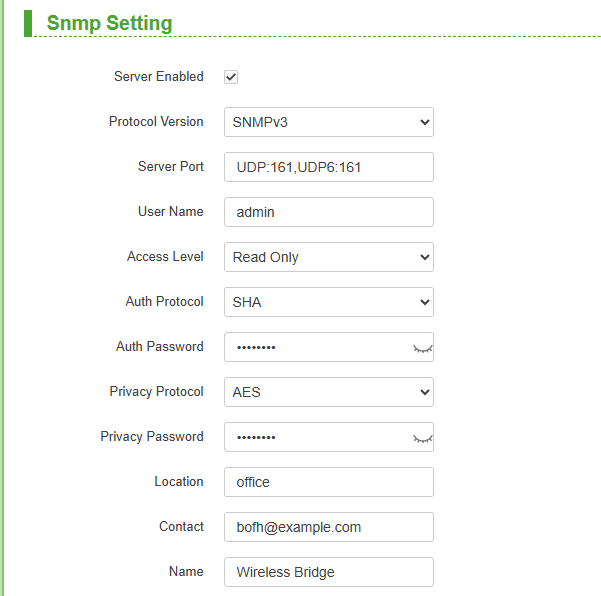
| Parameters | Description |
|---|---|
| User Name | The security name (user identity) used for SNMPv3 authentication and authorization. |
| Access Level | Defines the permission scope for this user.Support Read only and Read Write |
| Auth Protocol | The protocol used for authentication (SNMPv3).Suppoert SHA and MD5 |
| Auth Password | Password used to authenticate the connection to the server (SNMPv3). Password must be at least 8 characters in length. |
| Privacy Protocol | The encryption algorithm used for data confidentiality. Support DES and AES |
| Privacy Password | The secret passphrase used with the Privacy Protocol to generate the encryption key |
MiB
A Management Information Base (MIB) is a map of the hierarchical order of all of the managed objects or MIB variables. Each system in a network maintains a MIB that reflects the status of the managed resources at that system.
You can download the Wis MIB file from wisnetworks website.