
Security
ACL Rules
ACL Rules are used to configure access control rules that permit or deny network traffic based on protocol, action, source/destination zone, address and port conditions, with search, add, delete and entry management to implement basic network access permission and traffic filtering policies.
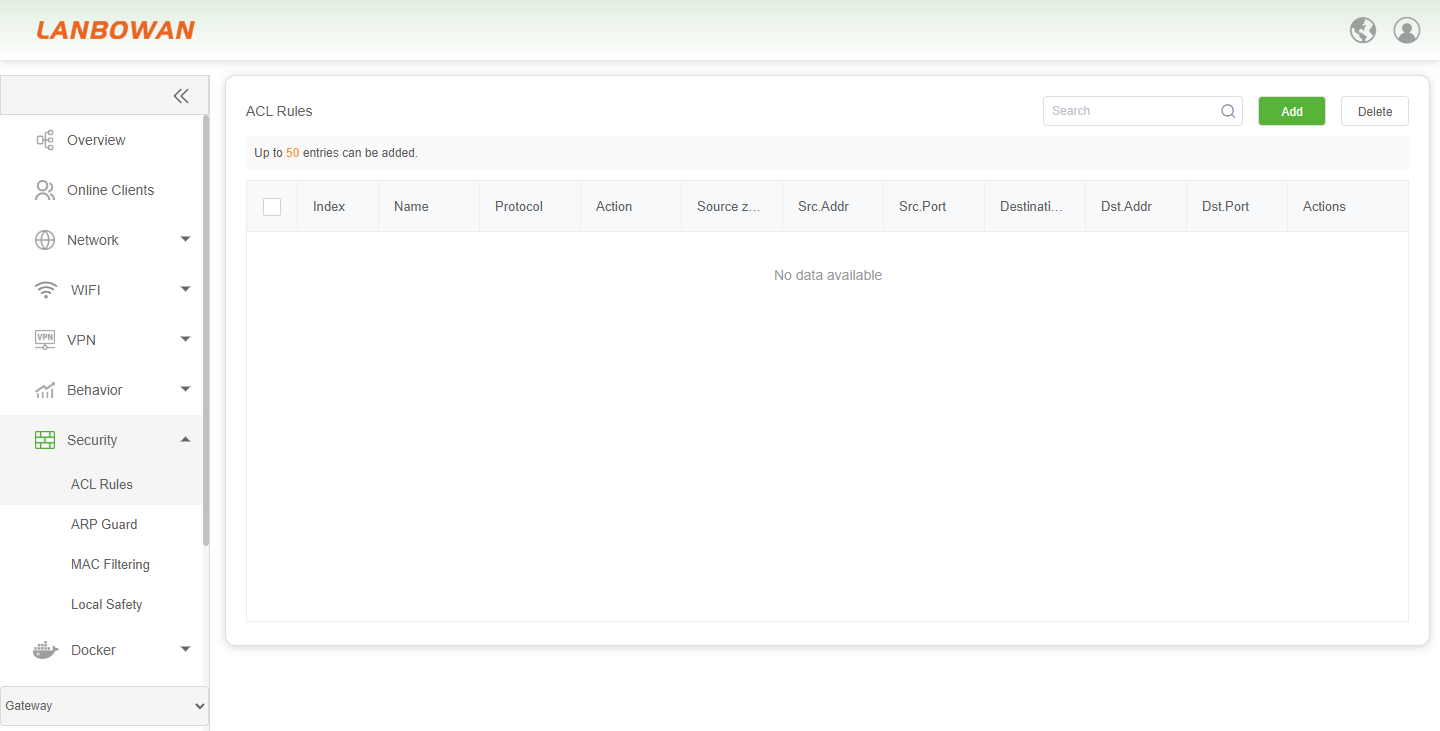
Add ACL Rules
Add ACL Rule is used to create an access control rule by specifying the rule name, protocol, action (accept/deny), source/destination security zones, and source/destination IP addresses and ports as match conditions, and saving to achieve granular network access permission and traffic filtering control.
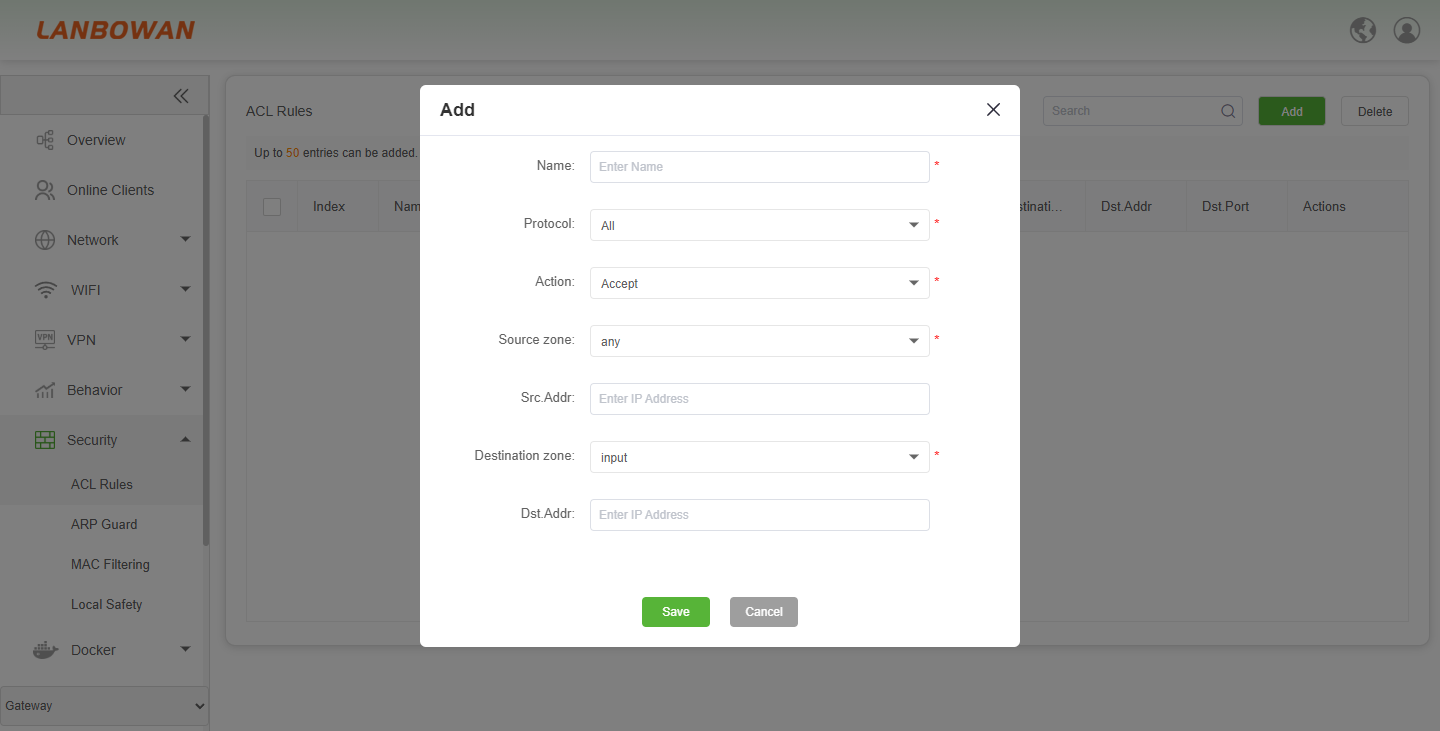
Parameter Description:
| Parameter | Description |
|---|---|
| Name | Rule name identifier, required for recognizing the ACL entry. |
| Protocol | Protocol type to match, such as All/TCP/UDP/ICMP, etc. |
| Action | raffic handling action, e.g., Accept (allow) or Deny (block). |
| Source zone | Source security zone for traffic matching, e.g., any. |
| Src.Addr | Source IP address or subnet to match; leave blank for any. |
| Destination zone | Destination security zone for traffic matching, e.g., input. |
| Dst.Addr | Destination IP address or subnet to match; leave blank for any. |
| Save | Save the configured ACL rule and add it to the rule list. |
| Cancel | Discard current changes and close the configuration window. |
ARP Guard
ARP Guard learns and maintains IP-MAC mappings of connected devices, supports enabling protection, IP-MAC binding/filtering, batch bind and delete, prevents ARP spoofing and restricts network access to bound devices to enhance LAN security.
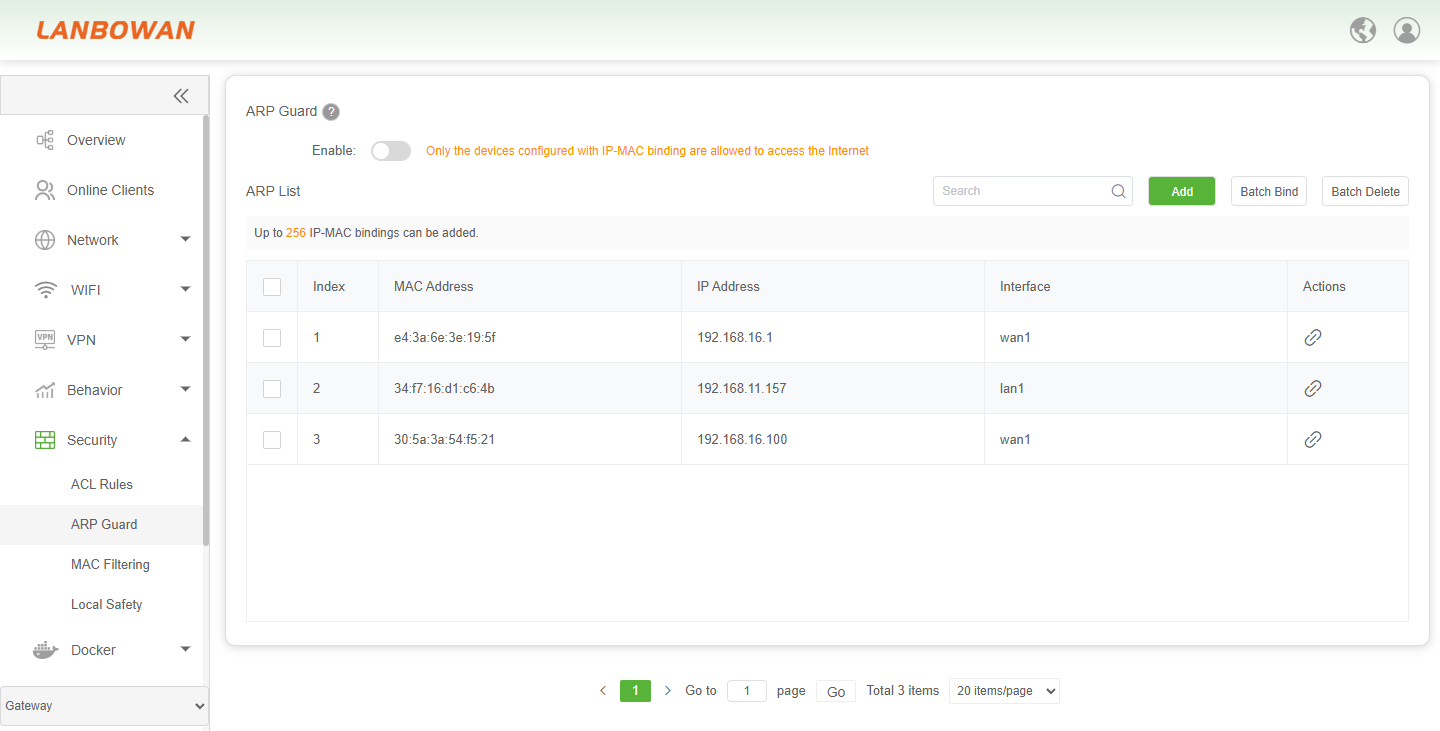
Parameter Description:
| Parameter | Description |
|---|---|
| Enable | Toggle to enable or disable ARP Guard; when enabled, only devices with IP-MAC binding are allowed to access the Internet. |
| Outgoing Interface | Select interfaces (e.g., lan1, wan1, or Select All) where ARP Guard/IP-MAC binding applies. |
| Select All | Check or uncheck all available outgoing interfaces at once. |
| lan1 / wan1 | Specific network interfaces included in the ARP Guard policy scope. |
| Save Configuration | Apply and save the enabled state and selected interface settings. |
| Search | Search/filter entries in the ARP List by keyword. |
| Add | Manually add an IP-MAC binding entry to the ARP List. |
| Batch Bind | Bind multiple learned IP-MAC entries in bulk. |
| Batch Delete | Remove multiple selected IP-MAC binding entries in bulk. |
| Index | Sequential number identifying each entry in the ARP List. |
| MAC Address | Hardware/MAC address learned or bound for the device. |
| IP Address | IP address associated with the MAC in the binding/learned entry. |
| Interface | Network interface where the IP-MAC mapping is learned/active. |
| Actions | Edit/bind or manage the specific IP-MAC entry. |
MAC Filtering
MAC Filtering enables MAC address-based filtering policies, using blacklist or whitelist types to control host network access permissions, and supports adding, deleting, searching and remark management of rules to restrict terminal access by physical address.
Parameter Description:
| Parameter | Description |
|---|---|
| Enable | Toggle to enable or disable MAC address filtering; when off, filtering is not applied. |
| Filter Type | Filtering mode selection, e.g., BlackList to block matched MACs, or WhiteList to allow only matched MACs. |
| BlackList | Deny/block network access for hosts with MAC addresses in the rule list. |
| WhiteList | Allow network access only for hosts with MAC addresses in the rule list; others are denied. |
| Save | Save the enabled state and selected filter type configuration. |
| Search | Search/filter entries in the filtering rule list by keyword (e.g., MAC or remarks). |
| Add | Add a new MAC filtering rule entry (MAC address and remarks). |
| Delete | Delete selected MAC filtering rule entries from the list. |
| Index | Sequential number identifying each rule entry in the list. |
| MAC | MAC address used for filtering/control. |
| Remarks | Optional description/note for the MAC rule to aid identification. |
| Actions | Operation for the specific rule entry, e.g., edit/delete or other management action. |
Local Safety
Local Safety controls local/device access security by prohibiting Ping probes from LAN/WAN and allowing configuration of administrator IP addresses, usernames, outbound interfaces and remarks to restrict management access sources and improve device management security.
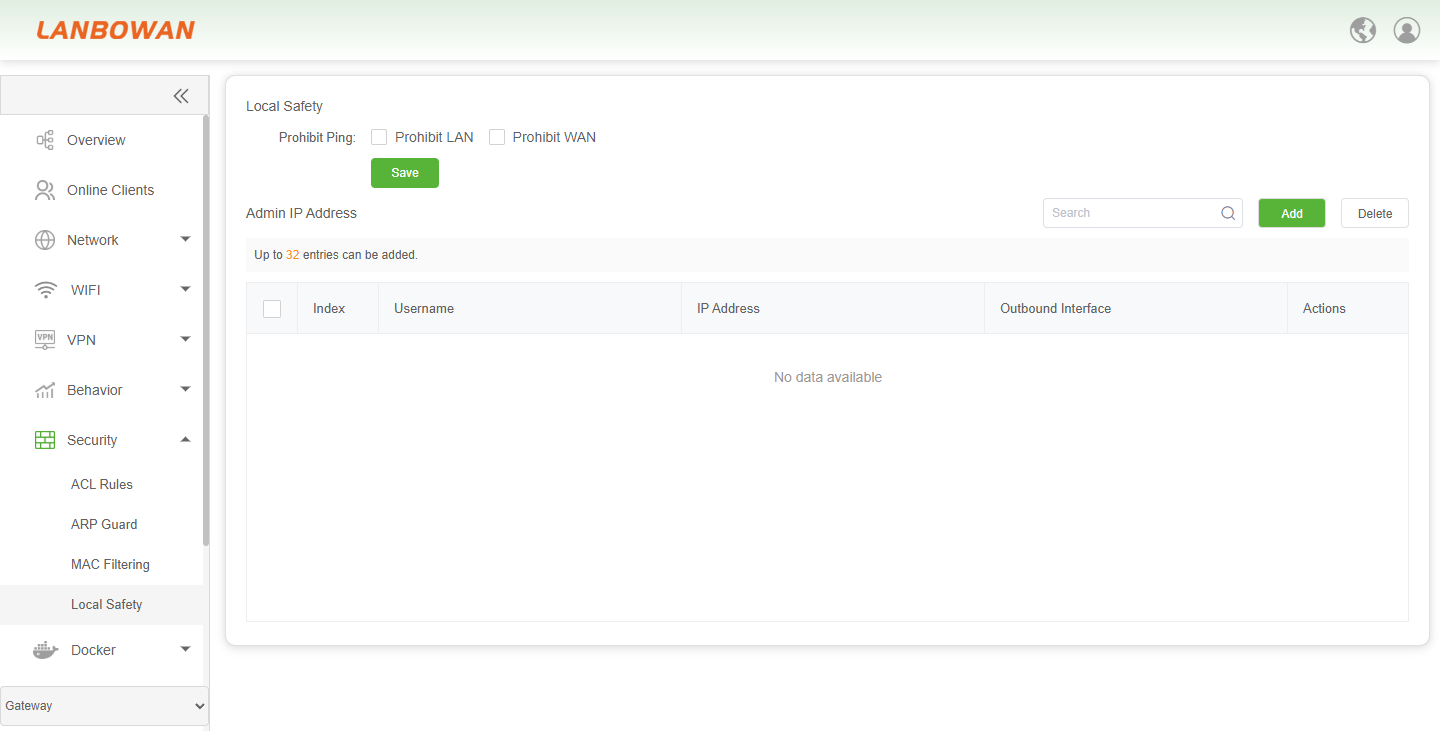
Add Local Safety
The Admin IP/access control add wizard is used to add local safety management entries by username and specified mode (IP address or outbound/network interface) to restrict management access sources and improve device management security.
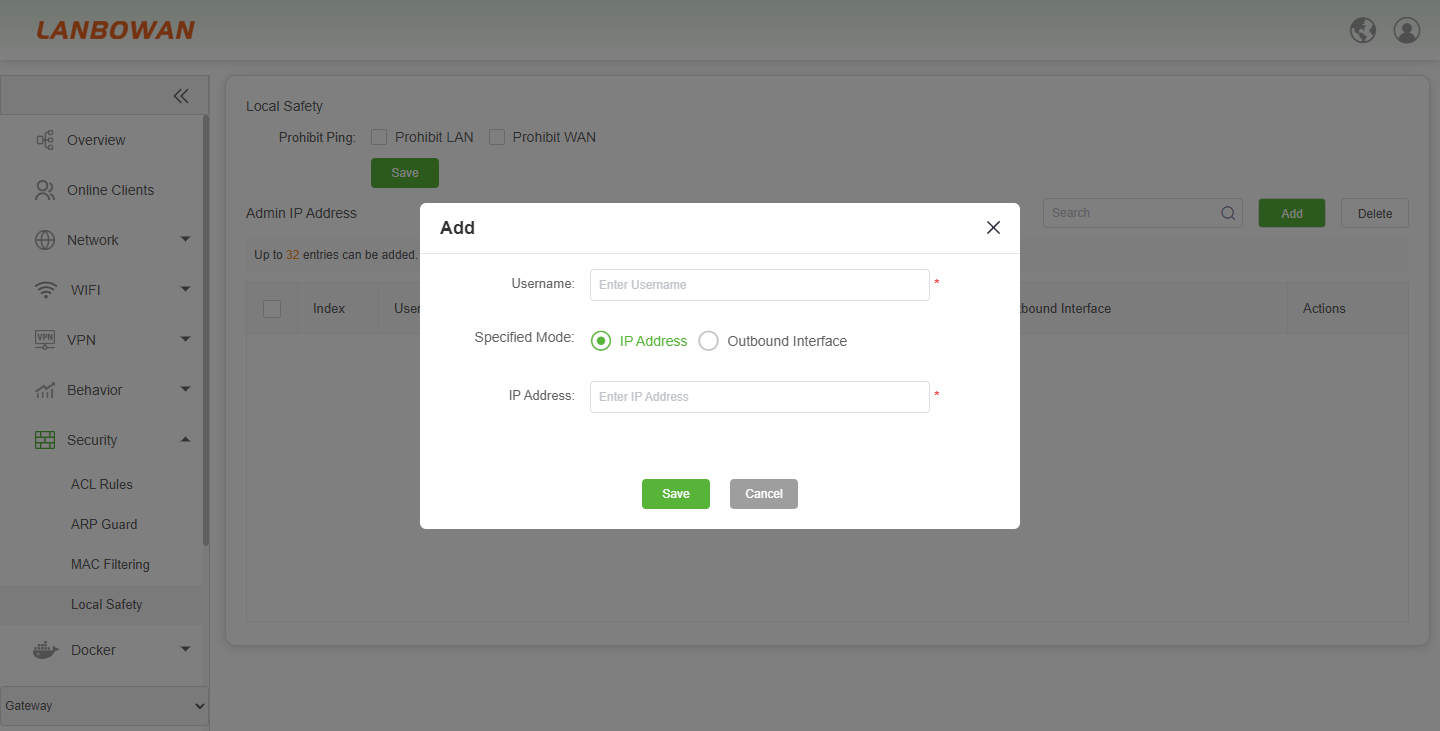
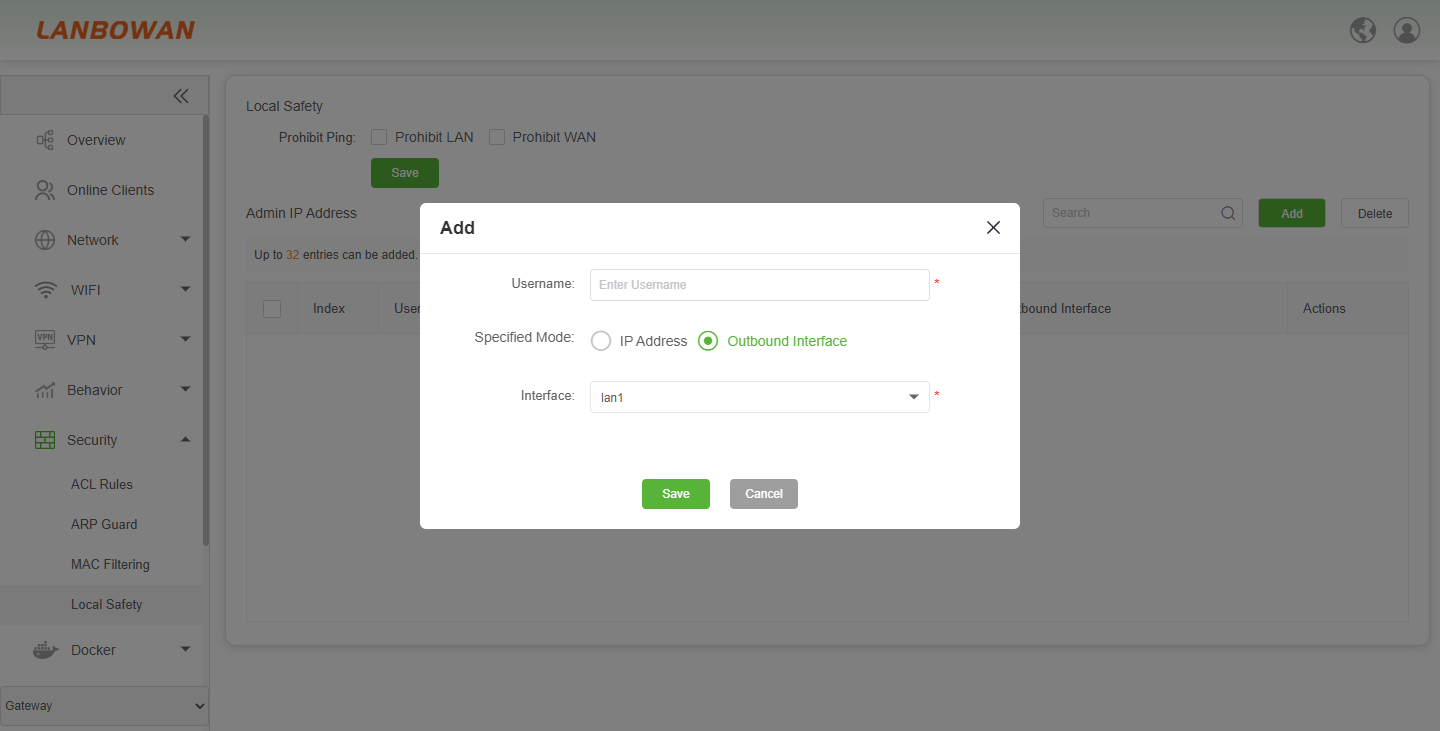
Parameter Description:
| Parameter | Description |
|---|---|
| Prohibit Ping | Enable blocking ICMP ping requests to the device/management plane from selected directions. |
| Prohibit LAN | Block ICMP ping requests from LAN-side sources to the device. |
| Prohibit WAN | Block ICMP ping requests from WAN-side sources to the device. |
| Save (top) | Save the prohibit-ping configuration settings. |
| Admin IP Address | Section/table for managing allowed administrator access sources (IP/interface/user). |
| Search | Search/filter admin IP address entries by keyword. |
| Add | Open the add dialog to create a new admin access entry (username, IP or outbound interface). |
| Delete | Remove selected admin IP/access entries from the list. |
| Index | Sequential number identifying each admin access entry. |
| Username | Identifier/name associated with the administrator access entry. |
| IP Address | Source IP address allowed to manage/access the device (when IP mode is used). |
| Outbound Interface | Interface/source interface associated with allowed management access (when interface mode is used). |
| Actions | Operation for the specific entry, e.g., edit/delete or other management action. |