
Network
WAN/LAN
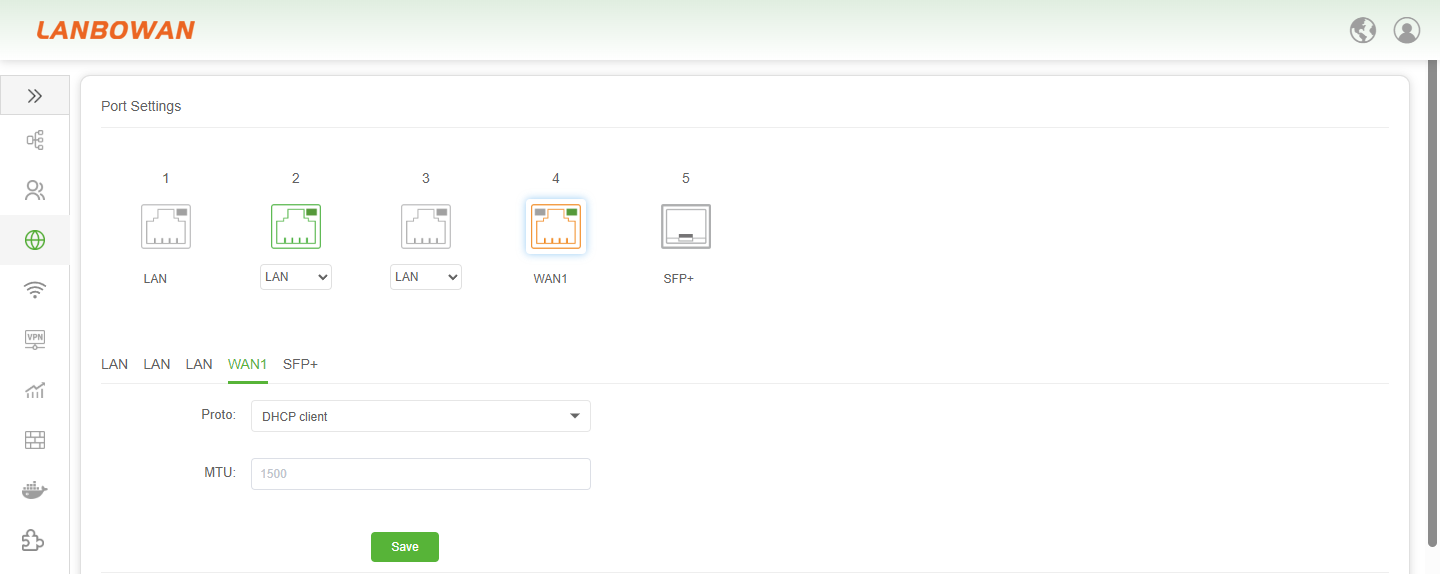
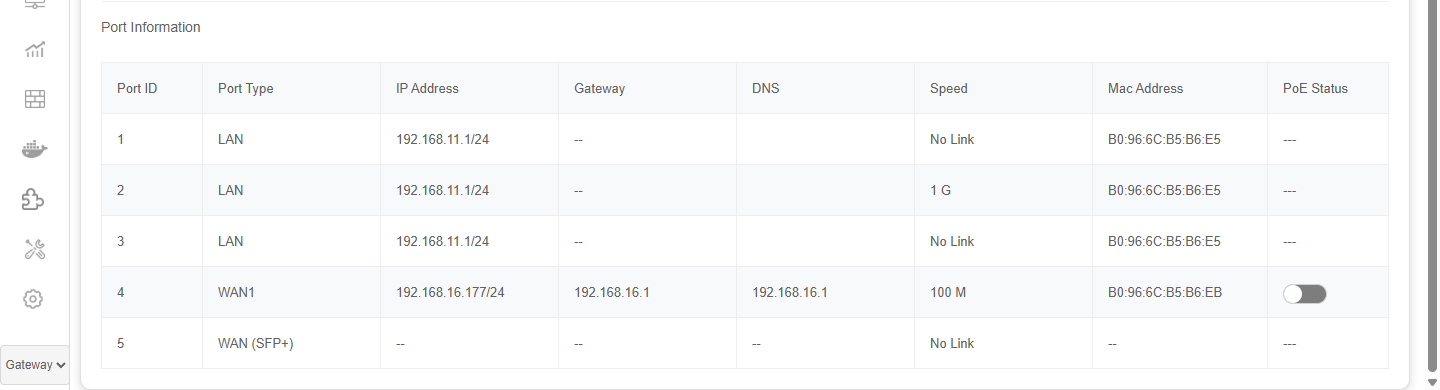
The port settings feature allows configuration of physical port roles such as LAN, WAN and SFP+, along with protocol and MTU parameters, while displaying real-time port information including port type, IP address, gateway, DNS, speed, MAC address and PoE status for network interface management and status monitoring.
Port Settings
The port role configuration supports flexible assignment of physical interfaces among LAN, WAN, multi-WAN or separate LAN domains with sequential conditional enabling of subsequent WAN roles, and allows configuration of IPv4 address, netmask, MTU and WAN protocol such as DHCP client, static address, PPPoE or DHCPv6 client to enable Layer-3 interface and uplink planning.
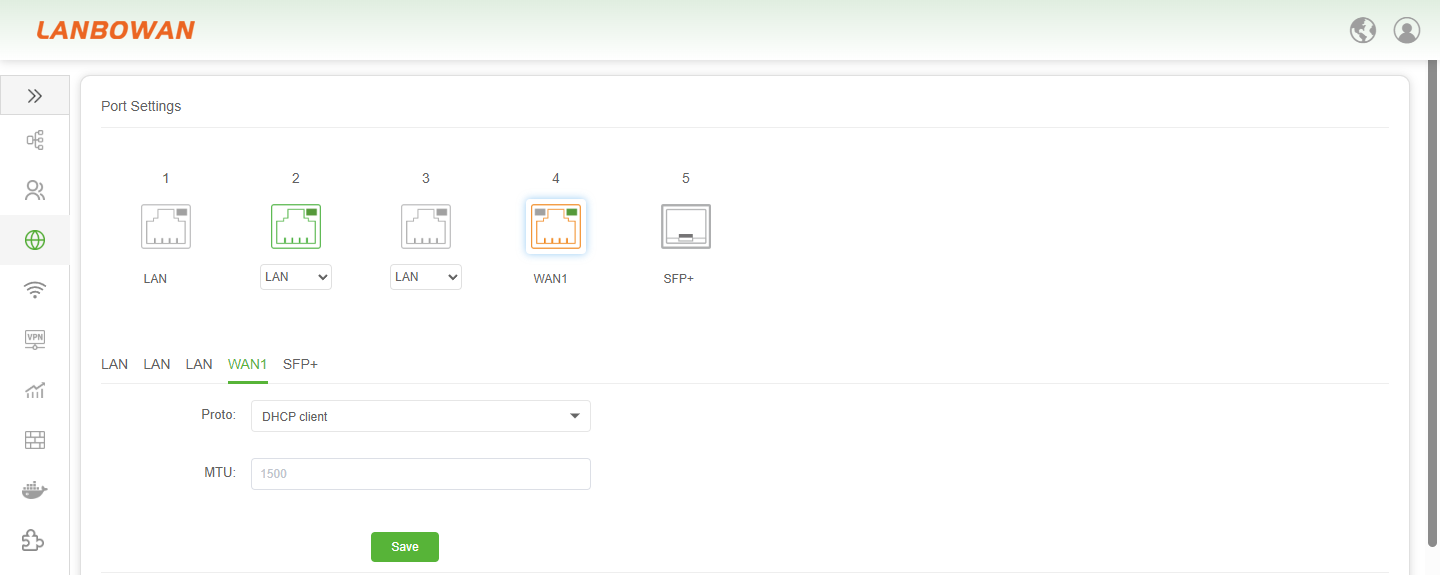
WAN Port Protocol Description:
| Parameter | Description |
|---|---|
| DHCP client | Automatically obtains IPv4 address, gateway, DNS and other parameters from an upstream DHCP server. |
| Static address | Manually configured fixed IPv4 address, netmask, gateway and DNS settings. |
| PPPoE | Point-to-Point Protocol over Ethernet used to establish a WAN connection with username/password authentication. |
| DHCPv6 client | Automatically obtains IPv6 addressing and related configuration from an upstream DHCPv6 server. |
| MTU | Maximum Transmission Unit size for the interface, controlling the largest packet size sent on the link. |
Port Information Description:
| Parameter | Description |
|---|---|
| Port ID | Identifier number of the physical or logical network port for reference and management. |
| Port Type | Role assigned to the port, such as LAN for local network or WAN/SFP+ for uplink/wide-area connection. |
| IP Address | IPv4 address and prefix length configured or obtained on the port for Layer-3 communication. |
| Gateway | Next-hop IP address used by the port to reach remote or external networks; shown as none if not applicable. |
| DNS | Domain Name System server address learned or configured for name resolution on the interface. |
| Speed | Current link rate or connection state of the port, such as negotiated rate or no link. |
| Mac Address | Hardware/MAC address associated with the port for Layer-2 identification. |
| PoE Status | Power over Ethernet status indicator for the port, showing enabled/disabled or not applicable. |
VLAN
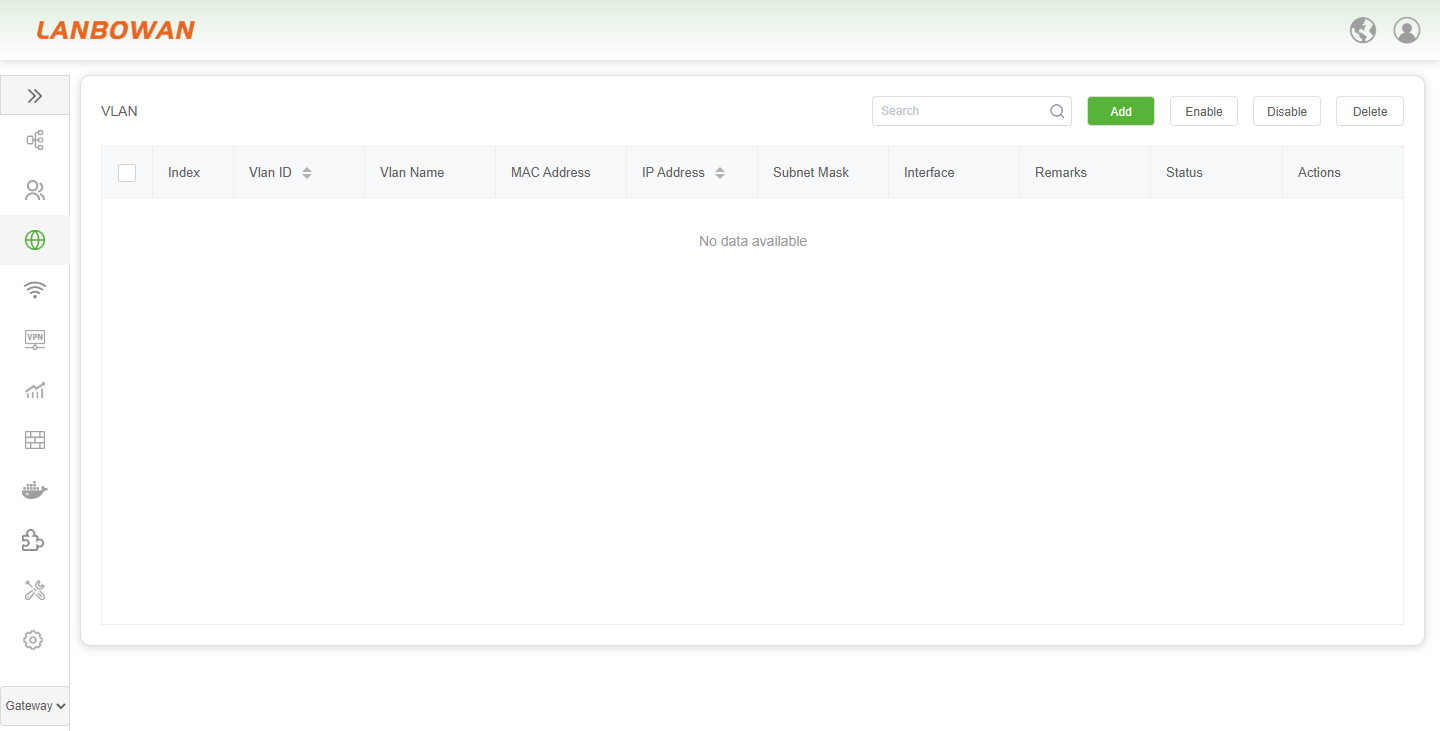
The VLAN feature is used to create and manage virtual local area networks, supporting configuration of VLAN ID, name, IP address, subnet mask, associated interface and status to achieve broadcast domain isolation and Layer-3 subnet planning, with management operations including search, add, enable, disable and delete.
Add VLAN
The VLAN add function is used to create a new virtual LAN entry by configuring VLAN ID, name, MAC address, IP address, subnet mask, bound interface, remarks and enable status to apply Layer-3 interface and broadcast domain parameters.
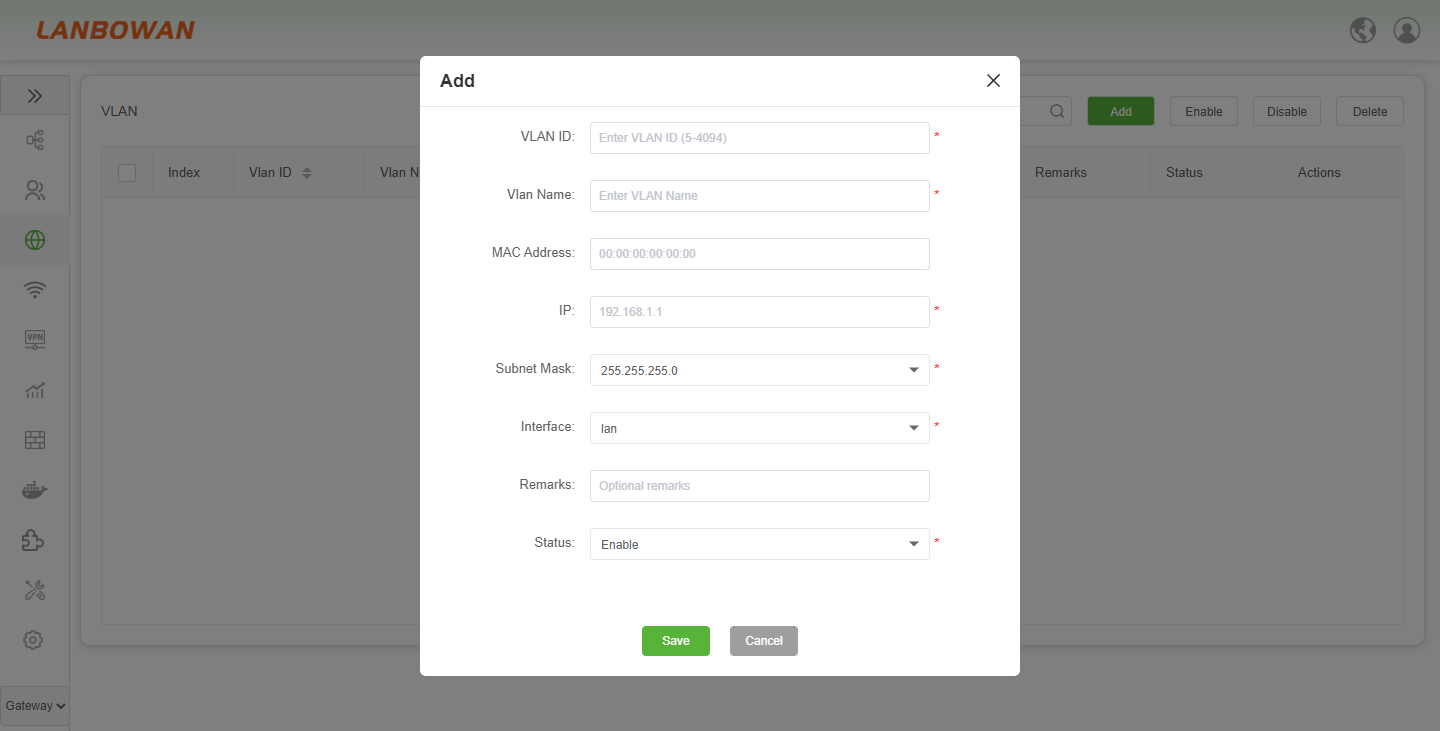
Parameter Description:
| Parameter | Description |
|---|---|
| VLAN ID | Identifier for the VLAN within the valid range, used to distinguish separate broadcast domains. |
| Vlan Name | User-defined name for identifying and managing the VLAN entry. |
| MAC Address | Layer-2 hardware address associated with the VLAN interface; may default to system or all-zero value if not specified. |
| IP | IPv4 address assigned to the VLAN interface for Layer-3 routing and gateway services. |
| Subnet Mask | Network mask that defines the IPv4 subnet scope and host address range for the VLAN. |
| Interface | Physical or logical port/bridge domain to which the VLAN is bound or attached. |
| Status | Operational state of the VLAN entry, such as enabled or disabled. |
DHCP
The DHCP Server function automatically assigns IPv4 address, subnet mask, gateway, DNS and lease time to LAN clients, supports per-interface address pool, primary/secondary DNS, lease duration and enable/disable status configuration, and provides management operations including search, add, edit and delete.
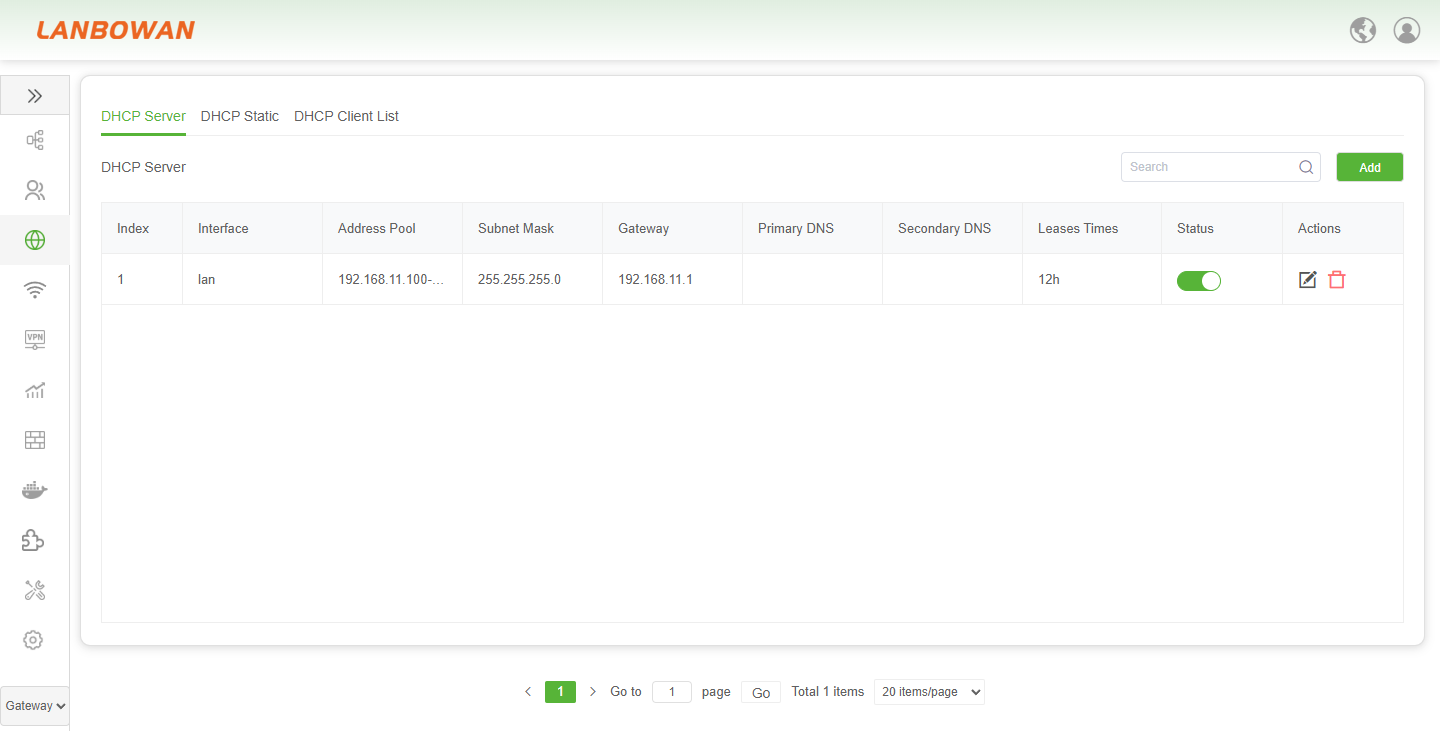
Parameter Description:
| Parameter | Description |
|---|---|
| Index | Sequential number identifying the DHCP server pool entry in the list. |
| Interface | Network interface or VLAN to which the DHCP address pool is bound. |
| Address Pool | Range of IPv4 addresses available for dynamic assignment to clients. |
| Subnet Mask | Network mask defining the subnet scope for assigned addresses. |
| Gateway | Default gateway address delivered to clients for reaching other networks. |
| Primary DNS | Preferred DNS server address offered to clients for domain name resolution. |
| Secondary DNS | Alternate DNS server address offered to clients for redundancy. |
| Leases Times | Duration for which an assigned IP address is valid and reserved for a client. |
| Status | Enable or disable state of the DHCP server pool. |
| Actions | Edit or delete operations for the DHCP server entry. |
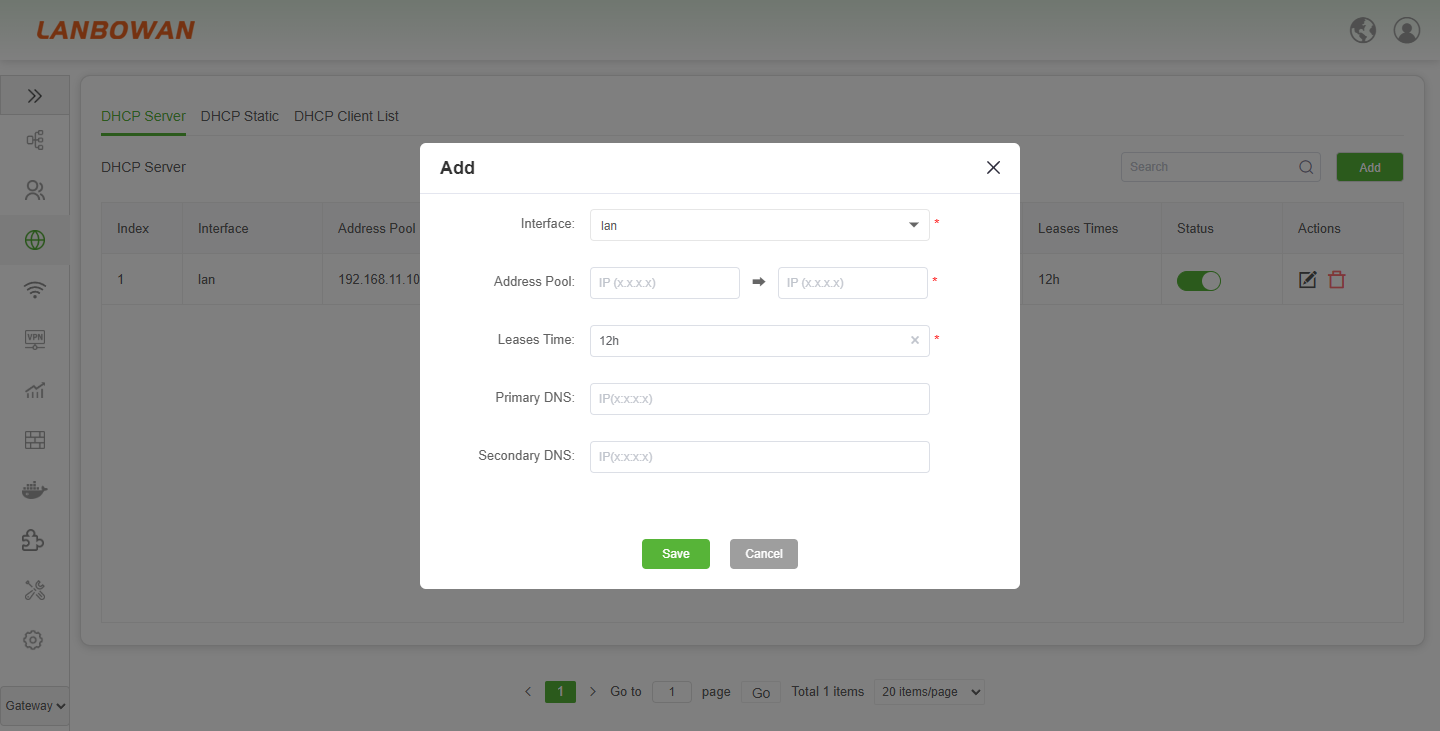
Add DHCP Server
The DHCP Server add function creates independent address pools per interface or VLAN by configuring IP range, lease time, primary/secondary DNS and related parameters to deliver automatic IP address assignment for multiple Layer-3 LANs or VLANs.
DHCP Static
The DHCP Static function binds client MAC address or DUID to a specified IP address to provide fixed address allocation, supporting hostname, lease time configuration and entry search, add and delete management.
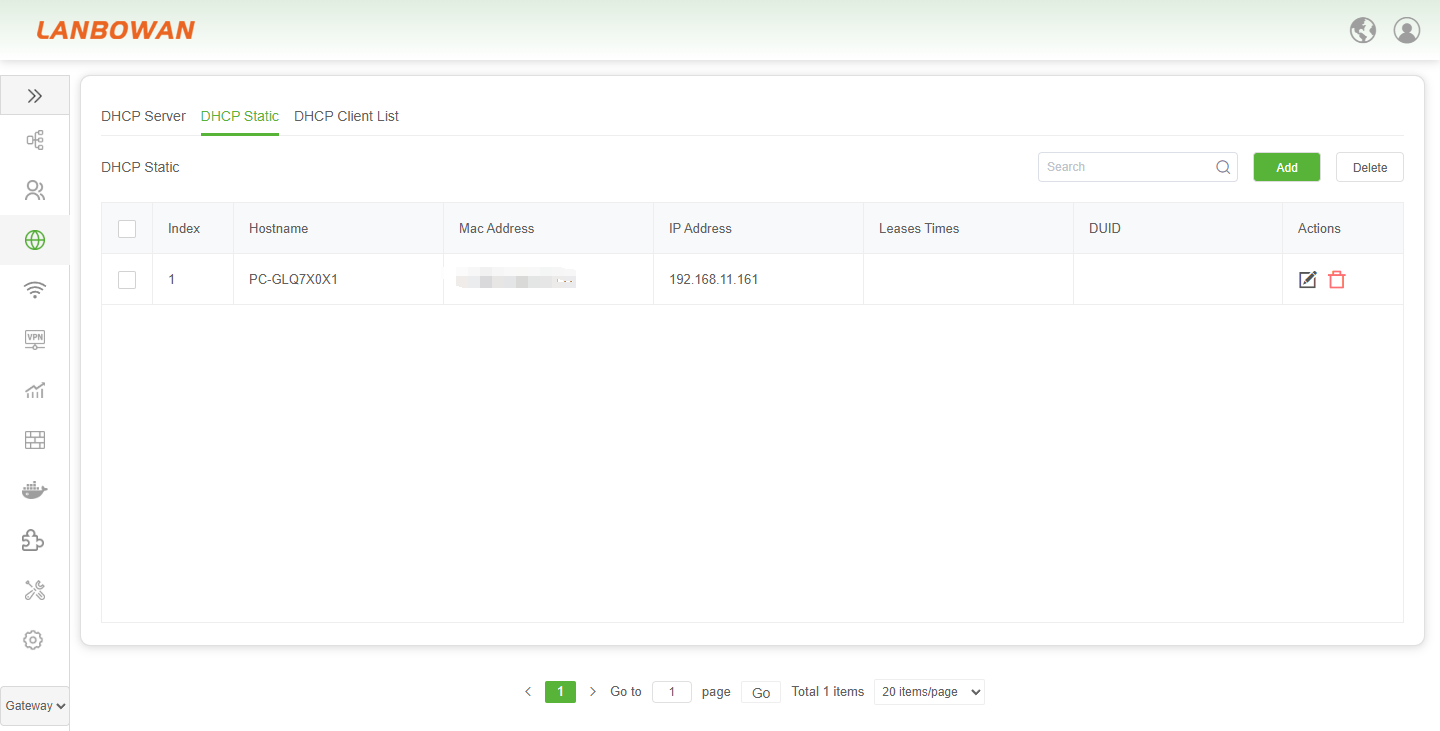
Parameter Description:
| Parameter | Description |
|---|---|
| Index | Sequential identifier for the static DHCP binding entry in the list. |
| Hostname | Device or client name associated with the static IP assignment. |
| Mac Address | Layer-2 hardware address used to identify the client for fixed IP binding. |
| IP Address | Fixed IPv4 address reserved and assigned to the specified client. |
| Leases Times | Lease duration applied to the statically assigned IP address. |
| DUID | DHCP Unique Identifier used for client identity in DHCPv6 or applicable DHCP bindings. |
| Actions | Edit or delete operations for the static DHCP entry. |
DHCP Client List
The DHCP Client List function displays real-time information of clients that have obtained addresses, including hostname, IP, MAC and remaining lease time, allows identifying or toggling static binding status, and supports searching current lease entries.
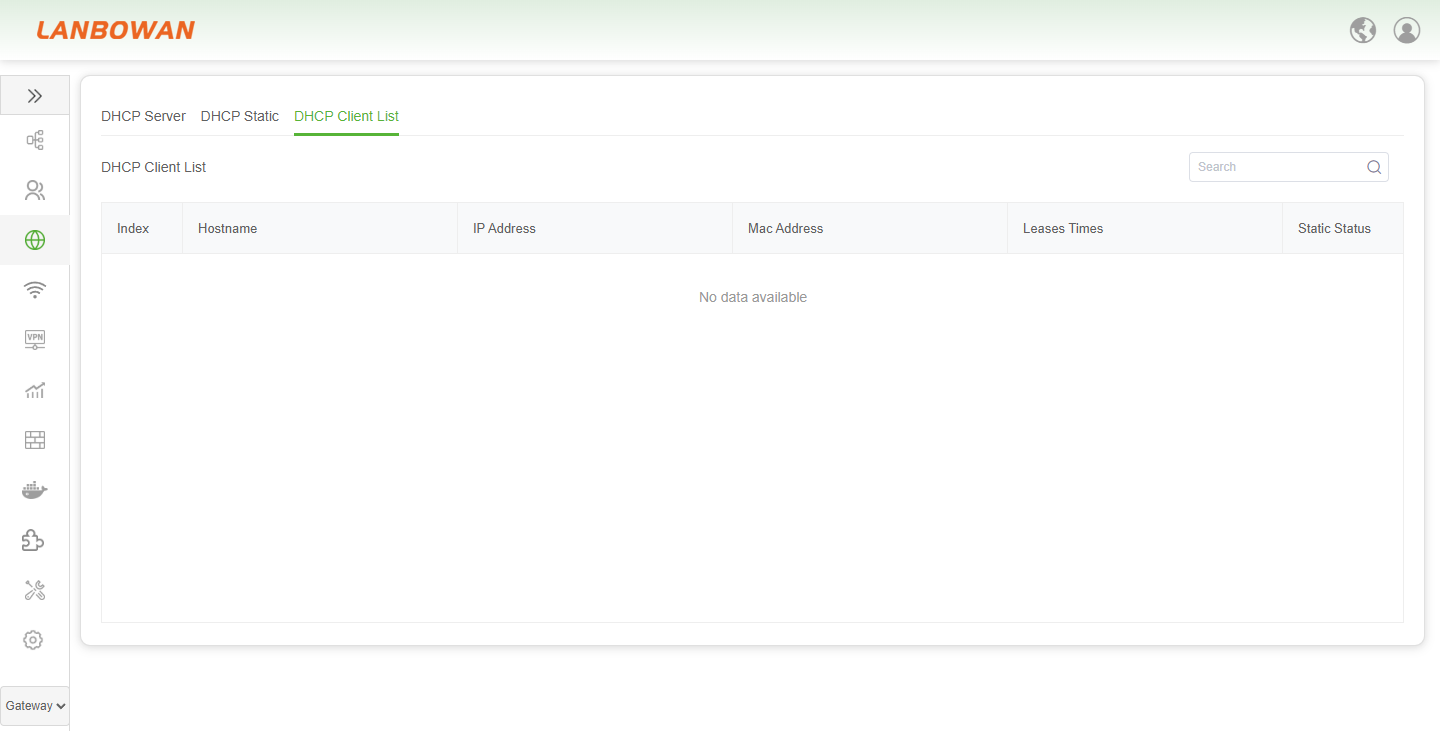
Parameter Description:
| Parameter | Description |
|---|---|
| Index | Sequential number identifying each DHCP client lease entry in the list. |
| Hostname | Name of the client device that obtained the DHCP lease. |
| IP Address | IPv4 address currently assigned to the DHCP client. |
| Mac Address | Layer-2 hardware address of the DHCP client. |
| Leases Times | Remaining or elapsed time of the IP address lease assigned to the client. |
| Static Status | Indicates or toggles whether the client is bound to a static DHCP reservation. |
| Search box | Input field to filter and look up DHCP client entries by keyword. |
| Search button | Triggers the search/filter action for the client list. |
Static Routes
The Routing Tables function displays IPv4/IPv6 routing entries including destination network, subnet mask, outbound interface, next-hop gateway and metric to help view current route forwarding and network reachability status.
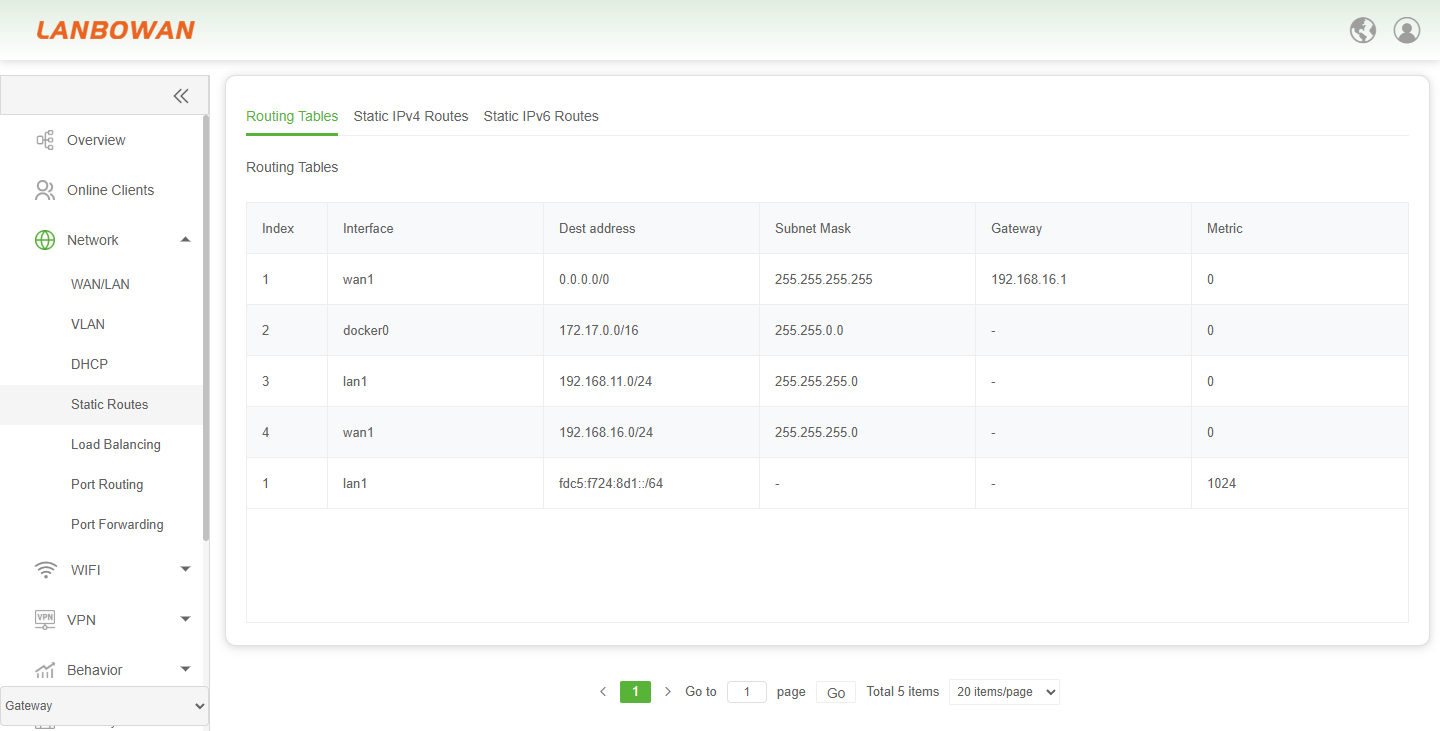
Parameter Description:
| Parameter | Description |
|---|---|
| Index | Sequential identifier for the routing table entry. |
| Interface | Outbound interface used to forward traffic toward the destination. |
| Dest address | Destination network or host address (e.g., 0.0.0.0/0 for default route, or IPv6 prefix). |
| Subnet Mask | Network mask that defines the destination address range (not applicable for IPv6 prefix entries). |
| Gateway | Next-hop IP address for reaching the destination; "-" indicates a directly connected route. |
| Metric | Preference or cost value used to select the best path when multiple routes exist. |
Static IPv4 Routes
The Static IPv4 Routes function is used to manually configure, view, enable, disable or delete IPv4 static route entries (destination network, subnet mask, outbound interface, gateway, metric and status) to control packet forwarding paths and achieve specific network reachability.
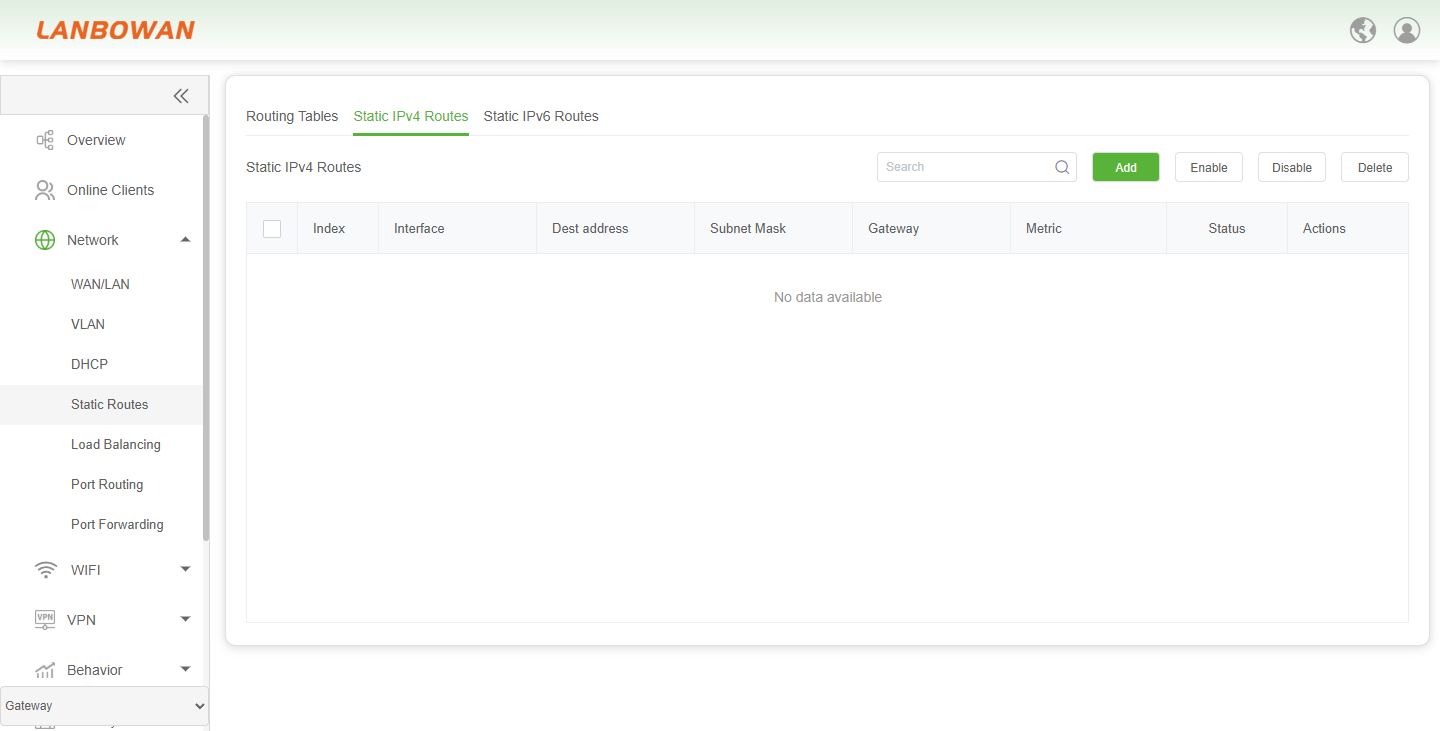
Parameter Description:
| Parameter | Description |
|---|---|
| Index | Sequential identifier for the static IPv4 route entry. |
| Interface | Outbound interface assigned for forwarding traffic to the destination network. |
| Dest address | Destination IPv4 network or host address to be reached via this route. |
| Subnet Mask | Network mask that defines the scope of the destination IPv4 address. |
| Gateway | Next-hop IPv4 address used to reach the destination network. |
| Metric | Route preference or cost value used to determine the best path when multiple routes exist. |
| Status | Current activation state of the static route (e.g., enabled or disabled). |
| Actions | Operation controls for editing or removing the specific route entry. |
| Search box | Input field to filter and look up static IPv4 route entries by keyword. |
| Search | Triggers the search or filter action for the route list. |
| Add | Creates a new static IPv4 route entry. |
| Enable | Activates the selected static IPv4 route entry or entries. |
| Disable | Deactivates the selected static IPv4 route entry or entries without removing them. |
| Delete | Removes the selected static IPv4 route entry or entries from the configuration. |
| No data available | Placeholder indication that no static IPv4 route entries are currently configured or displayed. |
Add Static IPv4 Routes
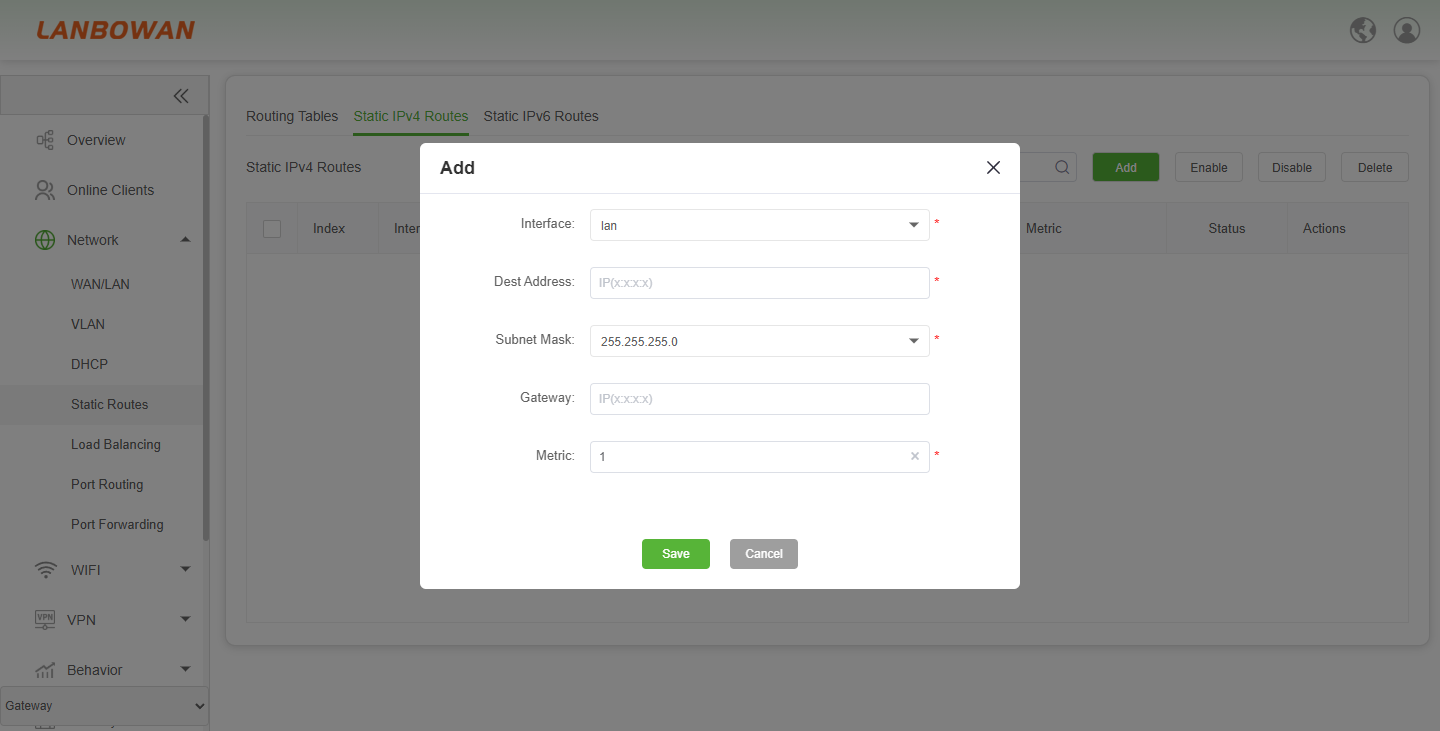
The Add Static IPv4 Route function is used to fill in the outbound interface, destination address, subnet mask, gateway and metric to create a new static IPv4 route, manually specifying packet forwarding paths and controlling network reachability.
Static IPv6 Routes
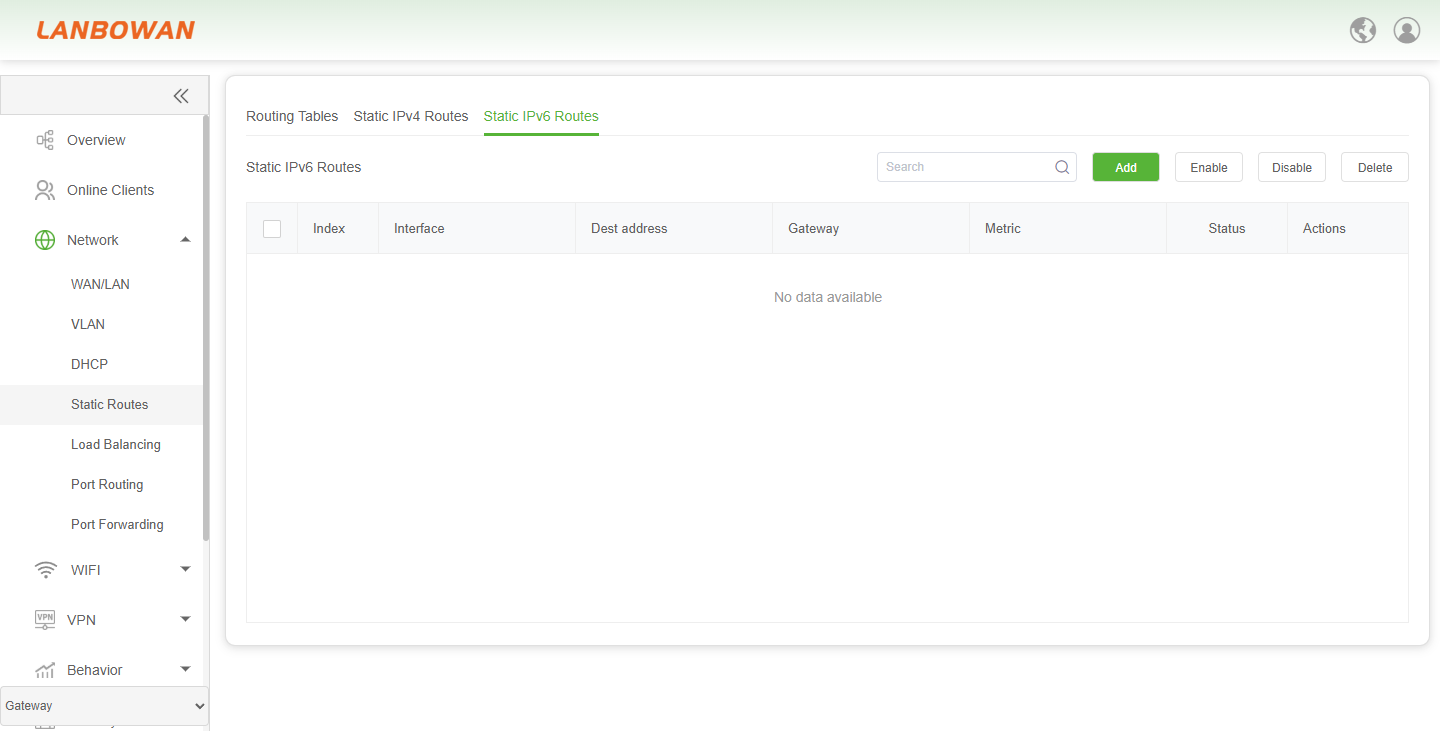
The Static IPv6 Routes function is used to manually configure, view, enable, disable or delete IPv6 static route entries (destination prefix, outbound interface, gateway, metric and status) to control IPv6 packet forwarding paths and achieve specific network reachability.
Add Static IPv6 Routes
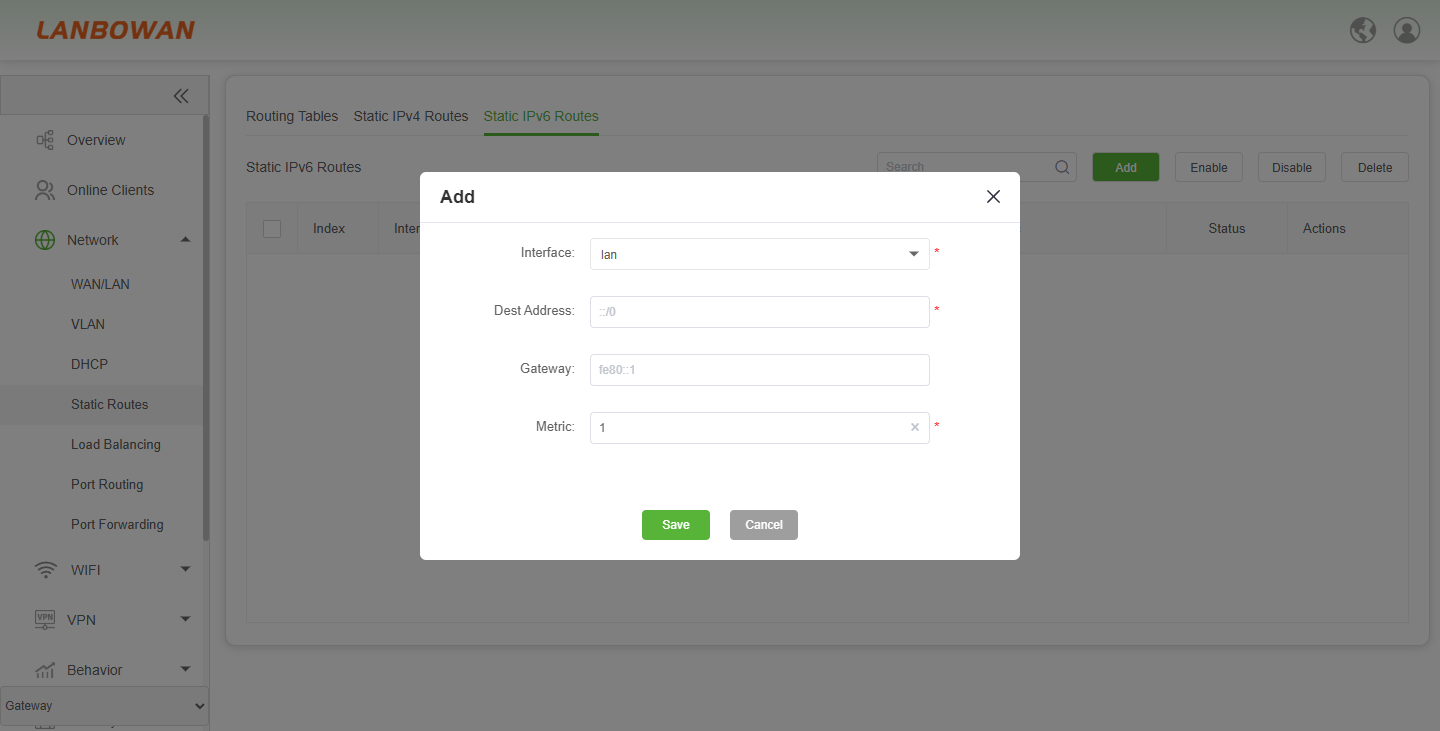
The Add Static IPv6 Route function is used to fill in the outbound interface, destination IPv6 address/prefix, gateway and metric to create a new static IPv6 route, manually specifying IPv6 packet forwarding paths and controlling IPv6 network reachability.
Load Balancing
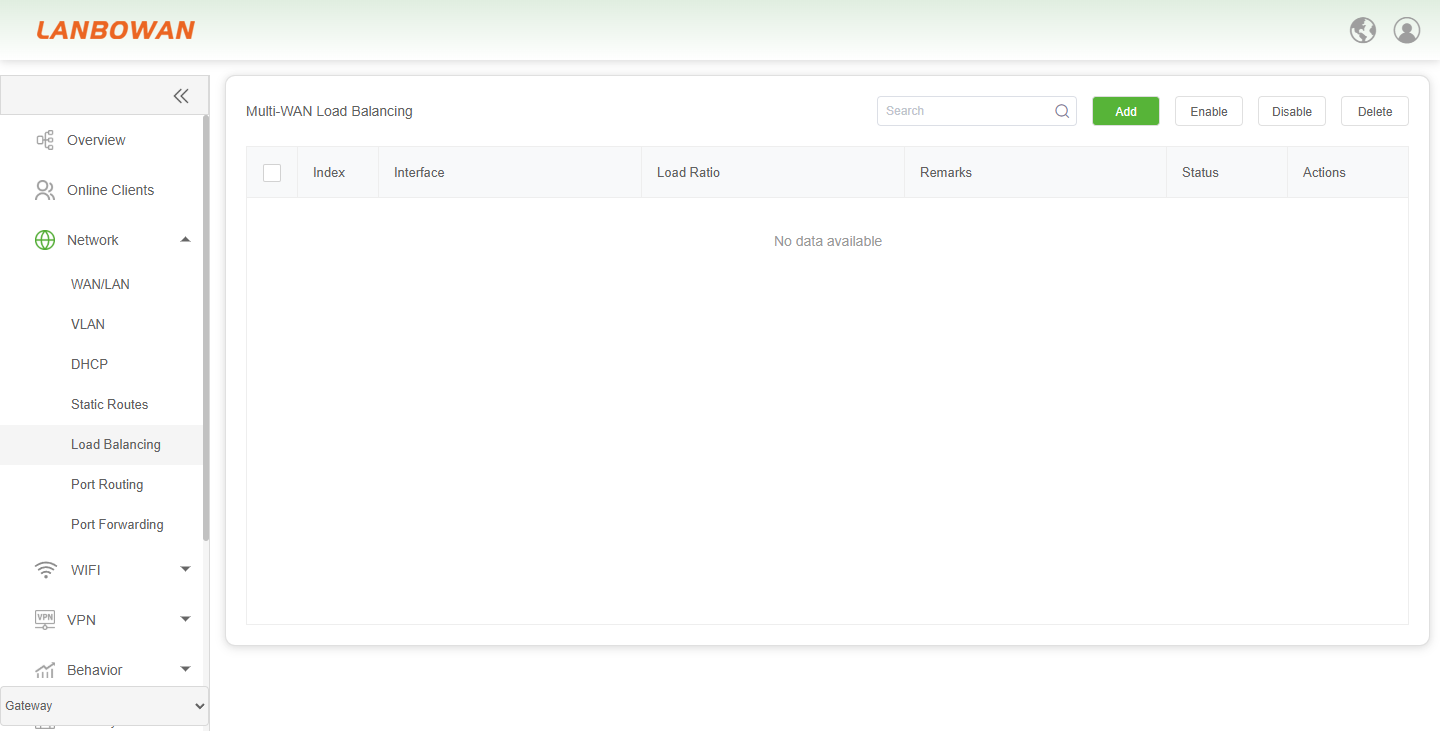
The Multi-WAN Load Balancing function is used to configure, view, enable, disable or delete load balancing rules for multiple WAN interfaces, distributing traffic by interface and load ratio with remarks and status management to improve link utilization and outbound bandwidth redundancy.
Add Load Balancing
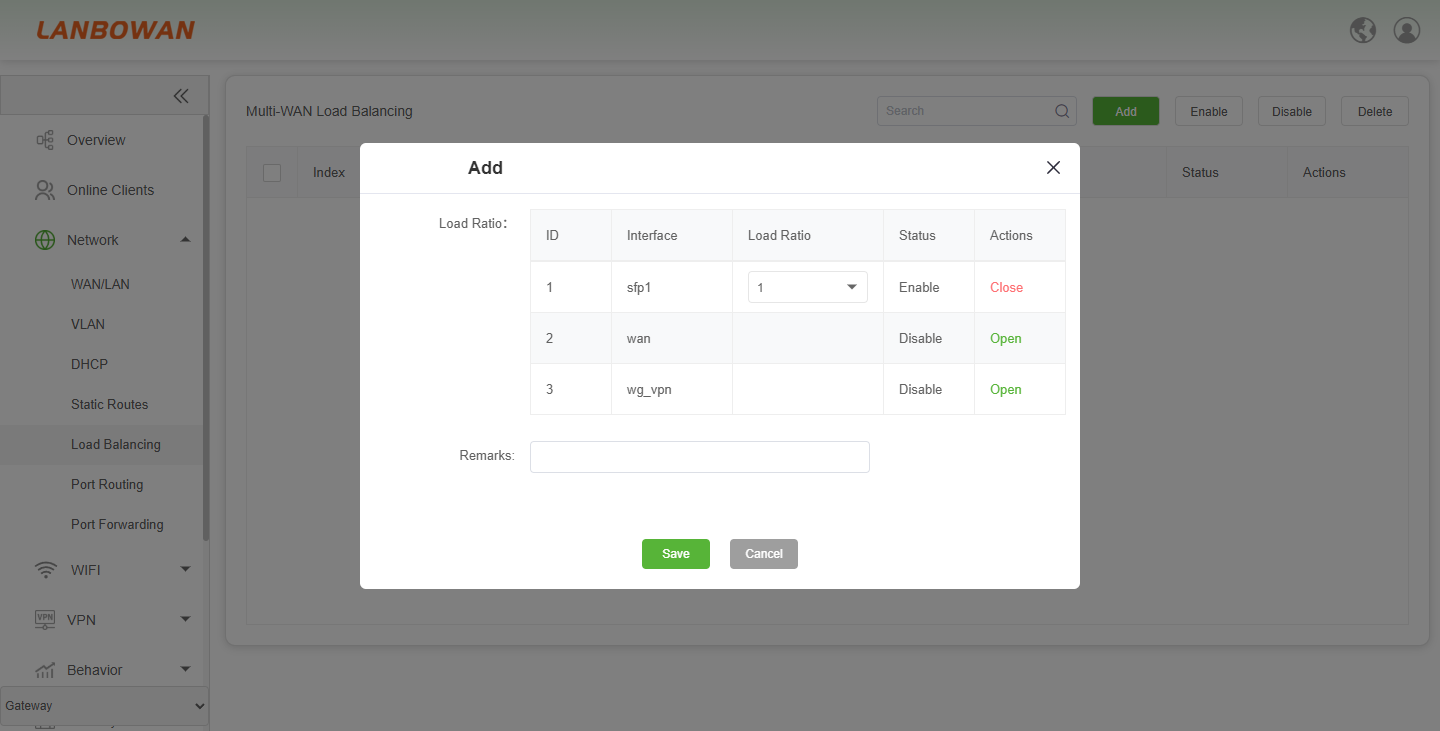
The Add Multi-WAN Load Balancing Entry function is used to create a load balancing entry by enabling the specified interface, configuring the load ratio and remarks for each outbound interface, so as to distribute traffic across multiple WAN ports by weight and improve link utilization and outbound redundancy.
Parameter Description:
| Parameter | Description |
|---|---|
| ID | Sequence identifier of the load balancing member entry. |
| Interface | WAN/outbound interface participating in load balancing. |
| Load Ratio | Traffic weight for the interface, configurable from 1 to 10. |
| Status | Current enable/disable state of the load balancing member. |
| Actions | Operation to open/close or edit the interface entry in the rule. |
| Open | Action to enable/editable the interface for load balancing configuration. |
| Close | Action to disable/collapse the interface entry from editing or active use. |
| Enable | Enable the load balancing member or rule. |
| Save | Save |
| Cancel | Discard changes and close the dialog. |
Port Routing
The Port Routing function is used to configure, view, enable, disable or delete port routing policies by interface, protocol, source/destination address and port conditions, so as to control traffic forwarding paths and egress selection.
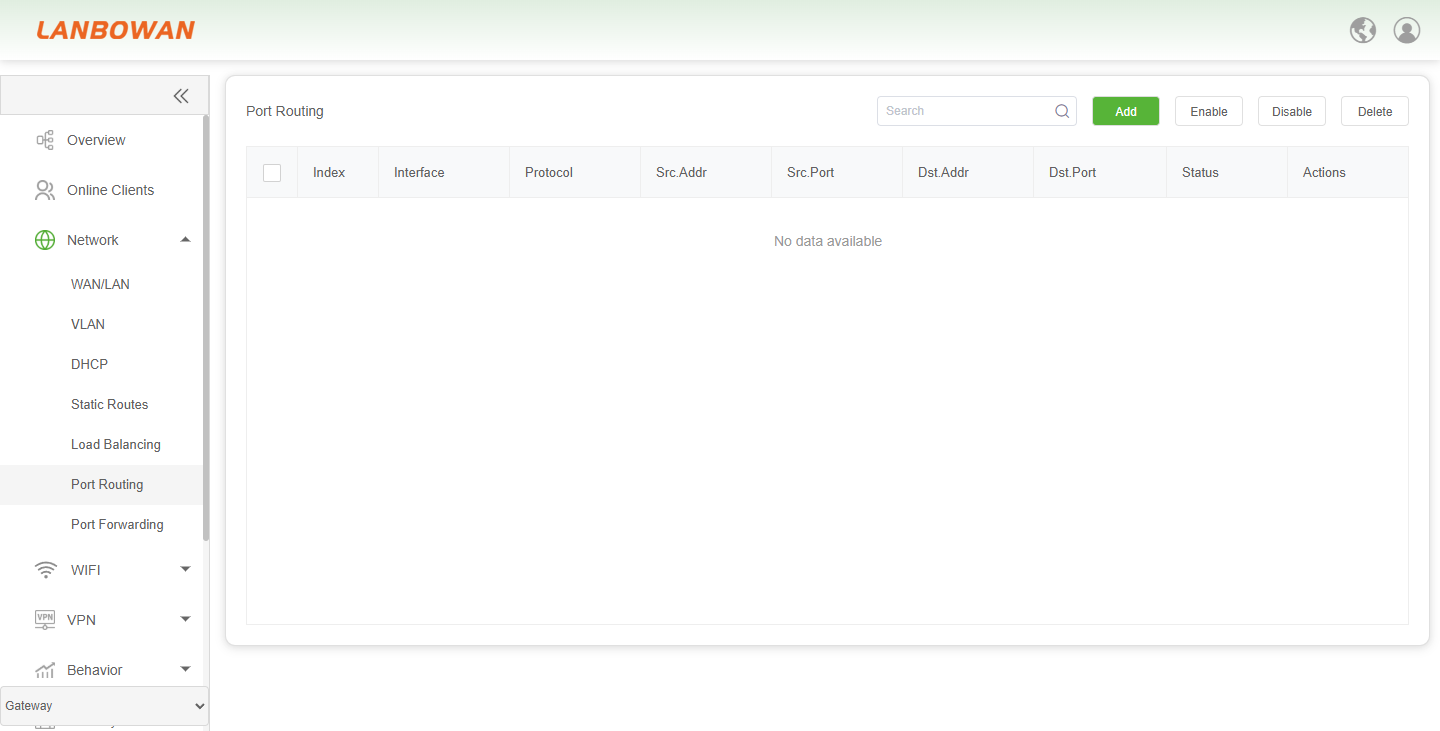
Parameter Description:
| Parameter | Description |
|---|---|
| Index | Sequence number of the port routing rule entry. |
| Interface | Outbound/forwarding interface used for the matched traffic. |
| Protocol | Network protocol condition for the rule, such as all/TCP/UDP. |
| Src.Addr | Source address condition to match traffic. |
| Src.Port | Source port condition to match traffic. |
| Dst.Addr | Destination address condition to match traffic. |
| Dst.Port | Destination port condition to match traffic. |
| Status | Enable/disable state of the port routing rule. |
| Actions | Edit or delete operation for the rule entry. |
| Edit | Modify the selected port routing rule. |
| Delete | Remove the selected port routing rule. |
| Status toggle | Switch to enable or disable the rule. |
| Checkbox | Select one or multiple rule entries for batch operations. |
| Search | Search/filter box to find entries by keyword. |
| Add | Create a new port routing rule. |
| Enable | Enable selected port routing rules. |
| Disable | Disable selected port routing rules. |
| Delete | Delete selected port routing rules. |
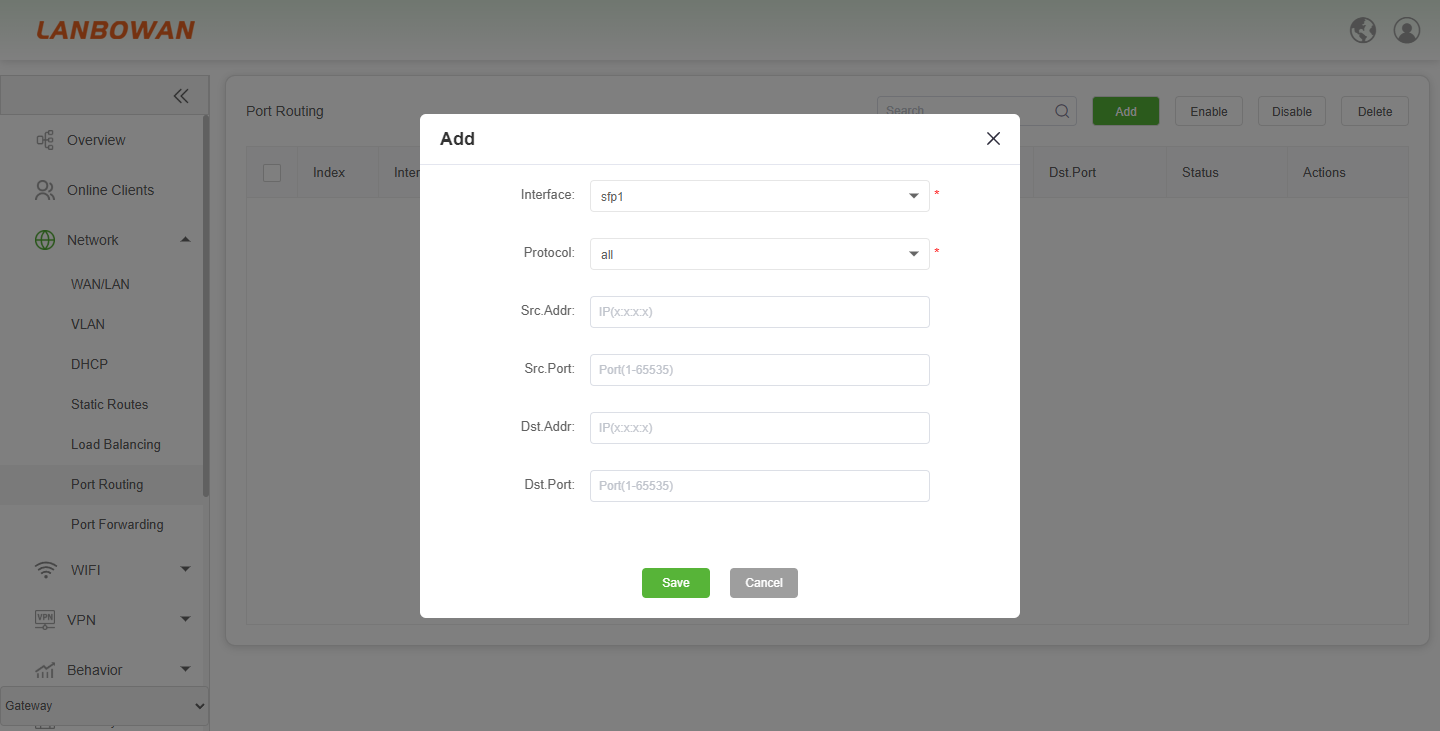
Add Port Routing
The Add Port Routing function is used to create a new port routing rule by specifying the outbound interface, protocol, source/destination address and source/destination port as matching conditions to define traffic forwarding paths, with options to save or cancel the configuration.
Port Forwarding
The Port Forwards function maps external address and port access requests to internal addresses and ports by protocol, allowing external network access to internal services, and supports adding, searching, enabling, disabling and deleting rules.
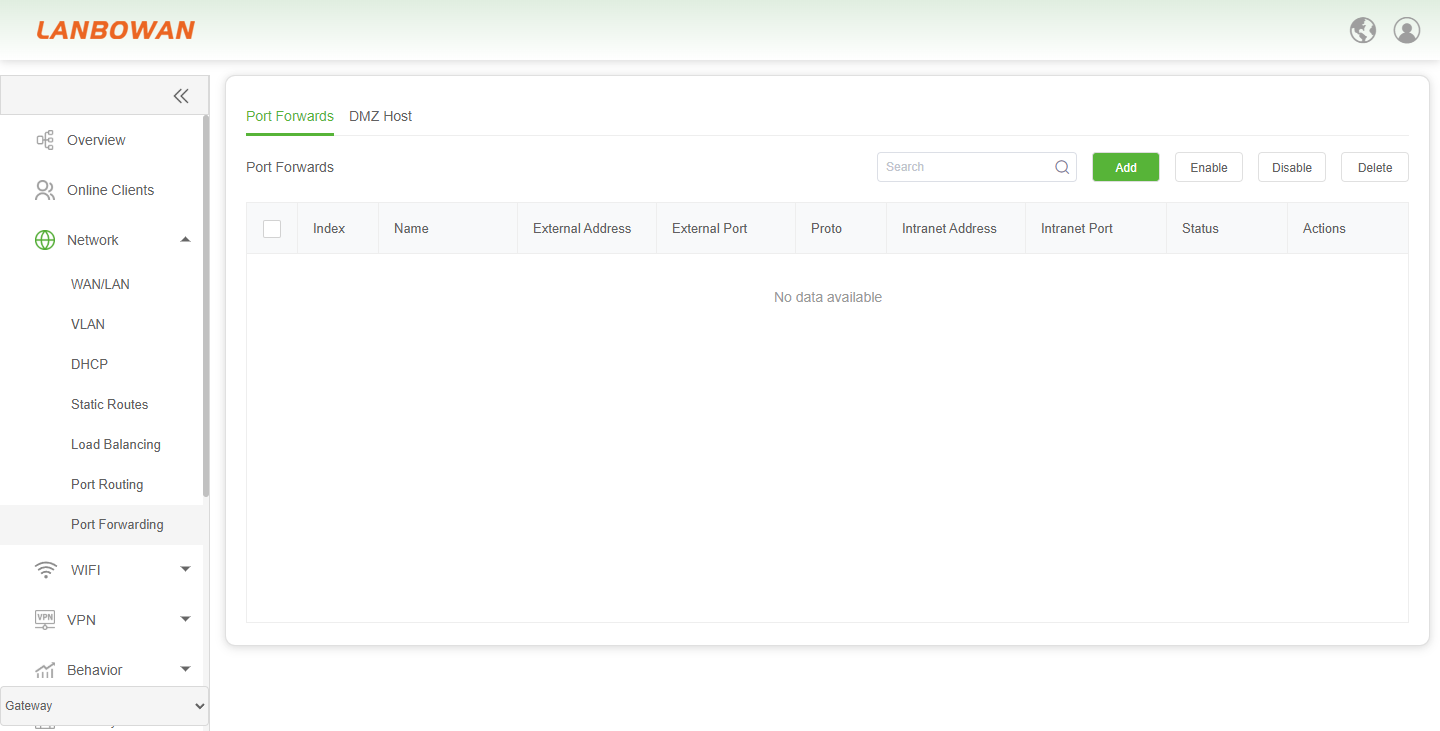
Parameter Description:
| Parameter | Description |
|---|---|
| Index | Sequence number of the port forwarding rule. |
| Interface | Outbound/forwarding interface used for the matched traffic. |
| Protocol | Network protocol condition for the rule, such as all/TCP/UDP. |
| Src.Addr | Source address condition to match traffic. |
| Src.Port | Source port condition to match traffic. |
| Dst.Addr | Destination address condition to match traffic. |
| Dst.Port | Destination port condition to match traffic. |
| Status | Enable/disable state of the port forwarding rule. |
| Actions | Edit or delete operation for the rule entry. |
| Edit | Modify the selected port forwarding rule. |
| Delete | Remove the selected port forwarding rule. |
| Status toggle | Switch to enable or disable the rule. |
| Checkbox | Select one or multiple rule entries for batch operations. |
| Search | Search/filter box to find entries by keyword. |
| Add | Create a new port forwarding rule. |
| Enable | Enable selected port forwarding rule. |
| Disable | Disable selected port forwarding rule. |
| Delete | Delete selected port forwarding rule. |
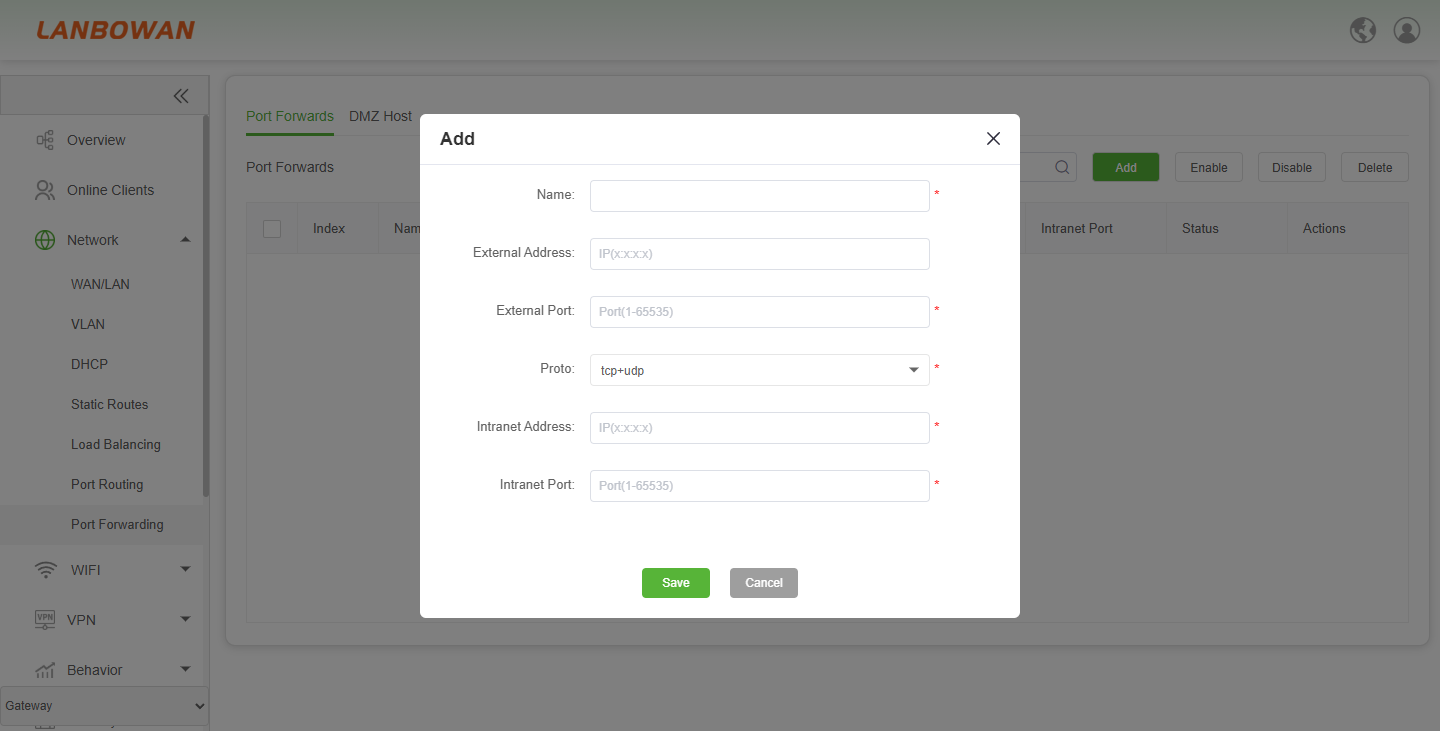
Add Port Forwards
The Add Port Forward function is used to create a new port forwarding rule by configuring the rule name, external address and port, protocol, and intranet address and port, so that external access requests are forwarded to the specified internal host or service, with options to save or cancel the configuration.
DMZ Host
The DMZ Host function designates an internal host as the demilitarized zone host to direct external access traffic not matched by port forwarding rules to that host, facilitating exposure of internal services, and supports adding, searching, enabling, disabling and deleting rules.
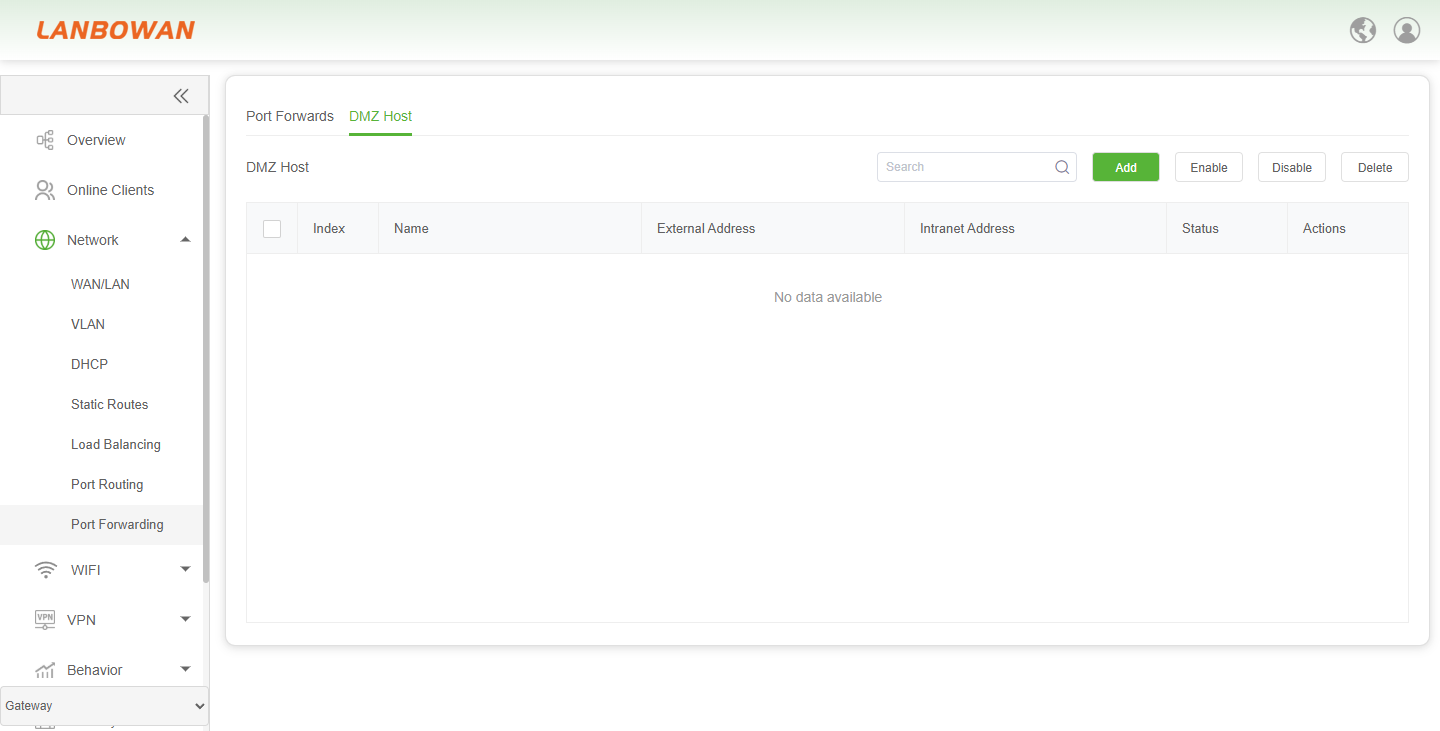
Parameter Description:
| Parameter | Description |
|---|---|
| Index | Sequence number of the DMZ Host rule entry. |
| Name | User-defined name or description for the DMZ Host rule. |
| External Address | External/public-side address associated with the DMZ mapping; may be empty to represent the external interface address. |
| Intranet Address | Internal/LAN-side host address that receives forwarded external traffic. |
| Status | Enable/disable state of the DMZ Host rule, shown as a toggle switch. |
| Actions | Edit or delete operation for the selected DMZ Host entry. |